Tired of looking at your Google Ads dashboard and wondering if any of those numbers are actually real?
Yeah. I get it.
Here’s the thing—about 70% of the conversions showing up in your Google Ads account right now aren’t observed. They’re modeled. Estimated. Educated guesses based on patterns.
And if you’re sitting there thinking “wait, what?”—that’s the reaction most people have when they hear this for the first time.
The old world of data-driven marketing—cookies firing, pixels collecting everything, nice clean data flowing into your reports—that world is basically gone. And most marketers are still operating like it’s 2019.
I just got back from Google’s New York office. (Yes, I was freezing. It was brutal that day.) But I was also weirdly excited, because everything I saw confirmed what I’ve been saying for a while now—there are tools and technologies sitting right in front of you that can fix this.
And most people are completely sleeping on them.
So today I’m gonna break down exactly what I took away from that Google trip. Not the NDA stuff—the things that are publicly available that you should already know about.
Watch the Full Breakdown
In this video, I break down exactly what I learned at Google’s office: the tools they’re pushing, why it matters for your campaigns, and what you should actually do about it based on your specific situation.
What You’ll Learn in This Post
- 70% of Google Ads conversions are modeled—not directly observed
- Google Tag Gateway delivers 11% more conversion signal with a 15-minute setup
- Marketing Mix Modeling is becoming accessible with Google’s open-source Meridian tool
- The future of measurement requires triangulation: attribution + experiments + MMM working together
Table of Contents
- Why Google Ads Conversion Tracking Is 70% Modeled
- Tool #1: Google Tag Gateway—Server-Side Tracking Made Simple
- Tool #2: Meridian—Google’s Open-Source Marketing Mix Model
- Tool #3: Why Data-Driven Marketing Now Requires Triangulation
- Stop Looking for the One Perfect Tool
- Your Next Steps
Why Google Ads Conversion Tracking Is 70% Modeled (And What That Means for You)
Let me explain why any of this matters in the first place.
For years, the way we tracked conversions was pretty straightforward:
- Someone clicks your ad
- A cookie gets dropped
- They convert
- The pixel fires
- Data shows up in your dashboard
Clean. Simple. Done.
That world is going away. Fast.

Privacy changes. Browser restrictions. iOS updates. Cookie deprecation. All of it is chipping away at your ability to actually SEE what’s happening with your campaigns.
Google knows this. That’s why—like I mentioned—about 70% of the conversions in Google Ads right now are modeled. Google is basically saying “we didn’t observe this directly, but based on patterns and signals, we’re pretty confident this conversion happened.”
Now here’s the thing—that’s not necessarily BAD. Google’s modeling is actually pretty good.
But it means the quality of the signals you’re sending Google matters way more than it used to.
Garbage signals in, garbage models out. That’s just how it works.
If you’re still relying purely on client-side tracking—basic pixels, standard Google Tag Manager setup, nothing server-side—you’re leaving data on the table. You’re giving Google less to work with. And your measurement is gonna get worse, not better.
This isn’t me being dramatic. This is just where things are headed.
But—and this is the part that got me excited at Google—there are solutions. Real ones. And they’re way more accessible than most people think.
Tool #1: Google Tag Gateway—Server-Side Tracking Made Simple
Let’s start with the tool that I think most people reading this should actually do something about.
Now—if you’ve been following my content for a while, you’ve heard me talk about server-side tracking. A lot. Like… a lot a lot.
And I want to be clear: I’m still very positive on full server-side GTM. It’s powerful. It gives you maximum control over your data.
But it’s also not for everybody. It requires setting up a server, maintaining it, paying for hosting… it’s a whole thing. For a lot of businesses, especially smaller ones, it’s just not realistic right now.
That’s where Google Tag Gateway comes in.
It’s basically server-side lite. And for most people? This is where you should start.
Here’s what it does in plain English:
Normally, when someone visits your website, your tracking tags fire from their browser. Client-side. That’s how it’s worked forever.
The problem? Browsers are blocking more and more of that stuff. Ad blockers, privacy settings, iOS restrictions—all of it gets in the way.
Server-side tracking flips that. Instead of the tag firing from the visitor’s browser, it fires from YOUR server. Which means way fewer things can block it. More data gets through. Cleaner signals.
Google Tag Gateway gives you a lot of those benefits without the complexity of full sGTM.
The numbers that matter:
- Setup time: 15 minutes using Cloudflare’s free tier
- Signal uplift: 11% median improvement (Google’s own data from their Rethink ROI event)
- Cost: Free
11% more signal. Free. 15 minutes.
I don’t really care if you’re a beginner or you’ve been doing this for 20 years—that’s a no-brainer.
What the pros are doing:
I was talking with Charles Farina at the Google event—he runs analytics at Adswerve, one of the top analytics agencies out there. And he told me they’re rolling out Google Tag Gateway across their enterprise clients.
Here’s the kicker: even their clients who are on other platforms like Adobe are implementing it. Because everybody needs to send conversion data to Google if they’re running Google Ads. That’s the whole point.
So if a major analytics agency is prioritizing this for their biggest clients—clients who aren’t even fully on Google’s stack—you should probably be paying attention too.
The mental model:
Picture a spectrum:
- Left end: Standard client-side tracking (basic GTM, pixels firing from browser)
- Middle: Google Tag Gateway (server-side lite)
- Right end: Full server-side GTM (maximum control, maximum complexity)
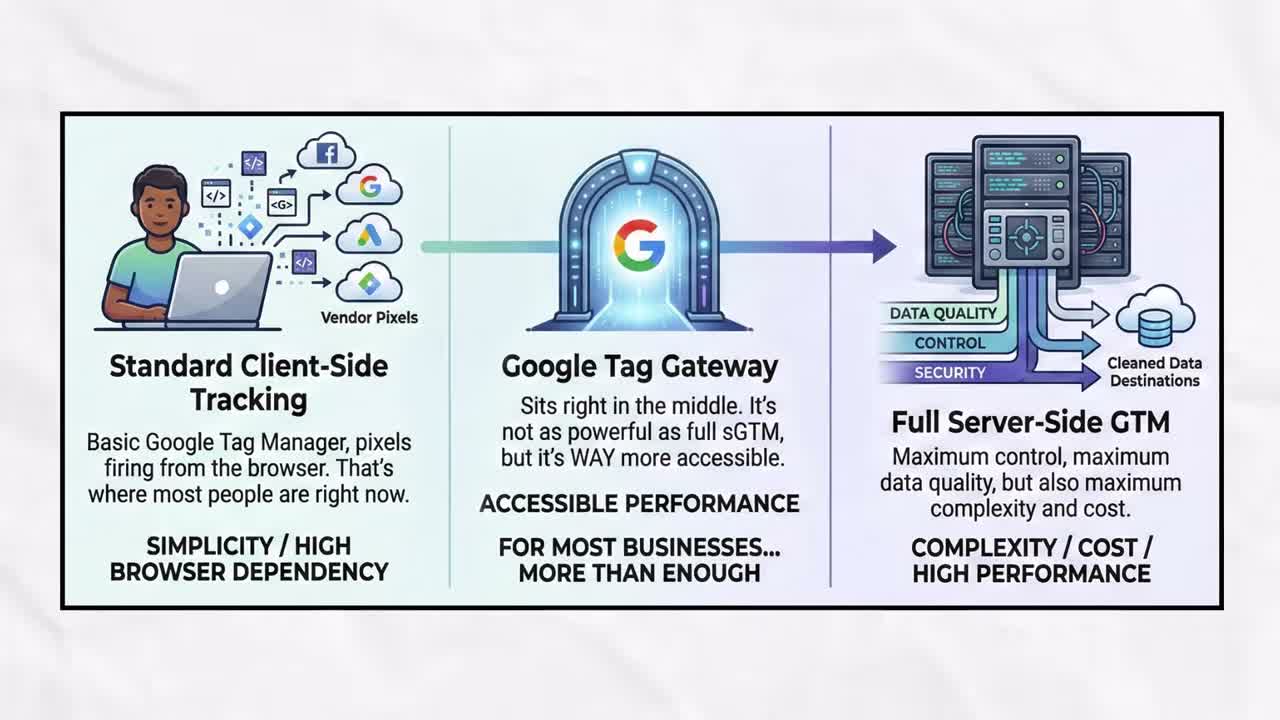
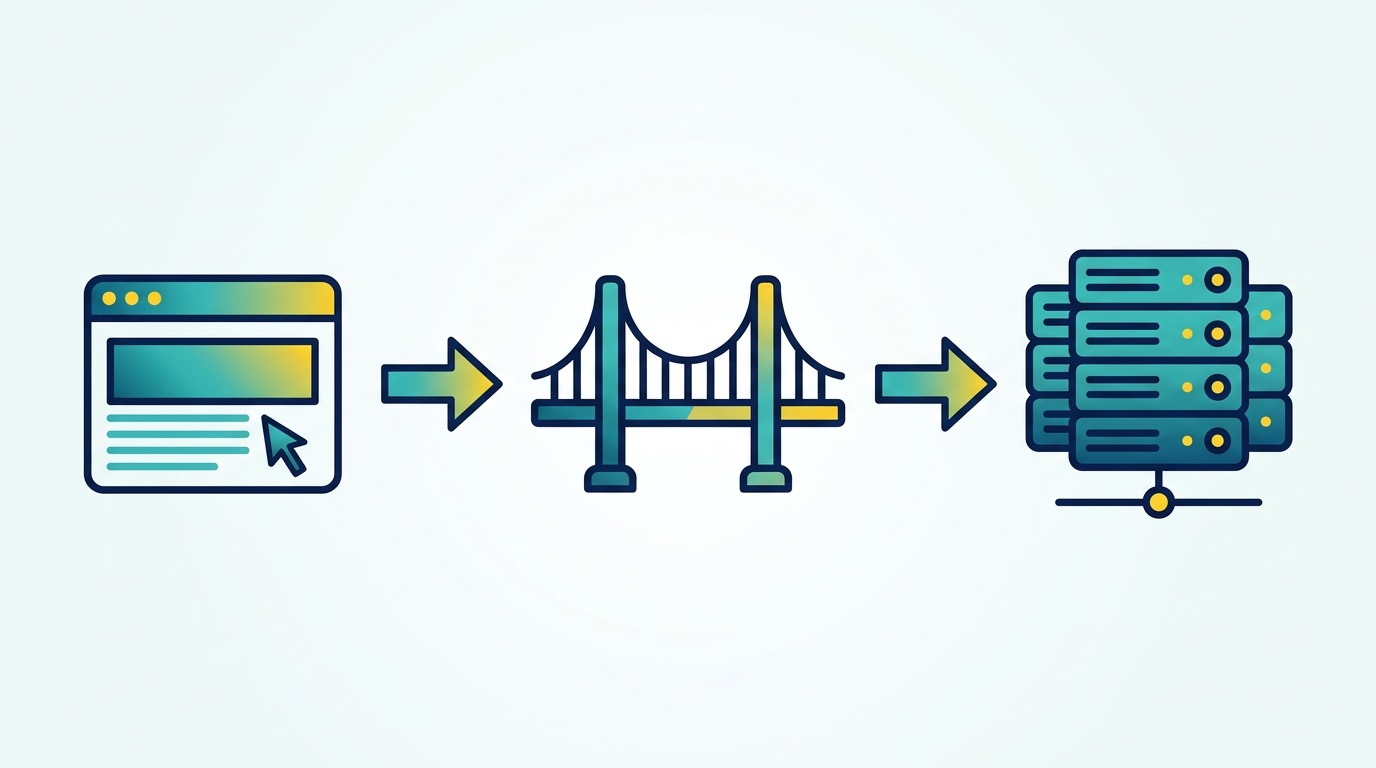
You don’t have to go from zero to full server-side overnight. Tag Gateway is the bridge. It’s the thing you can do THIS WEEK that will actually improve your data.
Tool #2: Meridian—Google’s Open-Source Marketing Mix Model
Alright, next up—and this one’s a little more advanced, but I want you to at least know it exists.
Meridian. It’s Google’s open-source Marketing Mix Model.
Now if you just heard “Marketing Mix Model” and your eyes glazed over a little—stay with me.
Here’s the concept:
Traditional attribution—the stuff you’re used to seeing in Google Ads or GA4—is all about tracking individual user journeys. This person clicked this ad, then they converted. Connect the dots.
Marketing Mix Modeling (MMM) works completely differently.

It zooms way out. Instead of tracking individuals, it looks at aggregate data over time:
- How much did you spend on each channel?
- What were your total sales?
- What external factors were happening—seasonality, promotions, even the weather?
Then it uses statistical modeling to figure out which channels are actually driving results.
Why this matters now:
MMM isn’t new. Big brands have been using it for decades. But it’s always been expensive and complicated. You needed data scientists, custom models, huge budgets.
Meridian changes that.
It’s open-source—meaning free—and Google just announced a new no-code Scenario Planner coming in February 2026. So you’ll be able to play with MMM without writing a single line of code.
Who is this for?
Is this for everybody? No. Probably not.
If you’re a smaller business just trying to get clean conversion data into Google Ads, Tag Gateway is your priority. Don’t overcomplicate it.
But if you’re at a company spending real money across multiple channels and you’re trying to figure out the bigger picture of what’s actually working? This is where things are headed.
The stat that caught my attention:
Google and BCG research found that companies with mature measurement practices—which includes things like MMM—are more than twice as likely to exceed their revenue goals by 10% or more.
Twice as likely. That’s not nothing.
MMM gives you a different lens. Attribution tells you what happened at the individual level. MMM tells you what’s working at the strategic level.
And the smartest marketers are using both.
Tool #3: Why Data-Driven Marketing Now Requires Triangulation
Okay so we’ve talked about Tag Gateway, we’ve talked about Meridian and MMM.
But here’s the thing that really clicked for me at Google—and it’s maybe the most important takeaway.
No single measurement method is enough anymore.
I know that’s not what people want to hear. Everyone wants the one tool that does everything. The magic dashboard. The single source of truth.
That’s not how this works. Not anymore.
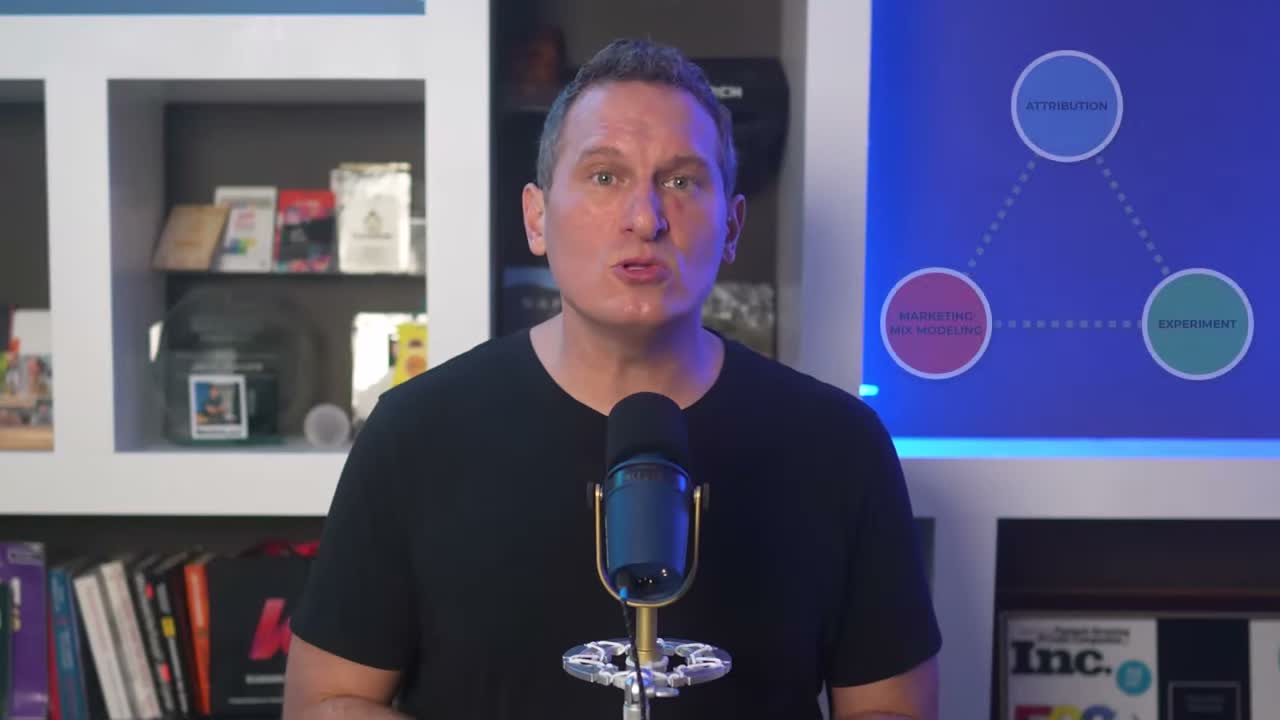
The triangulation framework:
What Google kept coming back to—and what the smartest measurement people I know are all saying—is this idea of triangulation.

Three approaches. Working together.
1. Attribution The stuff you’re used to. Last click, data-driven attribution, whatever model you’re using in Google Ads or GA4. It tells you what happened at the individual conversion level.
2. Experiments Incrementality testing. Holdout tests. Geo experiments. Actually proving that your marketing caused a result, not just correlated with it.
3. Marketing Mix Modeling The aggregate view. What’s working at the channel level over time.
Attribution. Experiments. MMM. Triangulation.
Each one has blind spots:
- Attribution can’t see everything because of signal loss
- Experiments are great but they take time and resources
- MMM gives you the big picture but not the granular detail
When you use all three together? The blind spots start to fill in. You get a much clearer picture of what’s actually driving results.
The first-party data connection:
Here’s where this connects back to the data quality stuff we talked about earlier.
Google’s own research shows that first-party data combined with AI-powered tools can drive a 30% performance lift. That’s a public number they’ve shared.

Enhanced Conversions for Leads—which is basically a way to send better first-party data back to Google—shows an 8% increase in conversions on average.
These aren’t magical new features. They’re about sending Google cleaner, more complete signals so their models work better.
Better signals in. Better results out. And using multiple methods to make sure you’re actually seeing the full picture.
Stop Looking for the One Perfect Tool
If you’re reading this and thinking “okay Jeff, this is a lot… where do I even start?”—I hear you.
I see this all the time:
- “Just tell me what tool to use, Jeff.”
- “Should I do Tag Gateway or full server-side?”
- “Is Meridian worth it or not?”
And I get it. There’s so much out there now, and it feels overwhelming. You just want someone to tell you what to do.
But here’s the thing… the answer is always “it depends.” And I know that’s annoying to hear. But it’s true.
The questions you need to answer first:
- What’s your budget?
- What’s your technical capacity?
- What problem are you actually trying to solve?
- How much are you spending on ads?
- What platforms are you on?
All of that matters.
My recommendation:
Figure out the problem you need to solve first. Then pick the tool that solves THAT problem.
Don’t start with the tool. Start with the problem.
And honestly? It shouldn’t take a trip to Google’s office for you to realize any of this. All of this information is publicly available. The documentation is out there. The case studies exist. The how-to guides are everywhere.
You just have to actually look.
Your Next Steps
Here’s what I want you to take away from this:
The measurement landscape is changing. Fast. Signal loss is real, it’s getting worse, and if you’re not doing anything about it, your data quality is going to suffer.
But the tools to fix it are more accessible than they’ve ever been.
This week, pick ONE thing:
- Set up Google Tag Gateway — 15 minutes, Cloudflare’s free tier, 11% more signal
- Take the Clean Data Scorecard quiz — 10 questions, 2 minutes, see where your measurement stack stands (measureu.com/quiz)
- Book a 15-minute call — Let’s figure out what makes sense for your specific situation (measureu.com/15)
Whatever it is—do something. Don’t just read this and move on to the next article.
The biggest thing I took away from my trip to Google? None of this is hidden. None of this is secret. The documentation exists. The case studies exist. The tools are available.
You just have to actually do something about it.
Ready to Fix Your Data?
If you’re serious about getting your measurement stack right, check out MeasureU Pro—our membership for marketers who want to master tracking, attribution, and measurement with hands-on training and a community of practitioners who are figuring this out together.