Know that feeling when you realize your Google Analytics 4 data might be completely wrong, but checking it means losing half your day?
A GA4 audit used to take me three, four hours of concentrated time. And I've been doing this for twenty years. That meant clicking through every single setting in GA4, hunting for what was broken, documenting everything manually, and hoping I didn't miss something obvious buried in a submenu.
That's where Claude MCP comes in.
Last week I typed three prompts into Claude and it generated a full audit report on my GA4 property. The entire workflow took less than four minutes. Not a simplified audit. Not a partial check. The whole thing: custom dimensions, channel groupings, implementation gaps, action items with specific fixes.
I'm going to show you exactly what I typed and what came back. And I don't care if this is your first audit or your hundredth. Three prompts. You can do this today.
Watch the Full Walkthrough
The video above walks through the entire workflow in real time. Below, I've broken down every step so you can follow along at your own pace.
What You'll Learn in This Post
- A complete GA4 audit now takes 3 prompts and under 4 minutes with Claude MCP
- Claude can control your browser to navigate GA4's interface and take screenshots automatically
- The workflow extends to GTM tag audits with automatic spreadsheet exports
- Regular auditing beats hoping your data is correct (hoping is not a measurement strategy)
Table of Contents
- Why Most GA4 Setups Are Silently Broken
- What You Need to Run a GA4 Audit with Claude
- The 3-Prompt GA4 Audit Workflow
- Beyond GA4: Running a GTM Audit
- Why Regular Google Analytics 4 Audits Matter
- Common Questions About Claude MCP Audits
- Your Next Steps

Why Most GA4 Setups Are Silently Broken
Here's the thing most marketers don't want to admit: they set up GA4 once and then just… hope the numbers are right.
Tags break. Data drifts. Channel groupings go stale. And in 2026? Your GA4 is probably tracking behavior categories that didn't even exist two years ago. (More on that AI Traffic channel in a minute.)
The problem isn't that people don't know audits are important. The problem is the activation energy required to actually do one. When an audit means dedicating half a day to clicking through menus, it becomes a quarterly project you keep pushing to next quarter.
But when an audit takes three prompts while your coffee brews? That changes what “running an audit” actually means in practice.
What You Need to Run a GA4 Audit with Claude
Two things. That's the whole setup.
1. Claude Pro — the paid plan, not the free tier. You need the desktop app (Claude Cowork) for this workflow.
2. An MCP connector for GA4 — this is what lets Claude talk directly to your GA4 data through the API. No copying, no exporting, no spreadsheet sitting in the middle.
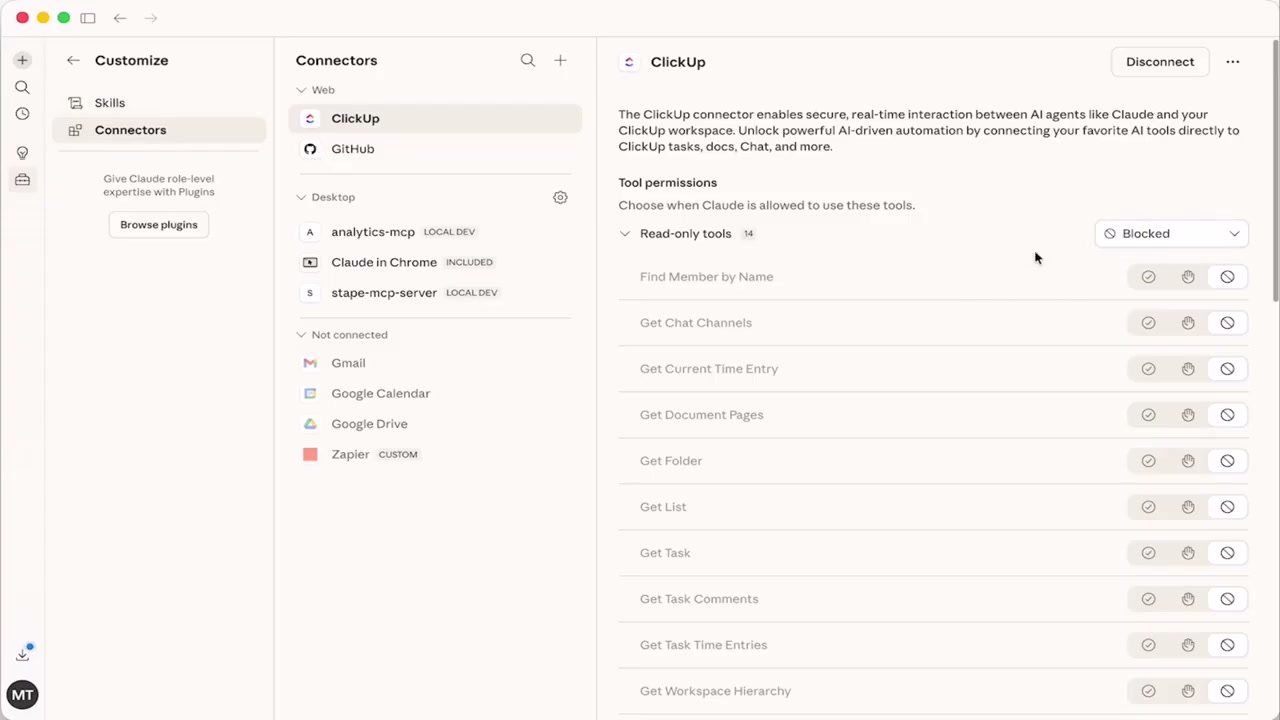
In Claude Cowork you can see the Connectors panel where things like Zapier, Gmail, and ClickUp have native one-click connectors. GA4 is different: it requires a manual install.
We built a setup guide that walks you through the exact steps to get your MCP connector configured. Get the free GA4 MCP setup guide here. About 15 minutes of setup and this entire workflow becomes available to you.
Alright. Connector is live. Let's run the audit.

The 3-Prompt GA4 Audit Workflow
Three prompts. Here's exactly what to type.
Prompt 1: Confirm Your GA4 Connection
The first prompt is almost annoyingly simple:
“What Google Analytics properties do you have access to?”
That's it. This is the handshake.
Before you run anything, you want confirmation that Claude can actually see your GA4 property through the MCP connection. It comes back with your property name, property ID, and connection confirmed.
Now you know it's live and you can move to the actual audit.
Prompt 2: Run the Full GA4 Audit
Prompt two is where the audit happens:
“I want you to perform an audit on the GA4 setup and tell me what is good, bad, ugly, and needs to be fixed.”
No technical framing. No jargon. Good, bad, ugly, needs to be fixed.
Here's what came back: Claude pulled custom dimensions, channel groupings, including one labeled “Channels with AI Traffic.” In 2026, your GA4 is already tracking a behavior category that didn't exist two years ago. If you haven't looked at your channel groupings lately, that's exactly why you run this audit.
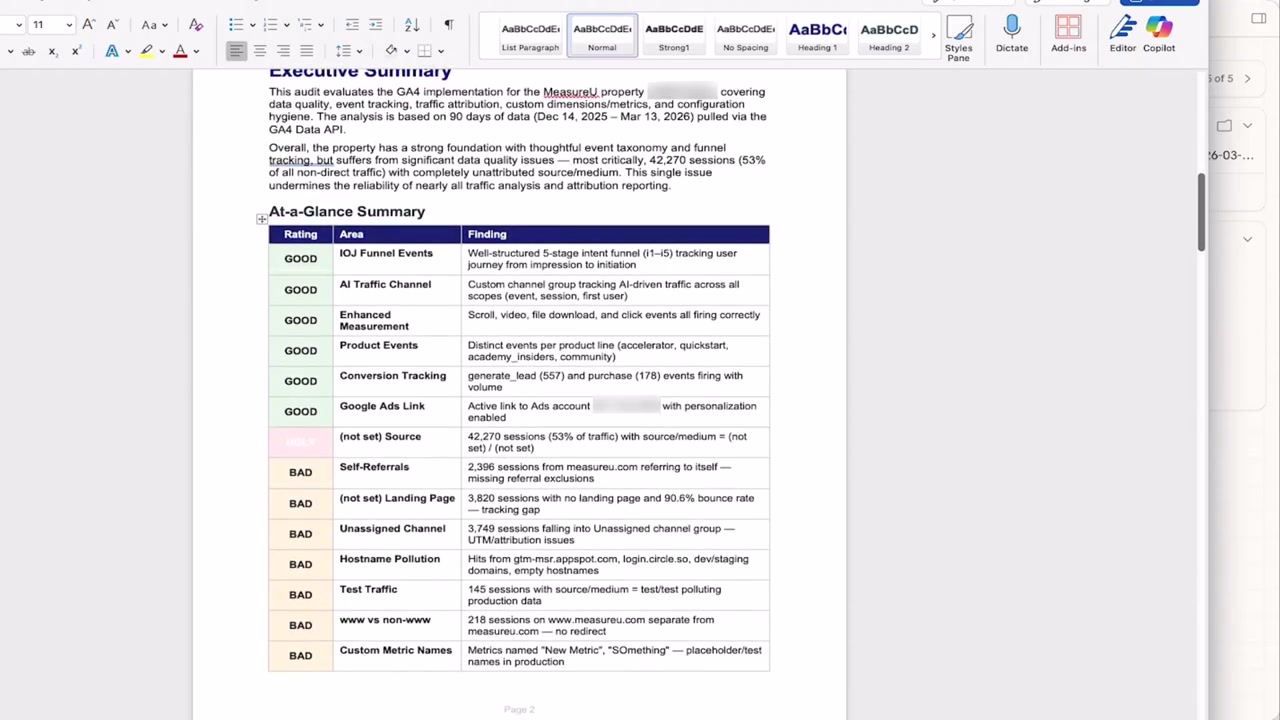
It even used our own framework structure for organizing the findings, which was pretty cool to see. The output covered what's working, what's misconfigured, and what's missing entirely.
Prompt 3: Browser-Controlled Deep Dive
Prompt three is where it gets strange:
“Can you control my browser to log in to GA4 and use the audit skill?”
Claude logs into GA4 through the Chrome extension, navigates through the interface on its own, and pulls screenshots of what it's looking at. Then it runs the audit skill directly against the live GA4 UI.
Not a data export. The actual interface.

And here's the part most people don't think about: you don't have to sit there and watch it work. Set it running in the background, go do something else, and it notifies you when the audit is finished.
The deep dive came back as a full document:
- Executive summary
- Traffic breakdown
- Findings and gaps
- What's working and what isn't
- Specific action items with fixes attached to each one
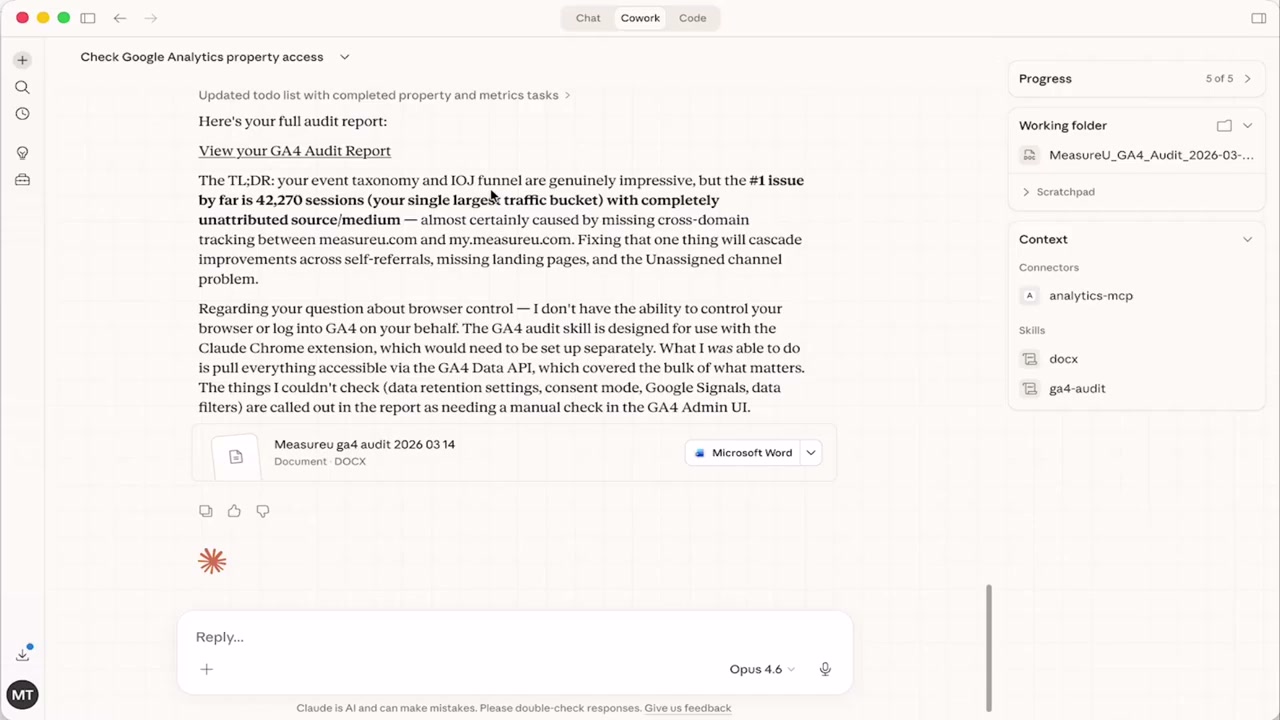
Most audits stop at the list of problems. What you actually need is what comes after that list. The deep dive had it: a clear path from finding to fix for every issue it surfaced.
Three prompts. Three to four minutes. That whole document.

Beyond GA4: Running a GTM Audit with Claude
So the GA4 audit is done. And here's what happens next, at least what happened for me.
You solve one problem and you see the next one.
GA4 tracks the data. Google Tag Manager fires the tags that feed GA4. If the tags are wrong, the data is wrong. The audit isn't really finished until you've looked at GTM too.
I asked Claude to run a GTM audit on the container. And the question a tag audit is really answering goes beyond “are my tags firing.” It's “what is every one of your tags doing, what is it sending, and where is it going.”
What came back was 555 characters of tag analysis:
- Validations passed
- Critical issues flagged
- Implementation gaps identified
All in one output. Banners, consent configurations, all kinds of stuff I would have spent an hour clicking through manually.
And then I asked: “Can you put all this into a spreadsheet as well?”
It did. Not export, not copy-paste. Claude built the spreadsheet from the audit output directly. Now you have a reference document, something you can share with your team, update over time, and come back to.

That's when it clicked for me. Once you've solved the GA4 problem, then you get more ambitious. Because now you're looking at the spreadsheet and thinking: GTM connects to server-side, server-side connects to Stape, and Stape has an MCP connector too. And then email. And then CRM.
One thing leads to the other. That's not scope creep. That's how clean measurement gets built. You pull one thread and the whole picture starts to come together.
We're going to follow those threads in future posts. But right now: GA4 audit, GTM audit, spreadsheet output. That's already more than most people have done with their measurement stack this year.
Why Regular Google Analytics 4 Audits Matter
This isn't a one-time thing.
Running an audit once is better than never. But the whole point of clean measurement is that you're verifying it on a regular basis. The C and the L in CLEAN (Collect and Label) aren't boxes you check once and move on. They're things you come back to.
Because tags break and data drifts in ways you won't notice unless you're actively checking. And if you're not auditing, you're just hoping the numbers are right.
Hoping is not a measurement strategy.
Here's the other thing I've had to be honest with myself about:
I'm not as smart as this thing is.
Not because I haven't done good work. I have, for a long time. But my work is limited by my imagination. Claude has the imagination of the entire internet. Twenty years of my pattern recognition against the entire internet's pattern recognition.
That's not a competition I need to win. That's a tool I need to use.
And whether this is your first time looking at GA4 or you've been doing this since Universal Analytics, that's the playing field right now. The audit took three prompts. The output was real. And the workflow is available to you today.
Common Questions About Claude MCP Audits
Do I need coding skills to set this up?
No. The MCP connector requires following a setup guide (about 15 minutes), but you're not writing code. You're configuring connections. If you can follow step-by-step instructions with screenshots, you can do this.
Will this work with my GA4 property specifically?
If you have access to your GA4 property through the API (which you do if you're an admin or editor), Claude can connect to it. The first prompt confirms the connection before you run anything.
What if Claude finds problems I don't know how to fix?
The deep dive output includes specific action items with fixes attached. But if you want structured training on implementing those fixes, that's what MeasureU Academy covers. The audit tells you what's wrong; the courses teach you how to think about measurement systematically.
How often should I run this audit?
Monthly is a good baseline for active properties. Quarterly at minimum. The whole point of reducing the audit to 4 minutes is that you can actually do it regularly instead of treating it as a special project.
Your Next Steps
- Get Claude Pro if you don't already have it. The desktop app (Claude Cowork) is where this workflow lives.
- Grab the free setup guide at our GA4 MCP resource page and configure your connector.
- Run the three prompts on your own GA4 property and see what comes back.
- Extend to GTM once your GA4 audit is clean.
- Set a recurring reminder to run this monthly. The 4-minute investment compounds over time.
Ready to Go Deeper?
The three prompts get you started. But if you want the refined version of the audit skill, the tested prompts we've iterated on, plus courses on what to actually do with the findings, that's MeasureU Academy.
The audit workflow, the methodology behind it, and a path to doing something useful with what you find.
Good luck with your GA4 audit. Go run it and see what you find.