The Problem With How You're Using Claude
Tired of getting mediocre AI outputs that need heavy editing every single time?
You're not alone. Most marketers are using Claude like a slightly better ChatGPT. Type a prompt, get an output, move on. And yeah, that works fine if all you want is a decent first draft.
But here's the thing: that's not what Claude actually is.
The Claude vs ChatGPT debate for marketers usually focuses on the wrong stuff. Which one writes better copy? Which one is faster? Which model is smarter this week? Those questions miss the point entirely.
I've been running my entire company through Claude for the last six months. Six full-time team members. Content, sales, client work, everything. And for the 18 months before that, I was a heavy user figuring it out. I'm not theorizing about this. I use it every day at real scale.
That's where this guide comes in. I'm going to show you the complete picture of how top marketers are getting the most out of Claude today: the full product family, the right model for the right work, and the connections that turn it into a system. Once you see it this way, you're not going back.
Watch the Full Breakdown
Below is the full written breakdown of everything covered in the video, with the product family, the model lineup, MCP connections, and the seven use cases laid out so you can put them to work.
What You'll Learn in This Post
- Claude isn't a chatbot, it's an operating system for marketing work
- Projects, MCPs, and Memory create compounding systems (not one-shot prompts)
- ChatGPT only wins on image generation; everything else favors Claude for marketing
- The real return is strategy and positioning work, not faster writing
Table of Contents
- The Mental Model That Changes Everything
- The Claude Product Family Explained
- MCPs: How Claude Connects to Your Marketing Stack
- 7 Marketing Use Cases That Change the Game
- Claude vs ChatGPT: The Honest Comparison
- Getting Started: Your First Real Workflow
The Mental Model That Changes Everything
Here's the reframe that changed my entire approach. Claude isn't a chatbot. Claude Code and Cowork are your operating systems for marketing work.

Think about it like this:
- Projects are your hard drive. Every brand, every idea, every client lives in its own folder.
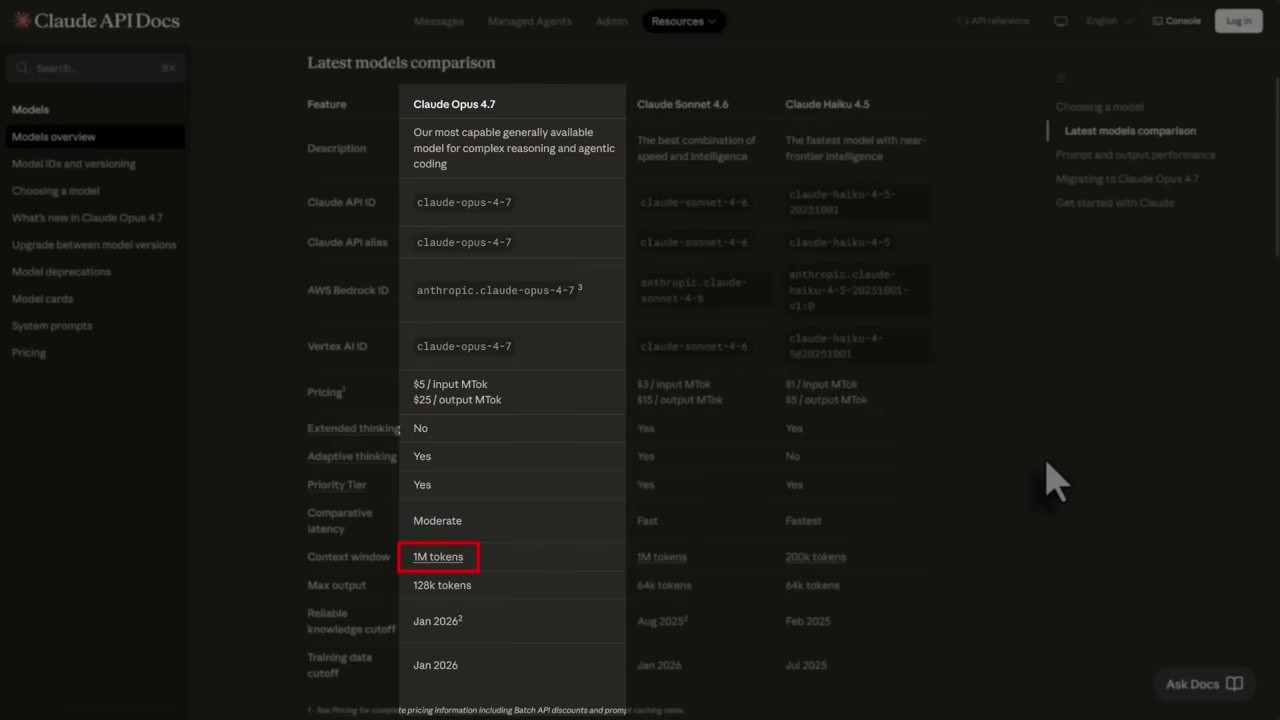
- The context window is your RAM. Up to one million tokens with current models, that's roughly 750,000 words of active memory.
- MCPs are your apps. They connect Claude to the AI marketing tools you already use.
- Memory files are your preferences. Claude learns how you work and stops making you repeat yourself every session.
When those pieces connect, you stop one-shot prompting. You start building marketing systems that compound over time. That's a completely different category of tool.
The Claude Product Family Explained
When most people say “Claude,” they mean Claude.ai, the web app. That's the right starting point, and that's where most of you should begin. But there's a lot more underneath it.
Projects
This is the feature that changes your relationship with the tool first. A Project is a persistent workspace. You upload files, set instructions, and every conversation inside inherits all of it automatically.
- Drop in a 50-page brand guide and every output matches that voice from that point on
- Drop in ten customer interviews and you have an analyst who has actually read all of them
- Set your company's tone, terminology, and preferences once, never re-explain them
That's not a parlor trick. That's a different category of work.
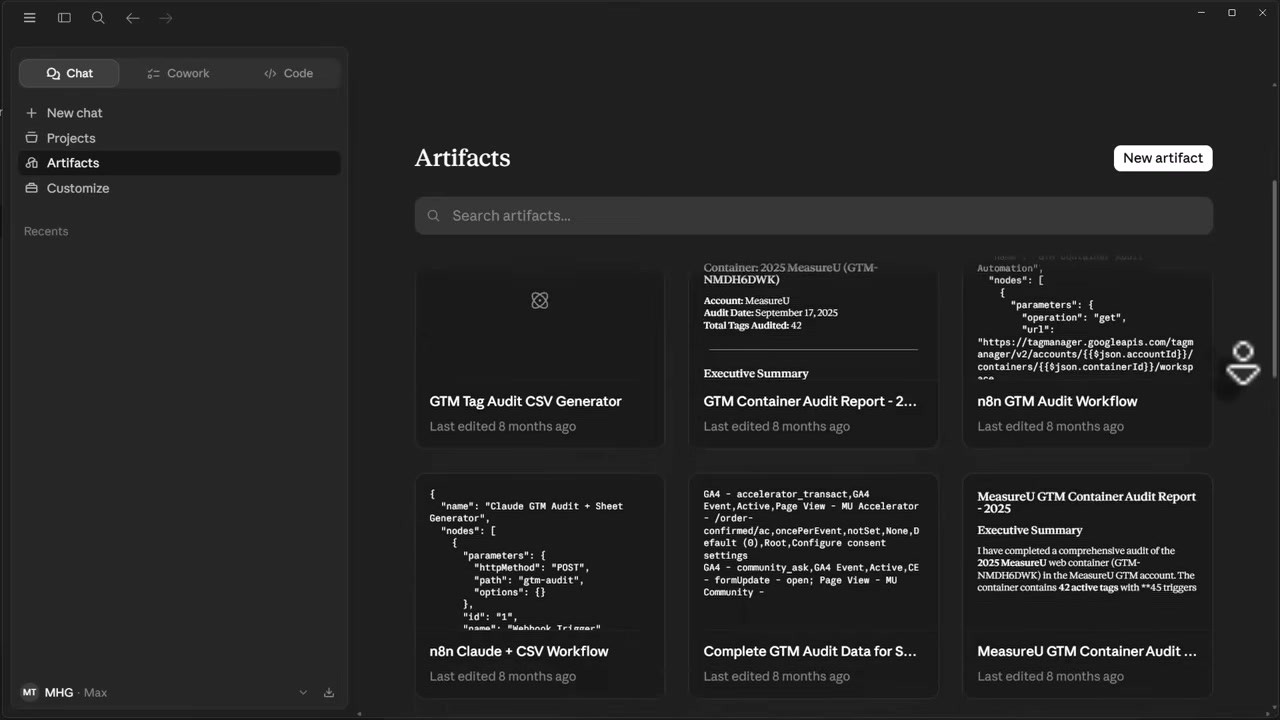
Artifacts
Artifacts are how Claude outputs structured content: documents, charts, code, HTML files. Instead of pulling text out of a chat window and reformatting it, you get a rendered output you can actually use.
Memory
It does what it sounds like. Claude learns your preferences and carries them forward.
- Tell it you prefer bullets over paragraphs
- Tell it your company name and tone
- Tell it how you like data presented
You stop re-explaining yourself every session. The context persists.
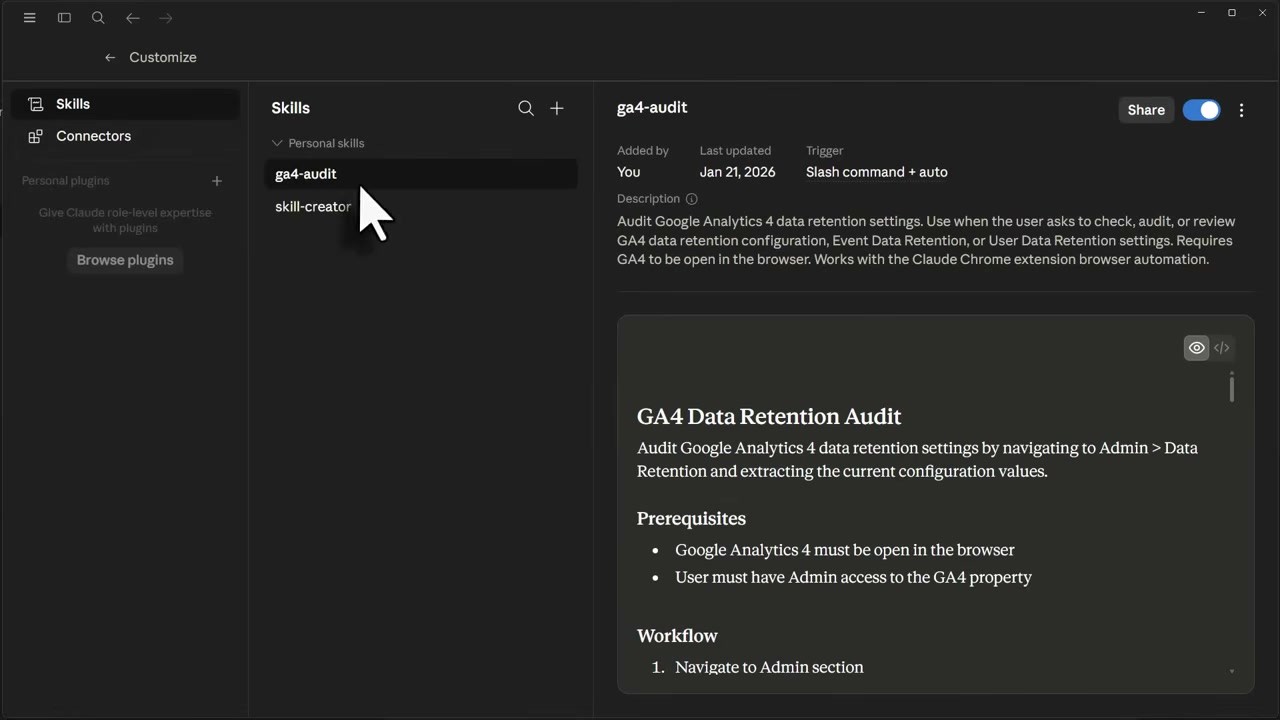
Skills
This is Claude's no-code marketing automation layer, generally available now across Pro, Max, Teams, and Enterprise. You build a Skill once and it runs as a reusable workflow. Think of it as a saved playbook for tasks you run over and over: ad copy variations, report summaries, content briefs.
Claude Cowork
Inside the desktop app, generally available on macOS and Windows. It sits on your machine and watches your screen (with your permission). It participates in your actual workflow. It even lets Claude operate a browser or application on its own.
Cutting-edge creators are using it constantly. But honestly? Most marketers aren't in that lane yet. Start with Projects and MCPs first.
Model Lineup
Three models in active use as of mid-May 2026:
Opus 4.7, the flagship. One million token context window, adaptive thinking architecture, best for complex strategy, deep document analysis, and anything where reasoning depth matters. Though I'll be honest, sometimes I get better results with Opus 4.6 and switch back.
Sonnet 4.6, the workhorse. Also one million tokens of context, supports extended thinking. Most marketing workflows run well here and it's fast.
Haiku 4.5, the lean option. 200,000 token context, supports extended thinking. Good for quick tasks where you want speed over depth.
Pricing
- Claude Pro: $17/month on annual billing, $20 monthly
- Claude Max: starts at $100/month for 5x the Pro usage limit
- Teams: $20 per seat annually
Same price point as ChatGPT Plus, which has sat at $20 for three years. For most marketers, start with Pro. You don't need Max on day one. Run one real month of work through it and you'll know what you need. Me? I've been on the 20x Max plan for $200 a month and love it.
MCPs: How Claude Connects to Your Marketing Stack
So what makes Claude actually useful for marketers? Data access through MCPs. MCP stands for Model Context Protocol. An MCP is a connection between Claude and an external tool.
Before MCPs, Claude only knew what you typed and what you uploaded manually. After MCPs, Claude can:
- Read your Google Drive
- Pull from GA4 directly
- Check Search Console
- Create assets directly in Canva
- Update Notion
- Post to Slack
- Manage tasks in ClickUp or Asana
That's a completely different category of work.

What This Actually Looks Like
GA4 via MCP: Claude pulls your actual traffic data, not a CSV you exported three days ago. It surfaces the implications, not just the surface metrics. The thing buried under six dashboard clicks is what Claude surfaces first.
Google Drive via MCP: Claude reads your entire content library before it writes anything new. No more context-less outputs that ignore what you've already published.
Search Console via MCP: it knows what you rank for before it suggests what to target next.
Canva via MCP: even Canva has an official native MCP connector now. Claude isn't just suggesting what your visual should say, it's building the asset alongside you.
Before vs. After
What did this work look like before?
- A lot of copying and pasting data
- Trying to write Excel functions to give data context
- Switching between three or four tools to complete one piece of work
What does it look like now with MCPs?
- You describe the work
- Claude pulls what it needs
- Runs the analysis
- Outputs into the format you use
And once that plumbing is set up, the work changes permanently.
7 Marketing Use Cases That Change the Game
Let me give you the use cases where Claude stops being convenient and becomes something you can't operate without. This is where AI marketing strategy actually gets practical.
1. Brand Voice Training in Projects
Most marketers are either producing generic AI output or spending time correcting it every single time. What I recommend: every client and every brand lives in its own Project. The Project gets the brand guide, sample copy, positioning language. Every output from that point is calibrated to that voice. It doesn't drift. It doesn't forget. That's not replicable in a standard chat workflow.
2. Multi-Document Synthesis
Drop ten customer discovery calls into a Project. Ask Claude to find the positioning angles that come up most often. Drop a competitor analysis, a research report, and your last campaign results into one session. Ask what you're missing. You get a synthesis that would take a junior analyst two days to produce. It comes back in minutes.

3. GA4 Interpretation
Most of you know GA4 is a nightmare when you want real answers fast. Claude with the GA4 MCP connector pulls your actual data and tells you what's happening. It surfaces the implications, not the surface metrics. The thing buried under six dashboard clicks is what Claude surfaces first.
4. Full-Funnel Content Production
This is where people usually conclude AI content isn't useful, because they tried it and the writing was bad. And they were right, because they were using Claude as a writing replacement. I use it as a thinking partner first. Strategy comes from a conversation. Structure comes from a conversation. Draft is last. When you sequence it that way, the output is calibrated to your audience before a single word gets written.
5. SEO Brief Production
Search Console data plus your competitors' top-ranking URLs plus Claude's reasoning. The output is a brief that knows what you rank for, what you're missing, and what the content needs to do to win. An actual brief, calibrated to your data. Not a template you filled in manually.
6. Ad Variations at Scale
You have a core message that works. Now you need 20 variations for different audiences. Claude with your brand guide in the Project produces variations that are on-brand and built around real angle differences. Not “change one word and call it a variation.”
7. Customer Interview Synthesis
This is the most underused use case on this list. You have recordings or transcripts from customer calls. Most of what's in those calls never makes it into your marketing. There's no process to pull it out. Feed it to Claude. Ask for the patterns. Ask for the objections. Ask for the specific language those customers used. Your messaging gets sharper and you did it in an afternoon.
The Bigger Picture: Strategy Over Writing
Most marketers think AI is about writing. When people complain about AI content, they're picturing weakly written articles. And sure, that's a real problem if you're using AI wrong. But that is the smallest possible use of this tool.

The real return is in strategy, research, and the positioning work that shapes what you sell. Marketers using AI to write blog posts are going to get lapped by the ones using it to do their thinking.
Claude vs ChatGPT: The Honest Comparison
Let me get into the comparison everyone always wants.

Where Claude Wins for Marketing Work
Long-form reasoning is better. On strategy documents and campaign planning, Claude holds context and logic together over a longer arc than anything else I've tested.
Brand voice adherence inside Projects isn't at the same level in ChatGPT custom GPTs. The persistence is stronger.
Document analysis at one million token context is next level. It can't be beat elsewhere right now.
Projects and Memory persistence means you're building something over time, not starting from scratch every session.
Where ChatGPT Still Wins
One area: image generation. The image generation inside ChatGPT is incredible, leaps and bounds above Claude and even surpassing Google's options as of late. If generating images is a primary workflow for you, that matters.
But you know what? I just have Claude use the ChatGPT API to generate them for me. Problem solved. That's the biggest single advantage ChatGPT holds for marketers right now. Everything else on the marketing side? Claude is the stronger tool.
The Verdict
If you're on ChatGPT Plus and you haven't seriously tried Claude Pro, that's a decision built on old information. Claude Pro is $20 a month on monthly billing, $17 on annual. Same price. Better return on the marketing work.
Common Questions
“Do I need Claude Max to get real value?” No. Start with Pro. Run one real month of work through it. You'll know if you need more usage within a few weeks. I'm on the $200/month plan because I run a full team through it; most solo marketers won't need that.
“What about ChatGPT's new features?” ChatGPT keeps adding features, and some are good. But for marketing-specific work, brand voice, document analysis, persistent context, Claude's architecture is ahead. Check back in six months, but that's where it stands today.
“Is it hard to set up MCPs?” Depends on the MCP. The official connectors (Canva, Google Drive) are straightforward. GA4 takes a bit more setup but it's worth it. Once it's done, it's done.
Getting Started: Your First Real Workflow
Here's what I'd suggest:
- If image generation isn't a primary workflow for you, there's no strong case for keeping the ChatGPT Plus subscription.
- Try Claude Pro for one month at the same price; use the ChatGPT API whenever you need images (it'll probably cost you less than $20/month).
- Load up a brand guide. Set up a Project. Run one real workflow through it.
- You'll know within a week whether this changes your work.
Get the Full Services Guide
If Claude is the operating system, the next question is what you actually sell on top of it. I put together a 109-page guide called 99 Services for 2026. It covers every service you could be selling this year, scored and ranked across six dimensions: market growth, revenue potential, demand, competition, ease of delivery, and AI resistance.
If you want to know which services are worth your time and which ones aren't, this is the map.