Know that feeling when a client asks “Should we do server-side tracking?” and you're not quite sure how to answer?
You're not alone. If you're anywhere in the measurement community—LinkedIn, podcasts, Slack groups, client calls—you've definitely come across this question over the last few months. Server-side tracking has picked up some serious momentum recently and as we move toward a privacy-first world where ad platforms are automating more of their optimization, the signals those platforms receive matter more than ever.
But here's the thing: investing in server-side tracking isn't just about time to set up. It's about time AND money. You need to ensure your client (or yourself) is ready to invest in the setup and be prepared to maintain it over time.
That's where this framework comes in. I'm going to walk you through:
- A free audit tool that runs in 30 seconds and lets you look under the hood at any client website
- 3 qualifying questions to ask before you even consider recommending server-side tracking
- A 5-step process for using the audit and questions for any client discovery call
Disclosure: This content is sponsored by Tracklution, a SaaS plug-and-play server-side tracking tool that lets you set up server-side tracking without a Google Tag Manager web or server container—they handle maintenance, updates, and integrations.
Watch the Full Walkthrough
What You’ll Learn in This Post
- Server-side tracking becomes worth considering when clients spend $1,000+ monthly on ads
- Cookie expiration (often just 7 days due to ITP) can kill your conversion tracking accuracy
- The free Tracklution audit takes 30 seconds and requires no signup
- Starting discovery calls with “Things you're doing right” changes the entire tone
Table of Contents
- Why Server-Side Tracking Is Having a Moment
- The 3 Questions That Determine Client Readiness
- The Free 30-Second Audit Tool Walkthrough
- The 5-Step Discovery Call Process
- When Server-Side Tracking Isn't the Answer
Why Server-Side Tracking Is Having a Moment
Let's face it, recently with ad blockers, ITP cookie restrictions and cross-domain tracking issues client-side tracking can be limiting. The signals that Meta, Google Ads, and other platforms receive are degrading. And when algorithms get worse data, they make worse optimization decisions. Which means your client's ad spend becomes less efficient.

The truth is, without server-side tracking, you're likely losing 20-40% of conversion data. That's not a small leak—that's a flood.
But server-side tracking isn't right for everyone. It requires investment and maintenance, so recommending it to a client who isn't ready is not advisable.
Instead of jumping to “Yes, you need server-side tracking,” you need a qualification framework.
The 3 Questions That Determine Client Readiness
Before you recommend server-side tracking to any client, run them through these three questions. If they answer yes to most of them, it's time to have the server-side conversation.
Question 1: Are They Losing Conversion Data Right Now?
Is your client running Meta ads? Google Ads? LinkedIn ads? TikTok ads?
If they're running any sort of paid advertising on any of those platforms, you want to put server-side tracking on the table. Not as a definite recommendation yet—just as something worth evaluating.
The ad platforms need conversion signals to optimize. If those signals are getting blocked or degraded, the algorithms can't do their job and your client is essentially paying for optimization that isn't working properly.
Question 2: Do They Have Long Customer Journeys or Multi-Domain Tracking?
Many clients have customer journeys that span multiple domains. They start on abc.com, convert on shop.abc.com, and their thank you page is back on abc.com.
Or their customer journey just takes longer than 7 days. (Which, let's be honest, is most B2B businesses and plenty of e-commerce.)
Here's the problem: with ITP restrictions, cookies often expire after just 7 days. If your client's typical purchase decision takes 30 days? You're losing attribution on everyone who doesn't convert within that first week.
Server-side tracking can help you recover tracking across these longer or multi-domain customer journeys.
Question 3: Are They Spending $1,000+ Monthly on Ads?
This is the financial threshold that makes server-side tracking worthwhile.
If a client is spending thousands of dollars per month on ads—whether that's $2,000 on Facebook, $1,000 on Google—it's time to seriously consider server-side tracking.
The math starts to work as you are losing 20-40% of conversion data. That lost data translates directly into less efficient ad spend. If you can recover even a portion of that signal quality, the improved optimization often pays for the server-side tracking investment.
The Free 30-Second Audit Tool Walkthrough
Now let's get practical. I want to show you how to actually assess a client's current tracking setup before your discovery call.
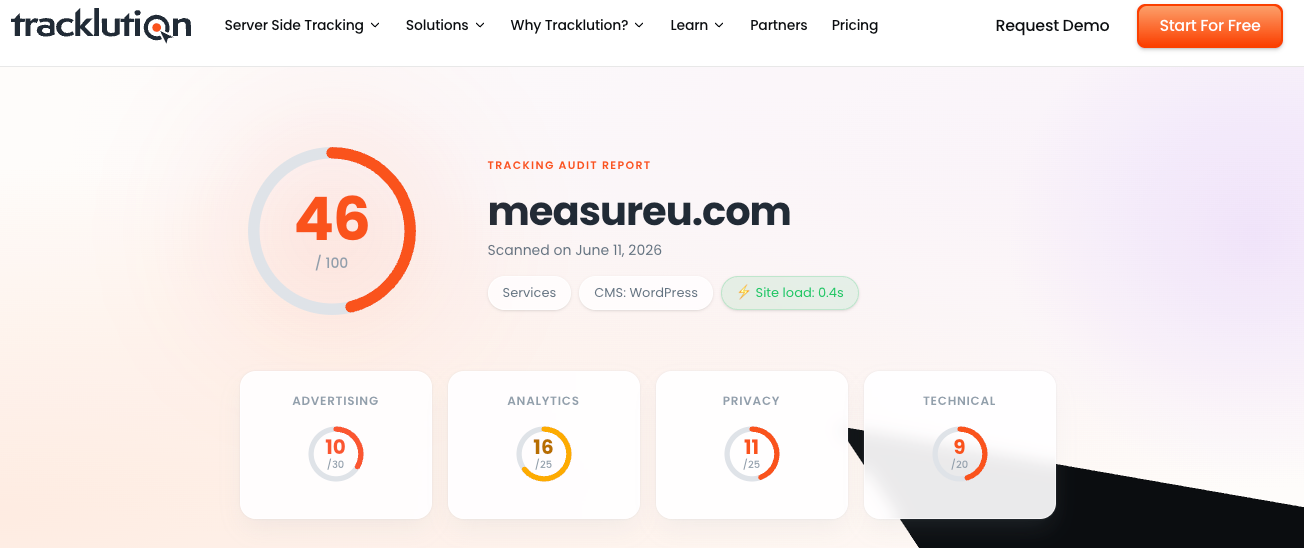
Grab your client's site URL and head to https://audit.tracklution.com/ to run your first audit.
Running Your First Audit
Type in your client's URL and click scan. In about 30 seconds, you get a complete breakdown of their tracking setup.
I ran this on our MeasureU site recently and the truth was our score wasn't great. Why? Because Julie, Jeff, and I are constantly experimenting. We're taking down tags, putting up new containers, testing different setups. So our score fluctuates.
But that's actually useful context. The audit gives you a snapshot of what's happening right now.
Understanding the Tracking Architecture Diagram
One thing I love about this audit is the visual tracking architecture.
It shows you exactly where the client is sending data—Google Analytics, Google Ads, Facebook, LinkedIn, whatever they have set up. And it shows whether that data is going client-side only or through a server.
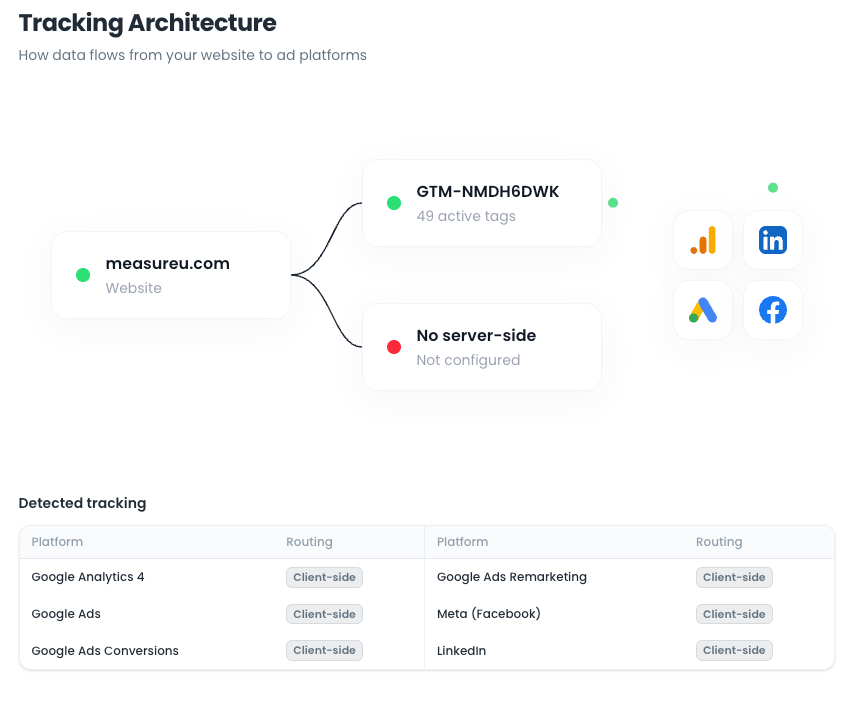
This is huge for client conversations. You can pull this up and say, “Here's your website, here's your Google Tag Manager setup, here's where you're sending data. And notice—it's all client-side right now.”
Sometimes clients are surprised by what they see. “Wait, we're sending data to Facebook? I didn't think we were.” Or “We're supposed to be tracking TikTok—where is that?”
Great conversation starter.
The “7 Things You're Doing Right” Section (Start Here)
I always scroll to this section first when presenting to a client.
Don't you love being on a call with somebody and they start with what you're doing well? This section sets up the entire conversation with a positive tone.
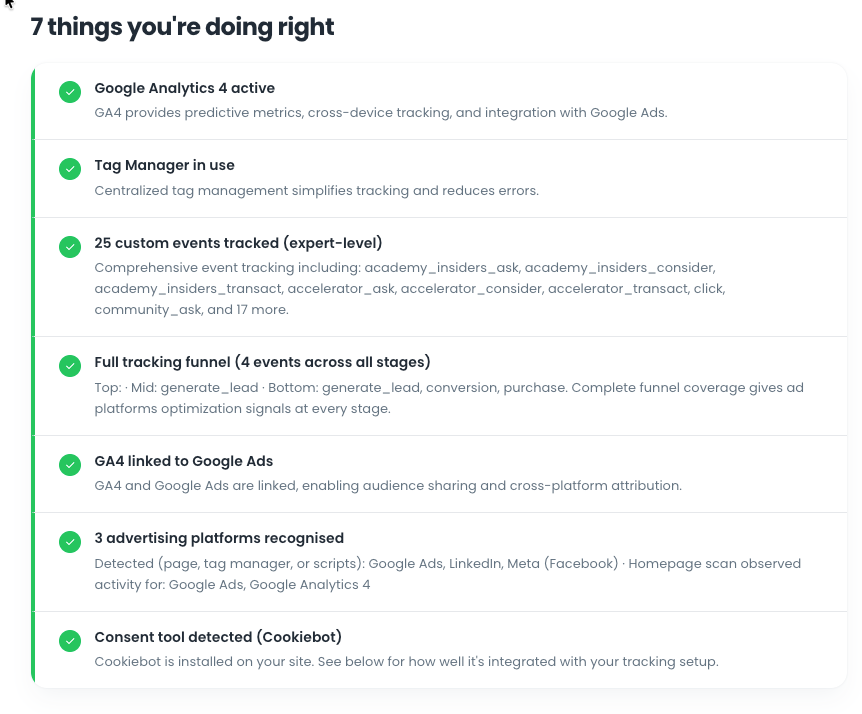
Typical wins you'll see:
- Google Analytics is working on your site (trust me, not everyone has this sorted)
- You're using Tag Manager (many people still don't)
- You have custom events set up
- You're tracking a conversion funnel (generate lead, purchase, etc.)
- GA4 is linked to Google Ads (you'd be surprised how often this is missing)
- Consent tool is implemented
Starting here changes the dynamic completely as it shows you've done your homework. It's not a negative call about everything they're doing wrong—it's a conversation about optimizing what's already working.
Diving Into Issues and Cookies
After the positives, I look at the cookies section.
The audit shows cookie expiration. For most sites without server-side tracking, you'll see something like: “Your Google cookie is only effective for 7 days.”
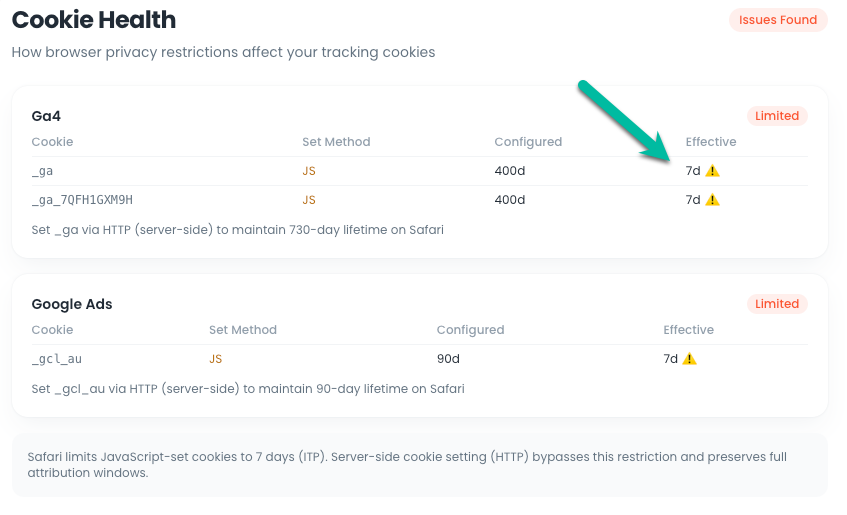
This is where I lightly ask: “How long is your typical customer journey?” Most clients say something like 30 days.
“Interesting—so you've got a 30-day journey but your cookies expire in 7 days. You're losing attribution on anyone who doesn't convert in that first week.”
That usually gets their attention.
Then I scroll up to the issues section:
- No server-side tracking
- Ad pixels running client-side only
- Cookie vulnerabilities with ITP
This is where I weave in those three qualifying questions naturally.
Calculating Recoverable Ad Spend
Now for the part that makes the business case.
Scroll down to the “Estimated Impact” section. It shows the generic stat: without server-side tracking, you're likely losing 20-40% of conversion data.
But here's where it gets practical. There's a field where you can enter the client's actual monthly ad spend.
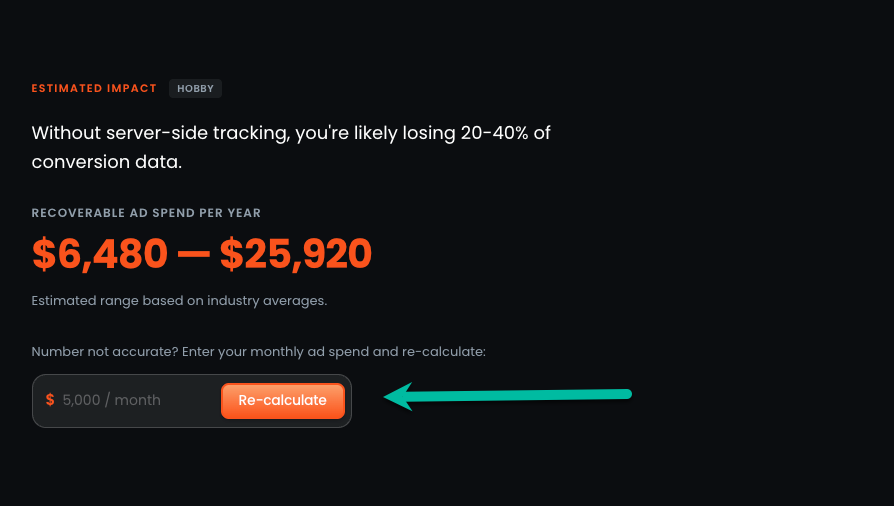
So I'll ask on the call: “How much are you spending per month on ads?”
Let's say they say $2,500. I type that in, hit recalculate, and suddenly they see their specific recoverable ad spend per year. Not a generic number—their number.
“So if we implemented server-side tracking and the implementation cost is X, you'd make this up within Y months and continue recovering this amount every year.”
Now it's a cost-benefit analysis they can actually evaluate.
And if they mention their ad spend is growing? “I'm spending $2,500 now but planning to hit $5,000 by Q4.”
Perfect. Recalculate with the projected spend. The case for server-side tracking gets stronger.
Bonus: Competitor Comparison
There's one more feature I want to mention. Below the estimated impact section, you can enter a competitor URL and compare their tracking setup to your client's.
I'm not going to run this live because we all play nice in the measurement community. But if your client names their top competitors, you can quickly see if those competitors are running server-side tracking.
If they are? That's a compelling argument. “Your competitor is capturing data you're losing.”
The 5-Step Discovery Call Process
Alright, let's put this all together into a repeatable process you can use starting today.

Step 1: Run the Audit Before the Call
Takes 30 seconds. No permission needed. The client won't know you ran it.
I recommend running it the morning of your call—tracking setups can change, and you want current data. Have it ready on your screen before you dial in.
(You could also have a team member run it and summarize the key points for you.)
Step 2: Share Your Screen During the Call
Having something tangible to show the client is huge.
You're not just showing up to have a conversation—you're showing up with homework already done. You've looked under the hood. The client immediately sees you as someone who's prepared and understands their setup.
Step 3: Start With What They're Doing Right
Go to the “7 Things You're Doing Right” section first.
I find this completely changes the energy of the call. It becomes a conversation instead of a sales pitch. You might even see them smile a few times.
“Hey, you've got GA4 set up properly, you're using Tag Manager, you have custom events tracking—these are all wins.”
Step 4: Ask the Three Questions
As you walk through the cookies section, issues section, and recoverable ad spend—this is where you naturally weave in the qualifying questions.
“I noticed you're running Google Ads and you have the Facebook pixel installed. Can you tell me a bit about your ad spend?”
“How long is your typical customer journey? Is it longer than seven days?”
“I see your total across platforms is around $4,000/month—is that accurate?”
Let their answers guide your recommendation.
Step 5: Make Your Recommendation
If they answer yes to most of the three questions:
- Running ads ✓
- Spending $1,000+/month ✓
- Long journey or multi-domain ✓
…then you can confidently recommend exploring server-side tracking.
If they're only hitting one of these criteria, maybe it's not the right time yet. And that's okay. You've still provided value by auditing their setup and identifying what they're doing well.
When Server-Side Tracking Isn't the Answer
Not every client needs server-side tracking. Some situations where I'd hold off:
- Ad spend under $1,000/month — The ROI math probably doesn't work yet. Focus on getting their foundational tracking right first.
- Very short sales cycles — If customers typically convert within 1-2 days, the 7-day cookie limitation isn't hurting them as much.
- Not running paid ads — Server-side tracking's biggest value is improving ad platform signals. If they're not running ads, the urgency drops significantly.
- No technical resources or budget for maintenance — Even with plug-and-play solutions like Tracklution, there's still some ongoing attention required. Make sure they're prepared for that.
Being honest about when server-side tracking ISN'T necessary builds trust. Clients remember when you told them they didn't need something.
Your Next Steps
- Run an audit today — Go to audit.tracklution.com and scan a client site. Get familiar with the interface before your next discovery call.
- Practice the 3-question framework — Next time someone asks about server-side tracking, run through the questions instead of jumping to a recommendation.
- Try the 5-step process on your next call — Share your screen, start with positives, ask the questions, calculate their specific recoverable spend.
If you're an agency with 5+ clients doing significant paid media, it's worth looking at Tracklution specifically—they help you standardize server-side tracking deployment across multiple clients without managing individual server containers.