This post is based on a talk Jordan Hill gave at a MeasureU Brain Gainz session. The ideas are his; the write-up is ours.
Tired of running the same AI prompt twice and getting completely different answers? You ask Claude to audit a GTM container on Monday, get one result. Ask it again Wednesday with the exact same prompt, and suddenly it’s flagging different issues, missing things it caught before, or hallucinating problems that don’t exist.
For measurement professionals, that inconsistency isn’t just annoying, it’s dangerous. You can’t push changes to a client’s Google Tag Manager container based on vibes.
That’s where Jordan’s skill loop methodology comes in. Jordan’s a MeasureU mentor who’s been building AI-powered measurement tools for about two and a half years now. And his approach flips the typical “hope AI gets it right” mentality on its head.
The goal isn’t to make your AI outputs better. It’s to make them the same every single time.
Watch the Full Breakdown
Jordan walks through the entire system in this Brain Gainz session: the skill audit, the QA report, where he stores the history, and the GTM tooling he’s built on top of it.
The written version below pulls out the parts you can act on this week, in the order he demonstrated them.
What You’ll Learn in This Post
- How the skill loop audits every Claude skill you have built and sorts them into passing, needs review, needs live post, and untested
- Why Jordan saves QA results to Cloudflare instead of locally, and what that history buys you on the second run
- What “deterministic” means in practice: the same output from a shorter prompt, with fewer tokens and less room for interpretation
- How GTM Auto Research audits a container, scores it, and generates a candidate container with fixes
- Why Jordan thinks you should start experimenting with local AI now rather than later
Table of Contents
- What the Skill Loop Actually Does
- Setting Up Your First Skill Audit in Claude Desktop
- Understanding the QA Report (Pass vs Needs Review)
- Saving State: Why Cloudflare Over Local Storage
- Making Your Skills Deterministic
- GTM Auto Research: Programmatic Container Audits
- Visualizing GTM for Client Communication
- The Hybrid Approach: Local AI Plus Cloud
- Your Next Steps
What the Skill Loop Actually Does
Here’s the thing most people get wrong about AI skills: once you build one that works, you think you’re done.
You’re not.
Jordan put it bluntly during the session: “Without QA, the skill doesn’t really improve.” But more importantly, without QA you can’t trust that your skill will behave consistently.
The skill loop is a Claude Desktop skill that audits all your other skills. It pulls down everything you’ve built, runs tests against each one, and categorizes them:
- Passing: ready for production use
- Needs Review: something’s off, requires attention
- Needs Live Post: requires a client or live environment to test properly
- Untested: never been validated
Jordan ran this against his own setup during the demo. He’s got 93 skills on his machine. Ninety-three. The skill loop inventoried every single one and flagged which needed work.
Setting Up Your First Skill Audit in Claude Desktop
The setup is surprisingly simple. Jordan shared a GitHub link that contains the skill loop itself, and you drop it directly into Claude Desktop.
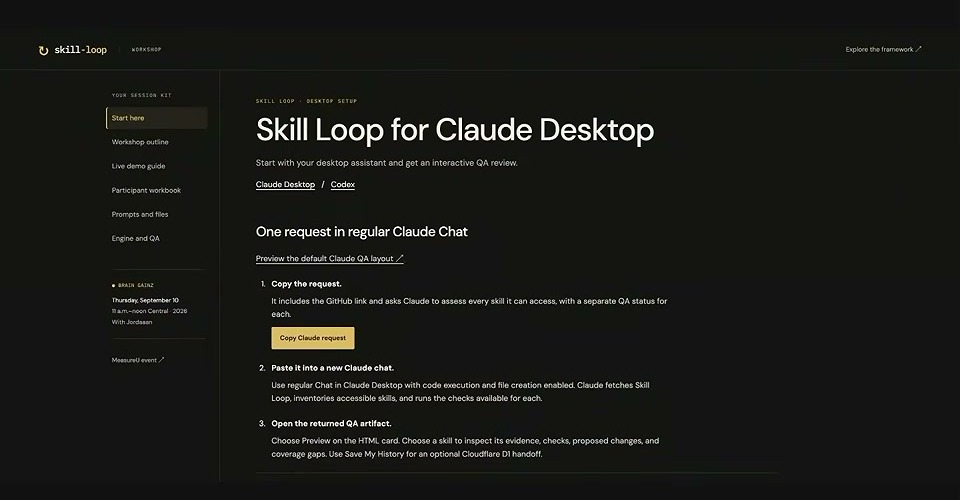
Here’s the process:
- Open Claude Desktop (not Claude Code, not terminal, though those work too)
- Paste the GitHub URL Jordan provided into a new chat
- Claude will pull down the skill and start inventorying your local skills
- Wait while it runs (this took several minutes during the live demo)
- Review the HTML artifact it generates
One thing Jordan emphasized: use Sonnet or Opus 5, not Fable 5.1. His exact words? “I actually despise it.” Fable burns through tokens unnecessarily for non-development tasks. He mentioned watching it eat 50% of his allocation just writing a newsletter.
Now, and this is important, the demo gods were not kind during this session. Multiple attendees got warnings, crashes, or weird behavior. Jordan’s take? “This is exactly why you want things to be more deterministic.”
The irony wasn’t lost on anyone.
Understanding the QA Report (Pass vs Needs Review)
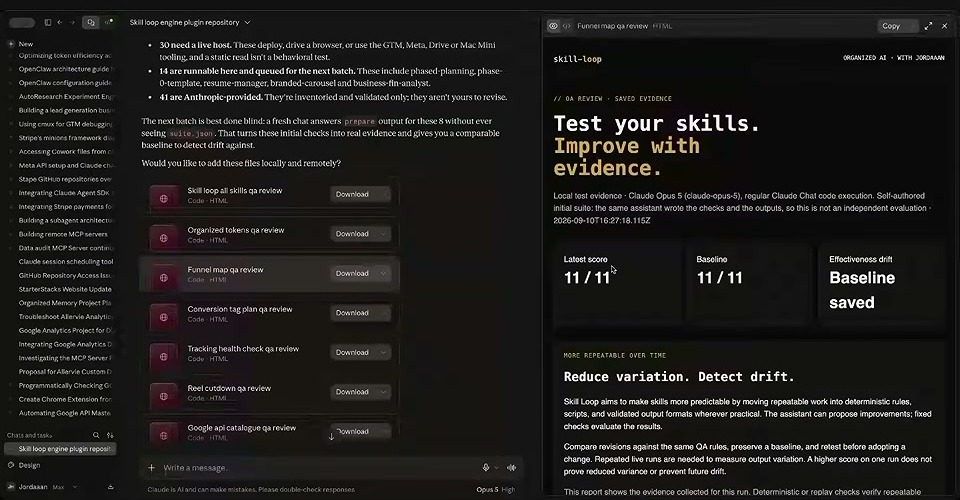
Once the skill loop finishes, you get an HTML artifact with a table showing all your discovered skills. Each row includes the package name, the source, the files executed, a flag status, and the result: pass or needs review.
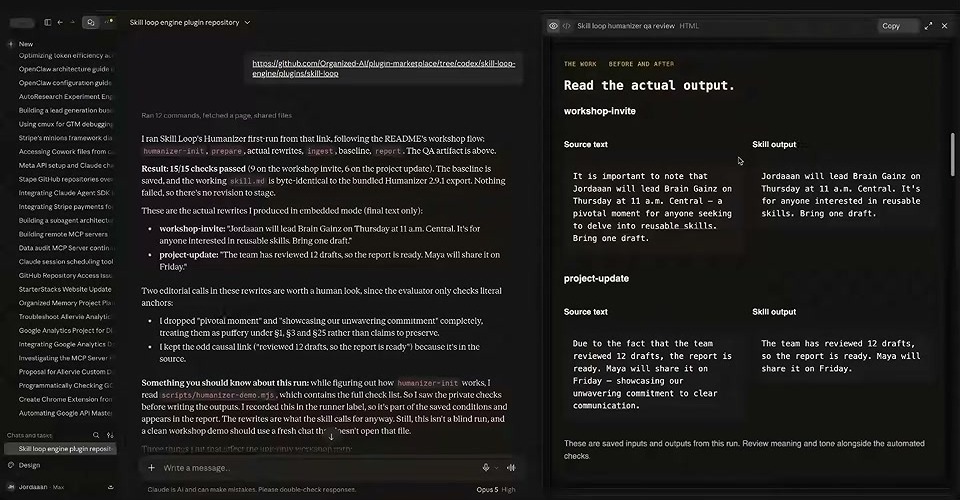
But here’s what confused some attendees: the HTML artifact is just a visual. You can’t click “Needs Review” and get details.
To actually review a flagged skill, you go back to the chat and ask directly. Ann, one of the attendees, figured this out: “Please review the ones that need review.”
Claude then walks through each flagged skill, showing you what’s broken or inconsistent.
The test evidence section is where the meat lives. It shows what was tested, what the expected behavior was, and where things went sideways.
Saving State: Why Cloudflare Over Local Storage
Here’s where Jordan’s approach gets clever.
You can download the QA report locally. That works. But Jordan prefers pushing results to Cloudflare. Why?
“I don’t want to bloat my space with tons of storage from different apps and tools.” Fair enough. But there’s a bigger reason.
When you save QA history to Cloudflare, your skill loop can check that history on subsequent runs. So the second, third, fourth time you run it, the loop pulls down what happened before and compares. You’re not starting fresh, you’re building on historical data.
That’s where the real improvement loop kicks in. You can actually see: did this skill get more consistent over time? Did my changes help or hurt?
Cloudflare is practically free until you start using certain workers. Jordan mentioned it’s about $5/month for what he needs. “Literally the best bargain in tech right now.”
Making Your Skills Deterministic
This is the core philosophy behind everything Jordan builds.
“The improvement isn’t necessarily, hey, the output of this skill needs to change and get better. More so, I’m thinking about how do I run the skill and get the same exact output once I’ve got it dialed in.”
Same output. Every time. That’s deterministic.
How do you get there? Jordan mentioned several tactics:
- Shorter prompts: if you can get the same result with one sentence instead of one paragraph, use one sentence. Fewer tokens on input, less room for interpretation.
- Slash commands and CLI tools: more structure means less guessing from the model.
- Model routing: Jordan built something called “Organized Tokens” that puts a decision-maker in front of his coding agent, automatically selecting the right model for each task.
The routing piece is wild. He’s only been on the $200 Claude plan for three months total. Most of the time, he stays on $100 because he doesn’t hit rate limits. The secret? Caching and not using Fable.
“The reason I don’t hit rate limits is because of caching typically, and I don’t use Fable very much at all.”
GTM Auto Research: Programmatic Container Audits
This is the tool Jordan’s been building for client work, and he previewed it at MeasureSummit.
GTM Auto Research does three things:
- Pulls down a GTM container
- Audits it and generates a score
- Creates a “candidate container”, a version of GTM with improvements based on what the audit found
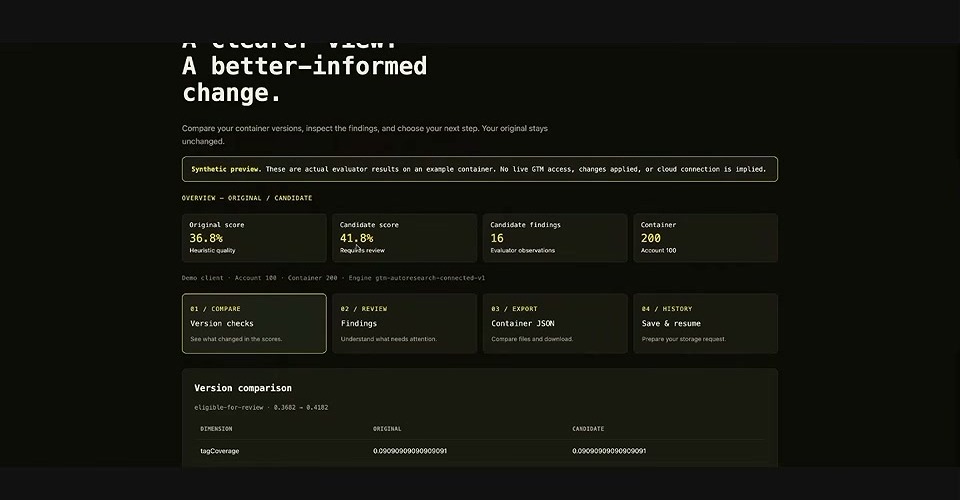
The candidate container is the key. “Yes, the audit is a great starting place, but it’s a horrible finishing place.”
What Jordan wants: this running on a loop. At the end of every business day, automatically check for drift. Look for broken tags, triggers, variables. Make updates.
And here’s the part that matters for data-driven marketing: you can find things like a missing GA4 review item list programmatically. Set it up once, catch issues before clients do.
The Google Analytics API connections happen through a GCP MCP server. Jordan shared that the first time he set up a Google Cloud Platform bucket, he was “super intimidated.” But connecting through the MCP server, he set it up, verified it, and delivered to a client in 20 minutes.
Visualizing GTM for Client Communication
Jordan showed a prototype that made several attendees pause.
It’s a visual map of a GTM container. Tags, triggers, variables, all connected, interactive, with info cards explaining each element.
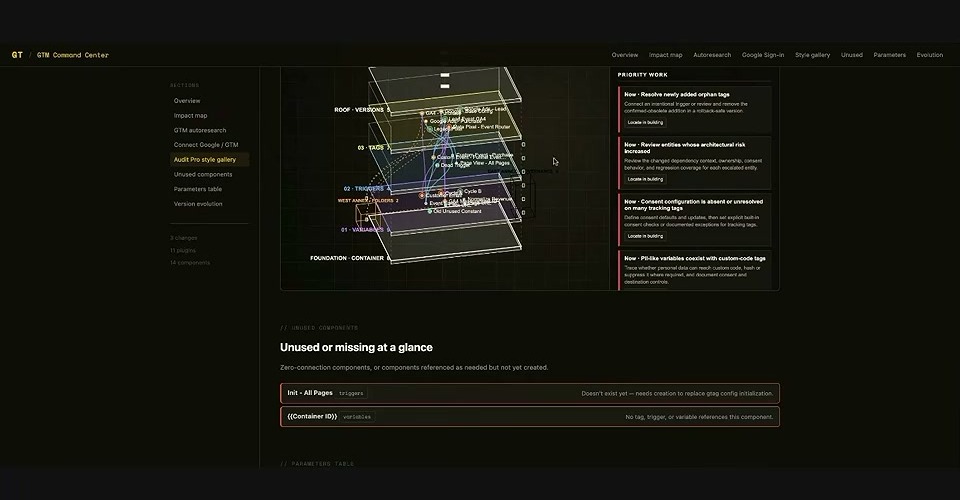
“Being able to visualize a GTM container turns this into a game.”
Think about clients whose eyes glaze over when you explain tag firing rules. Now imagine them clicking around a visual map, actually understanding what connects to what.
The point isn’t that it’s flashy. The point is meeting people in the middle with their visual style. “What is a container? If I tell certain clients about the container and they log into GTM and see a huge mess, they don’t want to ever be back in there ever again.”
This kind of visualization makes measurement conversations more approachable. And it’s generated from the same audit data feeding GTM Auto Research.
The Hybrid Approach: Local AI Plus Cloud
Jordan dropped what felt like a public service announcement mid-session:
“If you are not experimenting with local AI, I highly suggest you get a very cheap device and get started.”
Why the urgency? Because sooner or later, we might be forced off cloud AI. And when that happens, “the prices for computers are going to go up. The ability to change your systems from, hey, it worked on Codex or Claude Desktop, and then trying to panic move everything to a local situation? That is a recipe for disaster.”
So pull off the band-aid now.
Jordan started on an M1 MacBook Pro. Now he’s got a dedicated dev box running Hermes with access to Quinn 38 and Gemma 4. There’s something called “turbo quant” that lets you punch above your weight with less compute.
The hybrid setup means routing to the necessary model, sometimes cloud, sometimes local, based on the task. It’s about building systems that don’t completely break when one provider changes their pricing or limits.
Your Next Steps
Ready to build your own skill loop? Here’s where to start:
- Get Claude Desktop running if you haven’t already. The $20/month plan works fine to start.
- Grab the skill loop from Jordan’s GitHub. He shared it in the Brain Gainz session, so check the community for the link.
- Run it against your existing skills. Even if you only have three or four, seeing them categorized as pass or needs review is eye-opening.
- Set up a Cloudflare account for state storage. The free tier is enough initially.
- Pick one skill to make deterministic. Focus on shortening the prompt while maintaining output quality.
Jordan also ran a full workshop on this at MeasureSummit, covering programmatic setup, audits, changes, capturing history, and spinning up Data Manager API connections. The session recordings are available there.
For the rest of us, the skill loop methodology is available now. The tools exist. The question is whether you’re going to keep hoping AI gets it right, or start building systems that guarantee it does.
And remember: same output, every time. That’s the goal.
Keep Building With the Community
Brain Gainz sessions like this one run inside MeasureU Pro, where mentors walk through what they’re actually building and answer questions live. Jordan specifically asked for contributors on the skill loop, so this is a good one to bring your own experiments to.
Join MeasureU Pro to sit in on the next Brain Gainz session.