Did you know that over half the internet is bots?
And here's the thing: it might seem harmless because it doesn't show up in your GA4 analytics dashboard. But it's showing up in your hosting bill. It's showing up in your ad performance. It's showing up everywhere that actually costs money.
I found this out the hard way when I pulled up my own hosting dashboard and saw numbers that made me question everything I thought I knew about my traffic.
The crazy part? It's fixable. And there's now a way to scan any site in about 30 seconds to see how exposed you really are.
Watch the Full Breakdown
In the video I walk through the real dashboards behind these numbers. What follows is the written version, with the figures laid out so you can compare them against your own site.
What You'll Learn in This Post
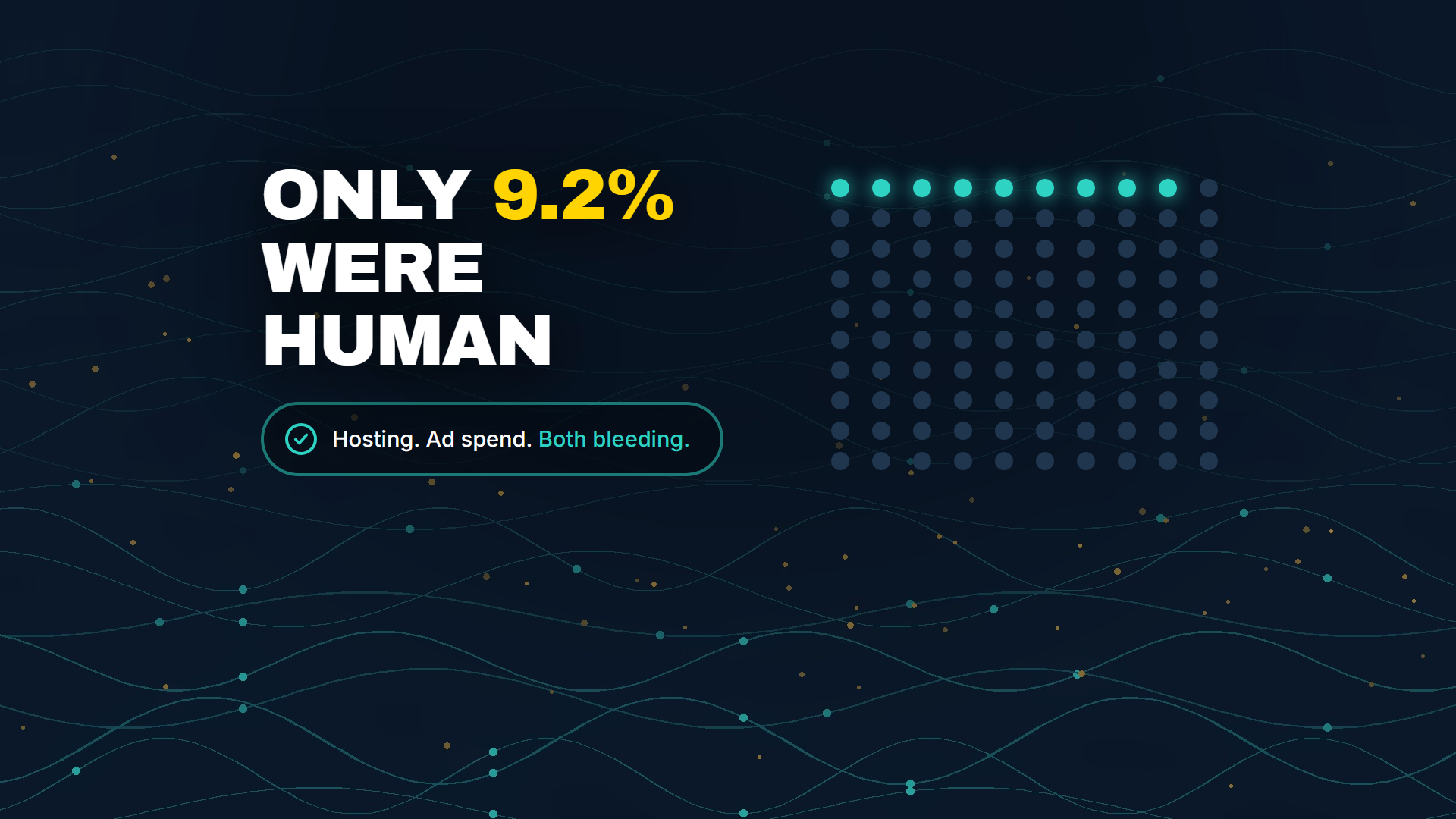
- Only 9.2% of the requests hitting my travel blog came from actual humans
- AI crawlers flagged as “excessive-rate” outnumbered human visitors on my own site
- GA4 only filters bots that identify themselves, which is almost none of them
- Only 2.8% of websites are fully protected against bot traffic, down from 8.4% last year
Table of Contents
- The Hosting Bill That Started This
- The Headline Number That Stopped Me Cold
- This Isn't Just My Problem
- The GA4 Analytics Blind Spot
- Not All Bots Are Bad: Understanding AI Crawlers
- Marketing Performance and Wasted Ad Spend
- So Is Any of This Actually Fixable?
- The Service Opportunity Nobody's Selling
- Your Next Steps
The Hosting Bill That Started This
I have a travel blog called Jeffsetter. It has been around for years, gets real traffic, and I host it on Kinsta.
A few days ago I pulled up my Kinsta dashboard and got a warning.
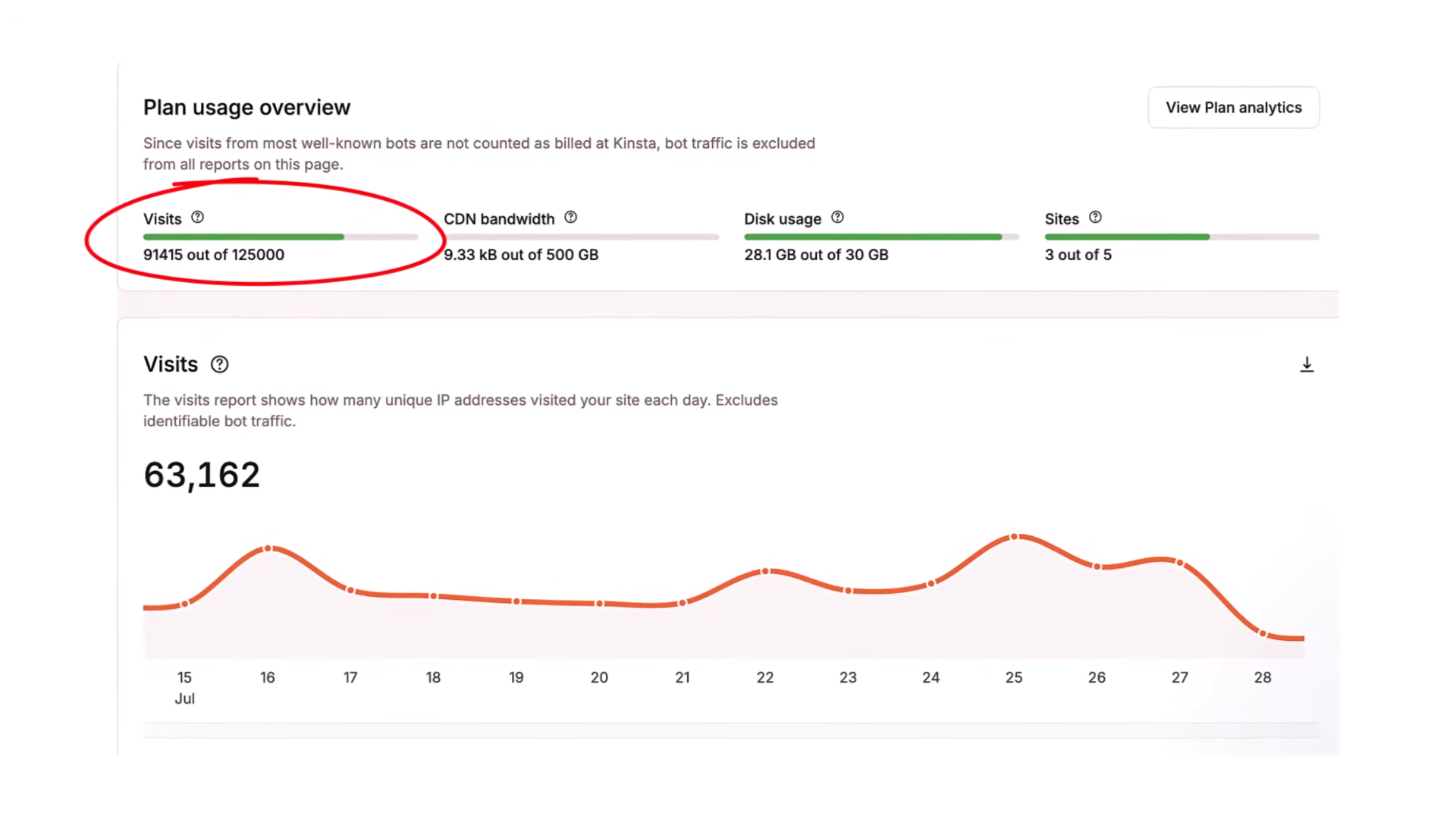
I was at 91,415 visits out of 125,000 on my plan. The meters were almost full. And I hadn't changed anything about the site.
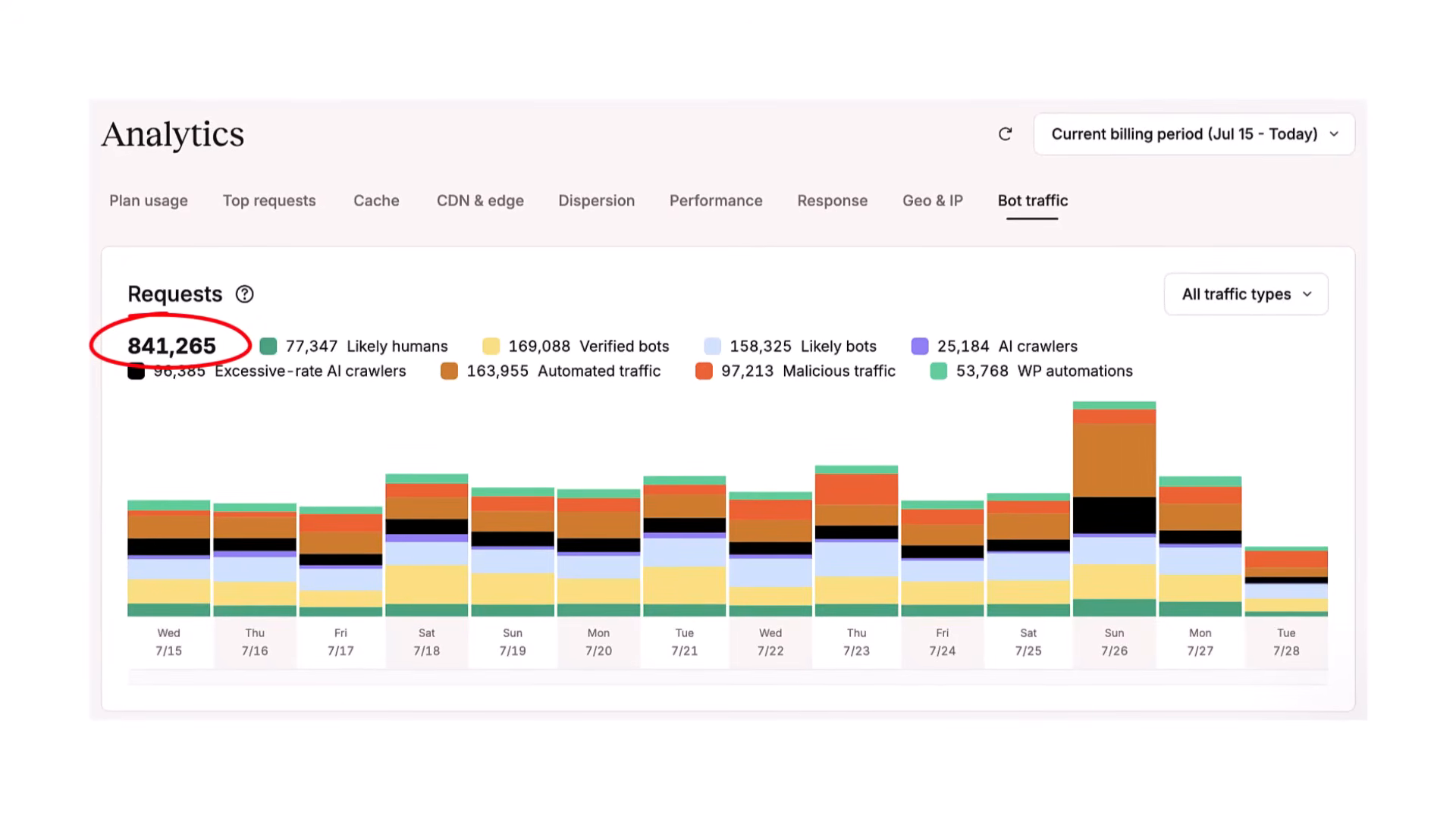
So I went looking for where the usage was actually coming from. Kinsta has a bot traffic analytics section, and I pulled it for a fourteen-day window. Here's what I found:
- Total requests to the site: 841,265
- Requests from likely humans: 77,347
- That's 9.2% of total requests
But here's what got me: I'm getting charged for all of the requests, not just the humans.
Kinsta's own dashboard says, right on that page, that billed visits exclude identifiable bot traffic. They're already filtering out what they can recognize. And I'm still hitting 73% of my plan limit.
The Headline Number That Stopped Me Cold
When I looked at the breakdown of those 841,265 requests, one comparison stopped me cold. Kinsta categorizes traffic into buckets. Two of those buckets are on the same chart, in the same unit:
- Excessive-rate AI crawlers: 96,385 requests
- Likely humans: 77,347 requests
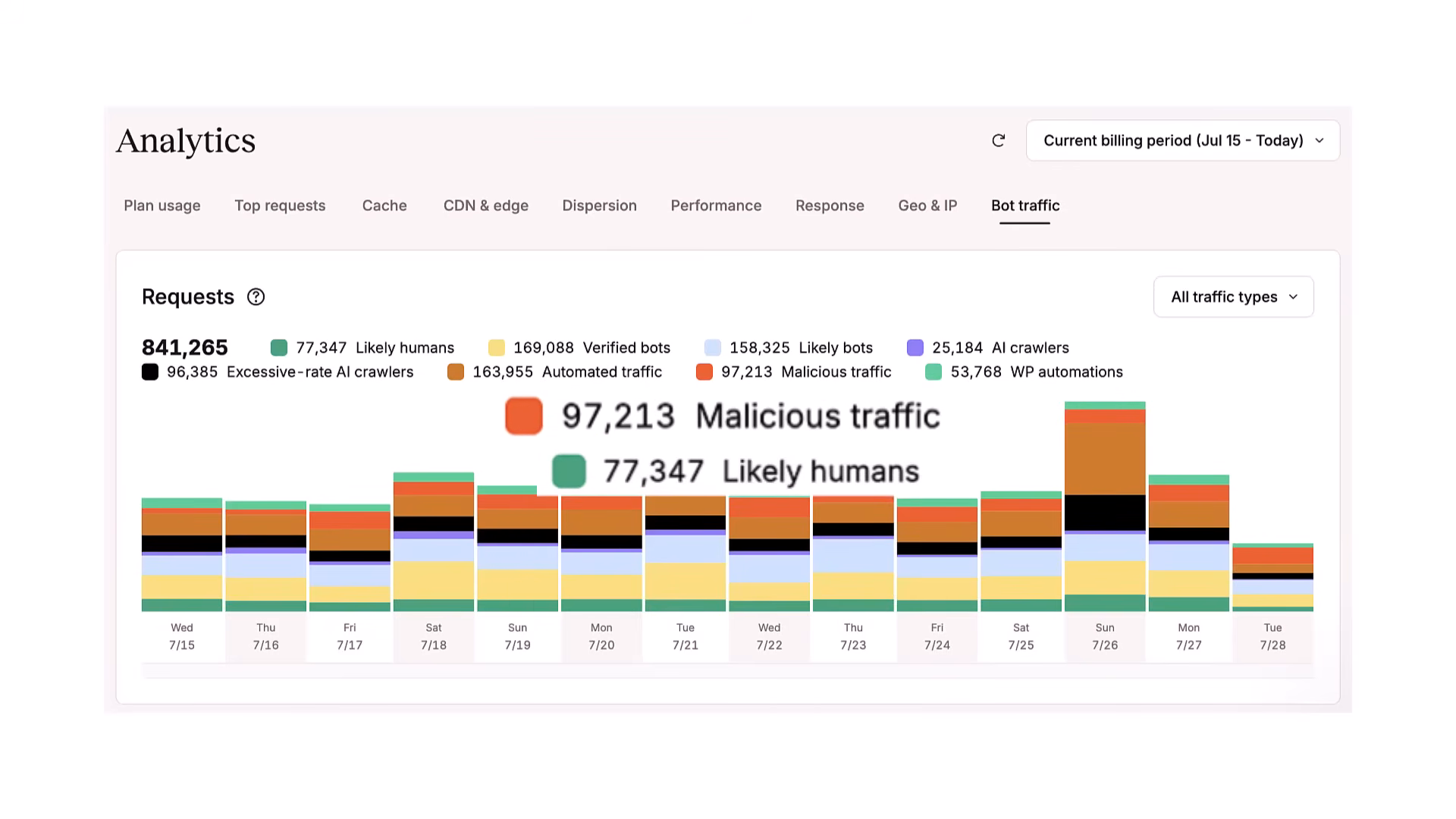
The AI crawlers that Kinsta flagged as “excessive-rate” outnumber the actual humans on my site.
And separately? Malicious traffic came in at 97,213 requests. Malicious traffic also outnumbers the humans. On its own. In the same fourteen-day window.
WP Engine published research showing bot traffic consumes up to 70% of dynamic hosting compute resources. That number makes complete sense to me now. Every dollar I spend on compute, disk, and bandwidth is mostly serving bots. Not customers.
This Isn't Just My Problem
Look, I thought maybe I had done something wrong with my site configuration. Maybe this was a Jeffsetter problem. It's not.
On Cloudflare's network, in June 2025, automated traffic passed human traffic for the first time in internet history. That's HTML requests on Cloudflare's network specifically: 57.4% automated, 42.6% human.
Imperva puts it at 51% of all web traffic automated, with 37% classified as bad bots. And DataDome found only 2.8% of websites are fully protected against this.
That number was 8.4% the year before. So the problem is getting worse. And the protection rate is going down.
The GA4 Analytics Blind Spot
The common response I hear is: “Well, bot traffic does not show up in my analytics, so it is not really a problem.” That is exactly why it went unnoticed for so long. Not why it's harmless.
GA4 filters against the IAB known-crawler list, which is essentially a text file updated once a month. It catches bots that identify themselves and nothing else.
Think about that for a second. The only bots GA4 filters out are the ones polite enough to announce they're bots.
Your GA4 dashboard is showing you a filtered reality. A reality where only the traffic that executes JavaScript and doesn't identify as a crawler shows up. Meanwhile, your hosting bill and your ad performance are dealing with everything else.
Not All Bots Are Bad: Understanding AI Crawlers
I want to separate two things here because this matters. Not all bots are bad.
Kinsta's breakdown shows 169,088 verified bot requests in that same fourteen-day window. Those are legitimate crawlers doing legitimate things: search engines, uptime monitors, feed readers. That category is not the problem.
The category most people haven't thought about yet is AI crawlers. I ran Cloudflare's AI Audit on measureu.com. In a single twenty-four-hour window, my site received roughly 12,000 AI-crawler requests.
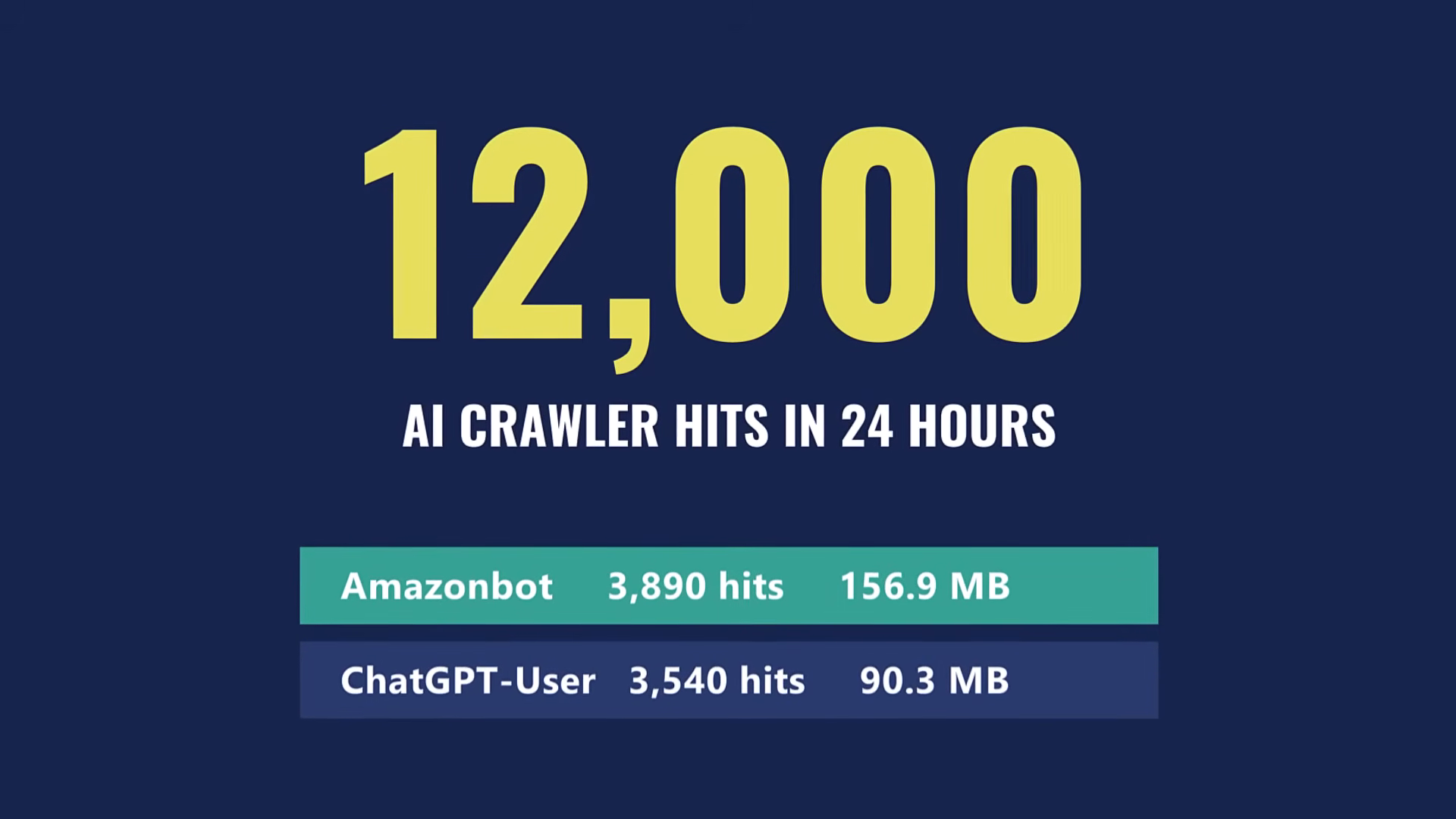
And those paths were not random. They were concentrated on my best GA4 tutorials. They are feeding model training, not reading a page the way a visitor would. That content is going into large language models, and you cannot see any of it in GA4.
The Crawl-to-Refer Ratio Nobody Talks About
Now, is that bad? That depends on what comes back. There's a metric called crawl-to-refer ratio: how many crawler requests it takes to produce one human visit back to your site.
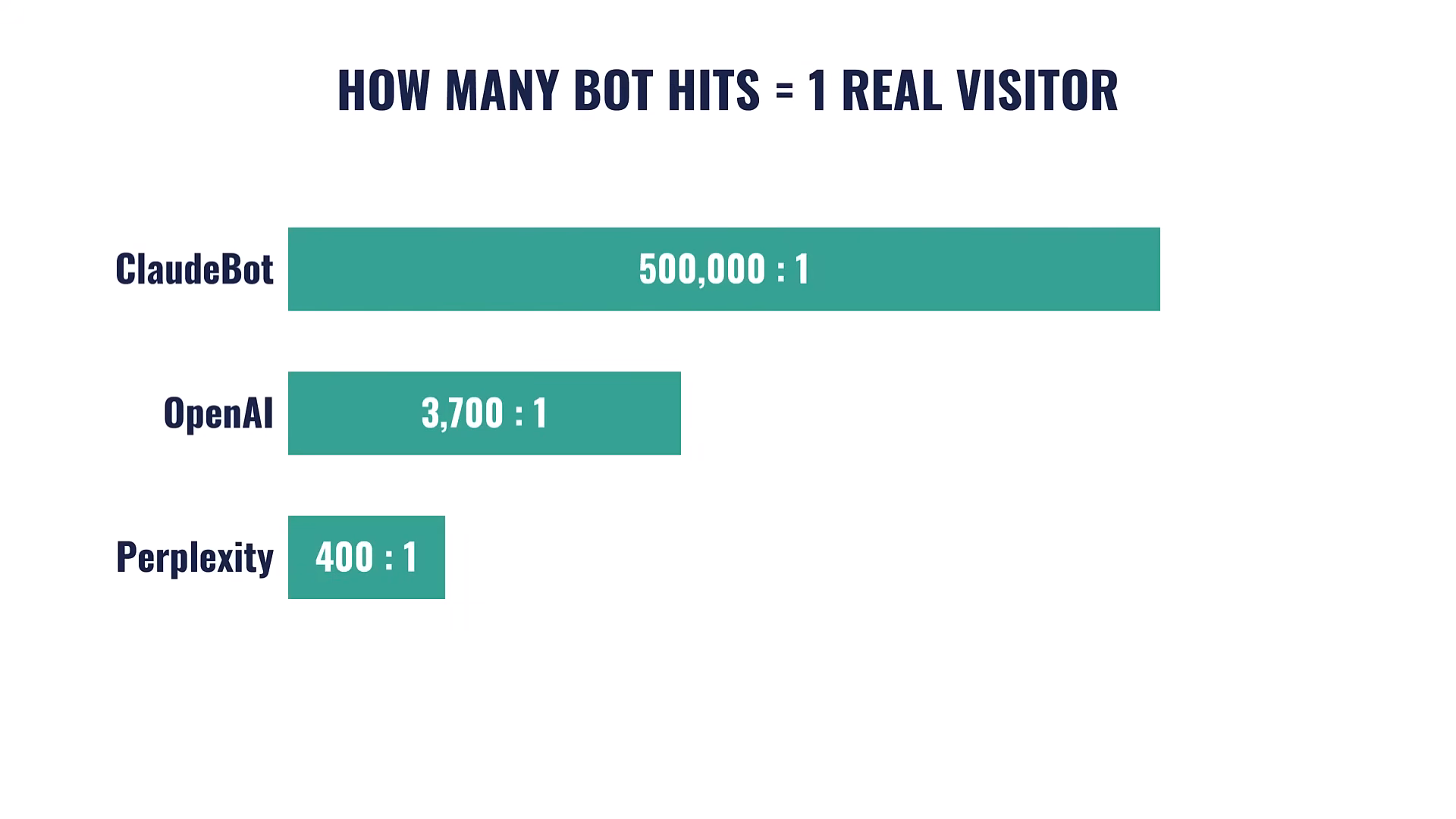
97.4% of AI-crawler requests never put a single human on your page. Perplexity is the exception, running below 400 to 1. That's still not great, but it's dramatically better than the others.
Which means these crawlers are not all the same, and the answer is not simply “block everything.” Some of this exposure is building LLM visibility that did not exist two years ago. Some of it is just consuming your bandwidth. You cannot tell which is which without looking, and right now most people are not looking.
Marketing Performance and Wasted Ad Spend
The hosting bill is one cost. Ad spend is the other side, and it compounds fast.
Back to Jeffsetter. It runs ads through Mediavine, whose dashboard tracks sessions the way any ad network does. Eighteen months ago, bots were 34.5% of sessions. Today that number is 76.4%.
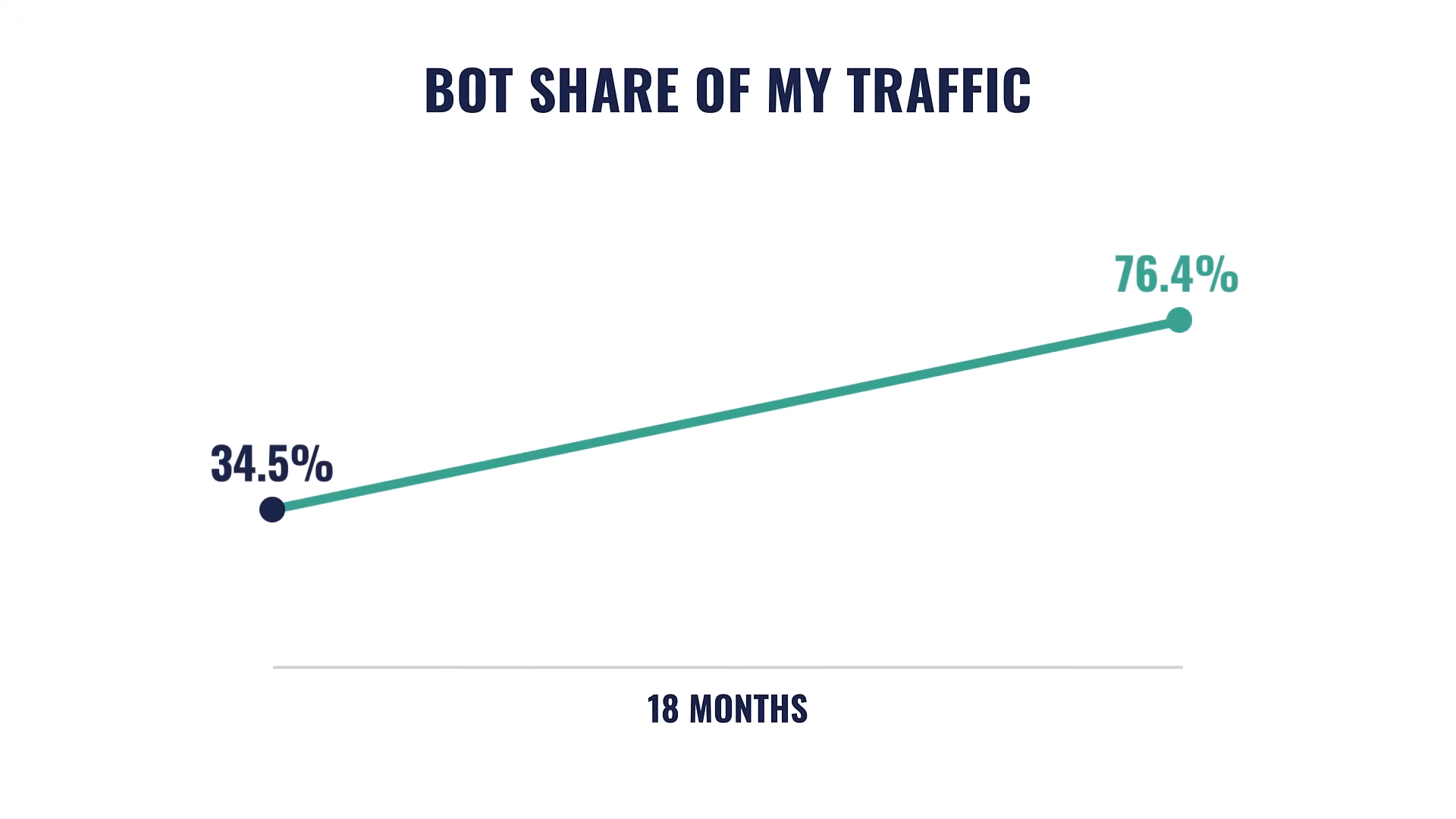
Same site. Same content. Two different vendors seeing the same thing, Kinsta on the hosting side and Mediavine on the ad side. Both telling me most of what hits my site isn't a person.
The ad data makes this concrete. Direct traffic is 83% of sessions, running at 1.1 ad impressions per session. Real referral sources run at 25 to 32 impressions per session.
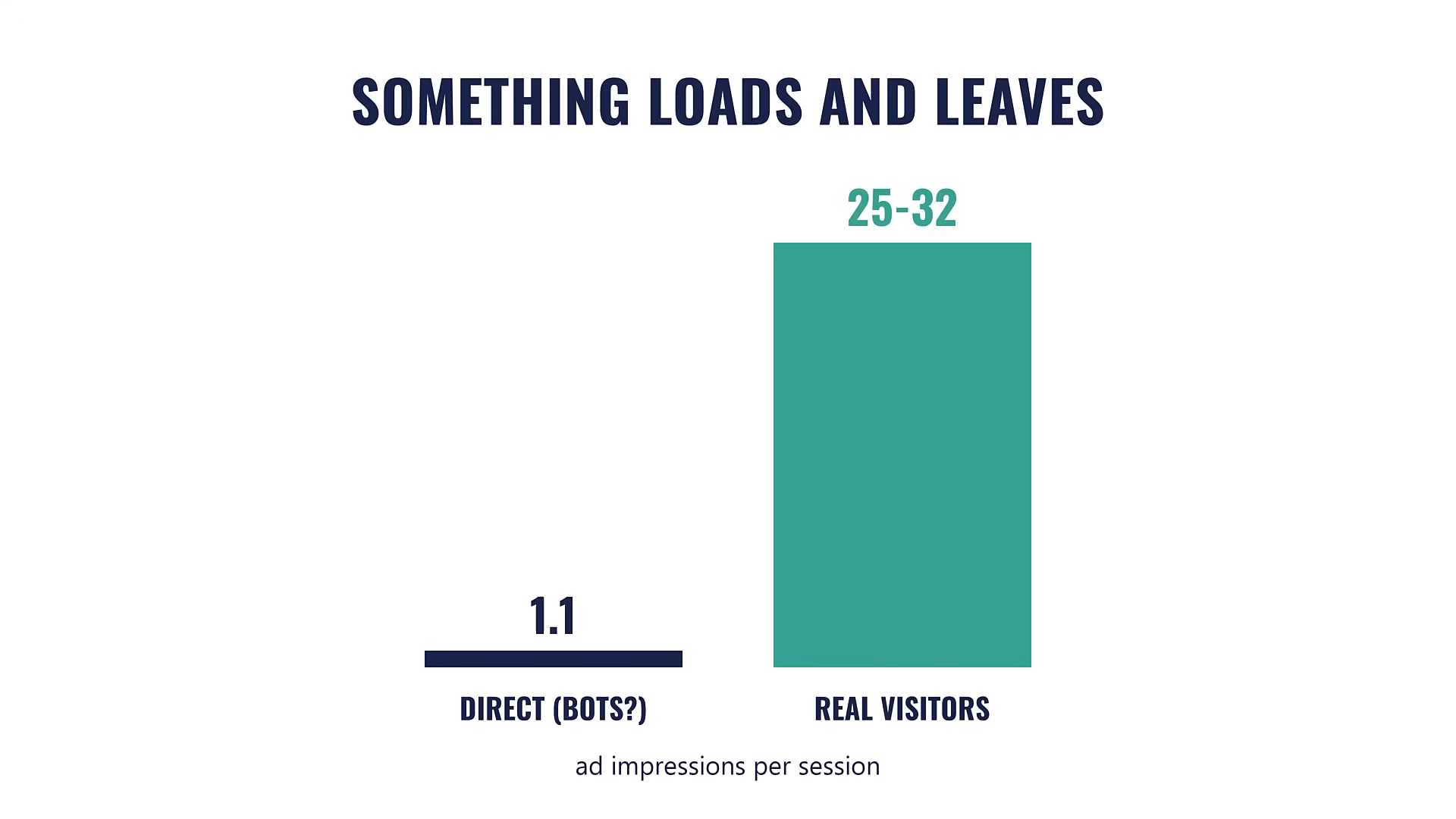
That distance is not something you can explain away with measurement noise. My homepage had 5,133 pageviews at 0.2 impressions per page. On a page with ads on it. Whatever loaded that page didn't stay long enough to see an ad.
The $100 Billion Problem
Every agency running paid media for clients is sitting in the same position.
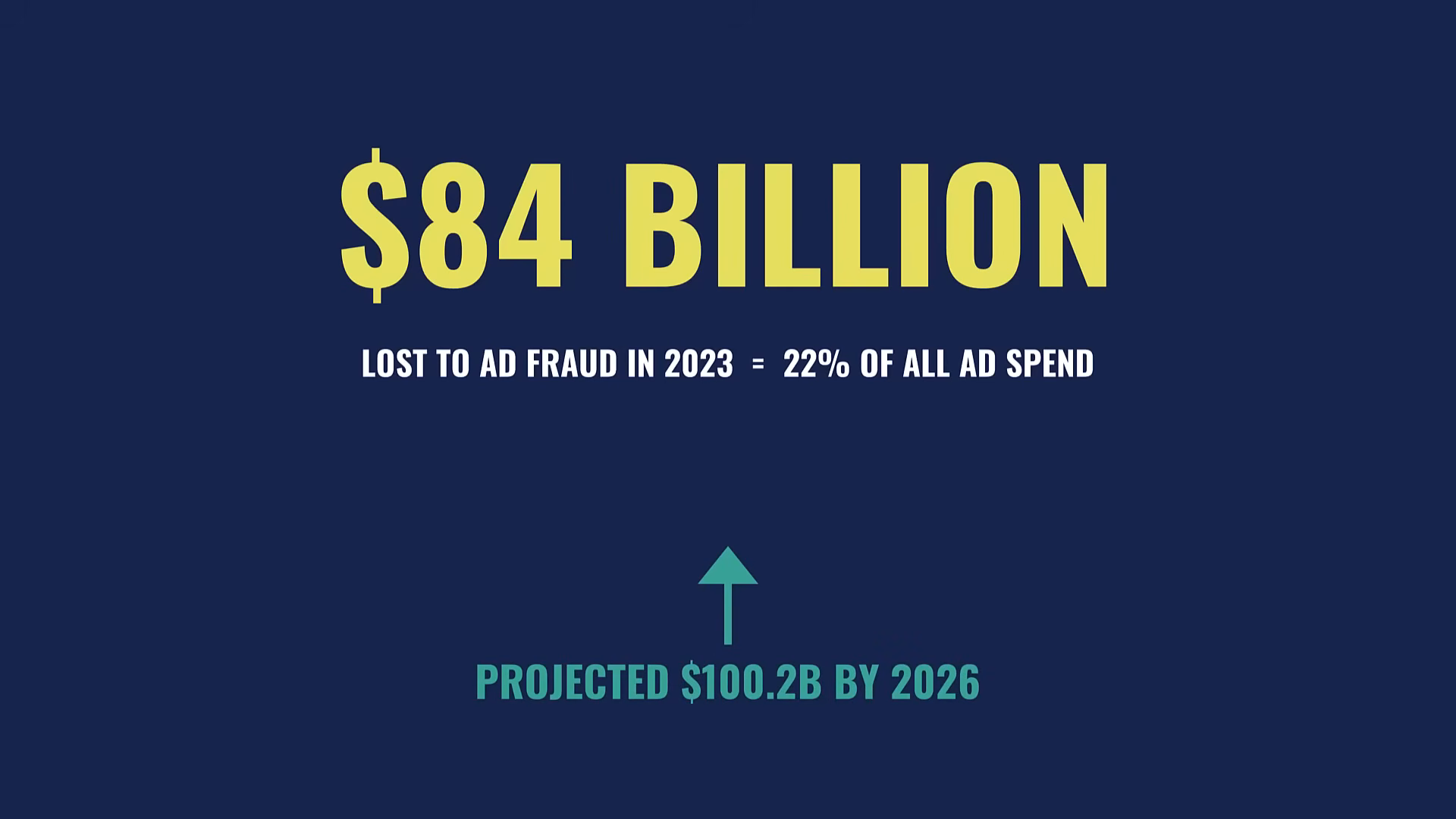
$84 billion in ad spend was lost to fraud in 2023. That's 22% of total ad spend, and the projected number for 2026 is $100.2 billion. Agencies are reporting on traffic and conversions right now, and the numbers they are reporting on include this.
So Is Any of This Actually Fixable?
Once I saw all of this in my own data, I wanted to know if anything could actually be done about it. That question sent me down a rabbit hole I haven't fully climbed out of yet.
That's where bot exposure scanning comes in. Bot exposure is the first step most people skip. It is how open and visible your site is to automated traffic, and how much of that traffic you can actually detect.
Every site has some. Bot exposure runs on a spectrum, and where your site lands on that spectrum directly shapes the numbers you report on. A site that's highly exposed is basically a welcome mat for bots, and most site owners have no idea where they stand.
That bothered me enough to go build something. I put together a front-end scanner that looks at any site from the outside and tells you how exposed it is. No login, no code to install. It looks at the site the way a bot would and gives you a read on how vulnerable you are. Yes, I built it. It's a side project, so take that for what it is.
If you don't know how exposed your site is, every budget decision built on those numbers is working with bad information.
The Service Opportunity Nobody's Selling
Almost no agency is offering bot protection to clients as a dedicated service. That's an opening, and most agencies are walking past it.
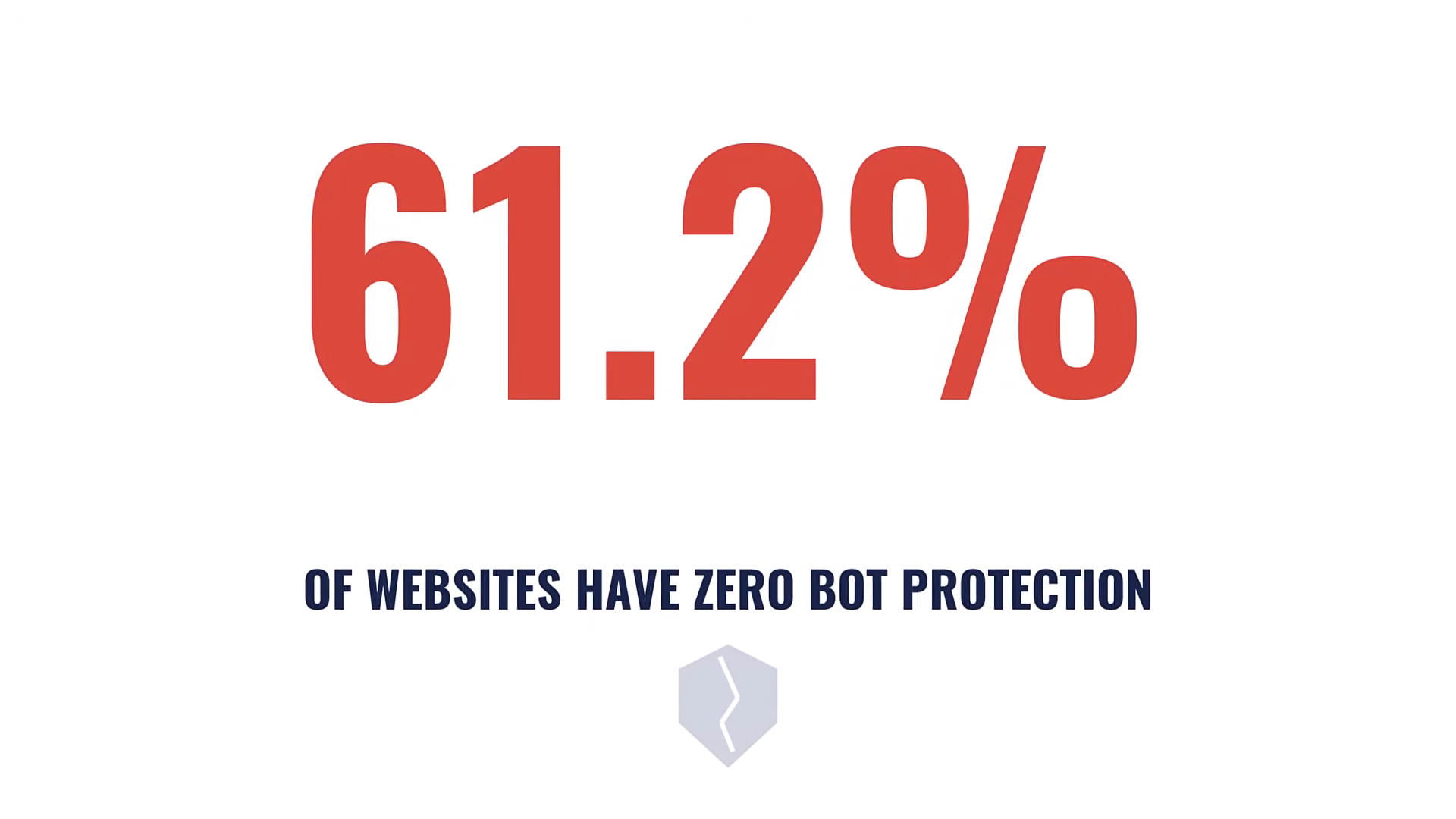
DataDome puts full protection at 2.8% of websites, down from 8.4% the year before, with 61.2% having no protection at all. Most of your clients are in that 61.2%.
And they're feeling it. Their hosting bills are going up. Their ad performance is moving in the wrong direction. They don't know why. You can show them.
Three Things an Agency Can Do With This
1. Audit. Show the client what bots can potentially hit their site. Pull in numbers wherever they are available, and use scanning tools to give them visibility they've never had.
2. Protect. Configure filtering, CDN rules, and bot management at the hosting or CDN layer. This is website performance work that actually impacts the bottom line.
3. Monitor. This is not a one-time fix. Bots went from 34.5% to 76.4% of sessions on my site in eighteen months. The ratio is increasing, and not in favor of humans. Ongoing monitoring is the service.
Agencies already handle hosting, performance reporting, and paid media oversight. Bot management fits alongside those, and it returns real savings. Clients have felt the pain creeping in for years. Now you have a name for it.
Your Next Steps
- Run a free bot exposure scan on your own site. See your own numbers, not mine. It takes about 30 seconds.
- Check your hosting dashboard for any bot traffic analytics your provider offers (Kinsta, Cloudflare, WP Engine).
- Run a scan on a client site and see what the conversation opens up when you can show them actual exposure data.
- Consider bot protection as a service line if you're running an agency. It's a real problem with real costs that almost nobody is addressing.
What you saw in my Kinsta dashboard is happening on your clients' sites. Each of them brings their own hosting plan, ad spend, and traffic ratios, so you need to see their exposure to have a targeted conversation. Start with the free scan.
And if you want the wider system for turning findings like these into scoped, paid engagements, check out MeasureU Pro.