Tired of wondering if your consent management platform actually does what it's supposed to do?
You're not alone. And here's the uncomfortable truth that Fred Pike, our resident CMP expert and someone who's been deep in the consent trenches for years, dropped on us recently: 83.7% of all CMP implementations are not done correctly.
His source? His gut. But before you laugh that off, consider this: in one week alone, Fred encountered three separate clients whose “working” consent setups were fundamentally broken. One had a banner that just said “Accept All Cookies” regardless of whether visitors were in Wisconsin, California, or the EU. Another had a beautiful, professional-looking banner from an expensive CMP provider that did absolutely nothing, users clicked reject, and tracking continued anyway.
That's where this guide comes in. We're going to show you how to audit your consent management platform implementation so you can actually verify it honors user intent, not just assume it does because the banner looks pretty.
Watch the Full Breakdown
In this Brain Gainz session, Fred Pike walks through his complete CMP auditing methodology, including live demonstrations of what to look for and common failure points he encounters constantly.
What You'll Learn in This Post
- The banner appearing is NOT proof your CMP works, you need to audit network requests, not just cookies
- There are exactly 4 consent scenarios you must test: pre-consent, post-accept, post-reject, and GPC enabled
- Tags can sneak onto your site from places you'd never expect (HubSpot pulling in LinkedIn, anyone?)
- Manual audits take 20+ minutes per scenario and produce videos nobody watches, you need a systematic approach
Table of Contents
- Why Most CMP Implementations Fail (And It's Not the Tool's Fault)
- The 7-Step Consent Flow (And Where Things Break)
- The Hidden Tag Problem: Where Tracking Actually Comes From
- The Four-Scenario Audit Framework
- Reading Network Requests: The Real Audit
- Common Pitfalls That'll Get You a Demand Letter
- Governance: Why “Set It and Forget It” Will Bite You
- What to Do Next
Why Most CMP Implementations Fail (And It's Not the Tool's Fault)
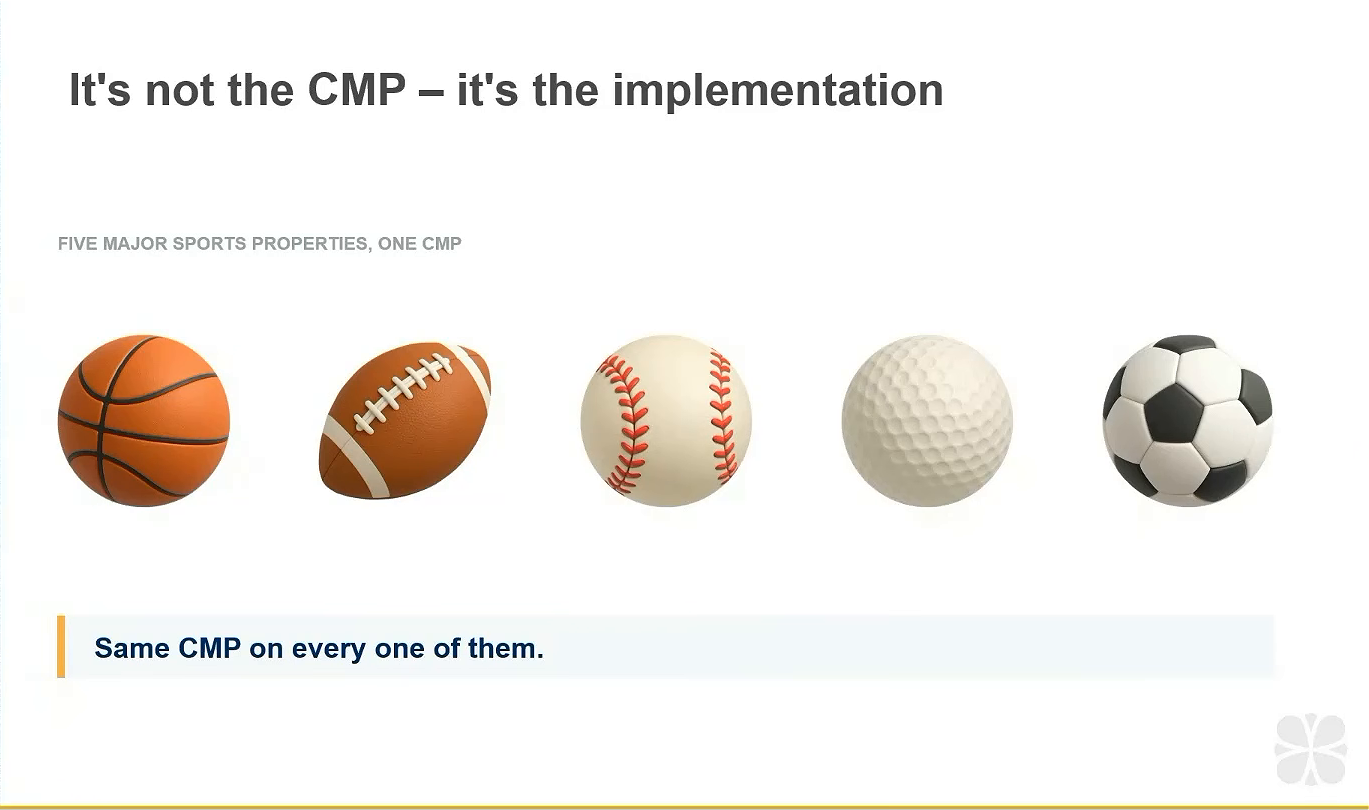
Here's the thing about consent management platforms: everyone argues about which one to buy. OneTrust versus Cookiebot versus Usercentrics versus a dozen others. But Fred audited five major sports organizations, all using the same expensive, well-known CMP, and only ONE passed.
The soccer team. That was it.
Same tool. Same price tag. Completely different outcomes. The difference wasn't the CMP. It was how each organization implemented it.
Let me give you some real examples of what “broken” looks like:
The “Just Add the Script” Client
One client messaged Fred saying they'd added the cookie script to Google Tag Manager and asked him to “let me know if there's a problem with that, it seems to be working.” How they determined it was “working” remains a mystery. No backend setup. No consent gates configured. Just a script floating in GTM doing essentially nothing.
The Accept-Only Banner
Another client's banner displayed identically for visitors in Wisconsin, California, and the EU. It just said “Accept All Cookies.” No reject option. No cookie settings. No “Do Not Sell My Personal Information” for California visitors. Completely non-compliant for GDPR jurisdictions.
The Pretty Banner That Does Nothing
This one's my favorite (and by favorite I mean it keeps me up at night). Beautiful banner. Well-known CMP provider. Users can click reject, navigate cookie settings, customize their preferences, the whole experience feels legitimate. But nothing actually happens. You click reject and tracking continues exactly the same as if you'd clicked accept.
The banner is theater. An expensive, professional-looking play that provides zero privacy protection.
The 7-Step Consent Flow (And Where Things Break)
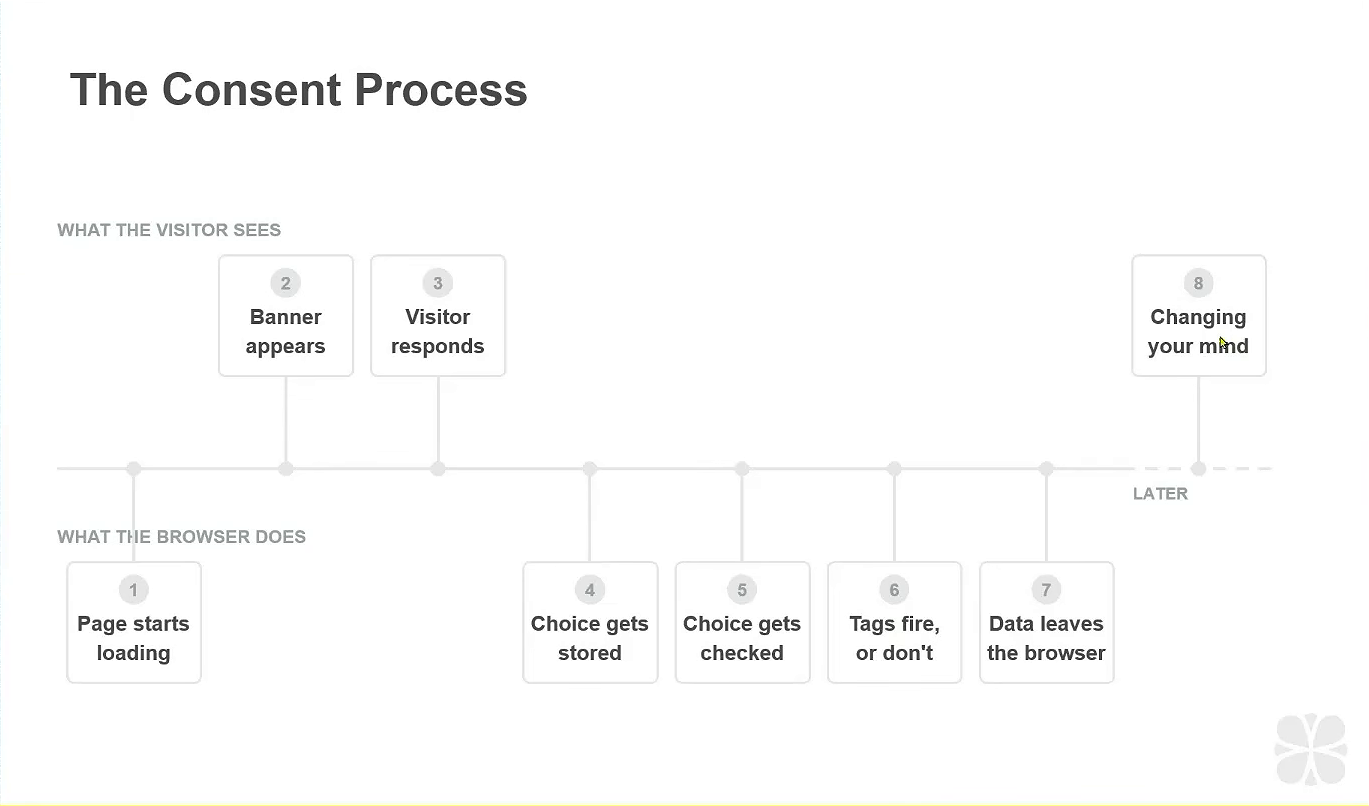
To understand why implementations fail, you need to understand how consent is supposed to work. Here's the flow:
- Page starts loading: CMP needs to be one of the very first things to load, high up in the head
- Banner appears: What it shows depends on the visitor's jurisdiction and your CMP configuration
- Visitor responds: Accept, reject, customize settings, or ignore entirely
- Choice gets stored: Usually in cookies, sometimes in local or session storage
- Something checks that choice: This is where things often break
- Tags fire (or don't): Based on whether consent was granted
- User can change their mind: And the whole process repeats
See steps 1, 5, and 6? That's where implementations typically fail.
Step 1 fails when your CMP loads after other tags have already fired. Those tags don't know or care about consent, they just do their thing before anyone can stop them.
Step 5 fails when nothing actually checks the user's choice. The CMP stores the information beautifully, but Google Tag Manager (or whatever should be gating your tags) never reads it. The consent exists in a cookie somewhere. Nobody's looking at it.
Step 6 fails when you've configured consent mode incorrectly. You think you've set up basic mode but you've actually got advanced running. Or vice versa. Or you're sending data to both GA4 and Google Ads through a single Google tag and can't honor separate consent choices for analytics versus advertising.
The Hidden Tag Problem: Where Tracking Actually Comes From
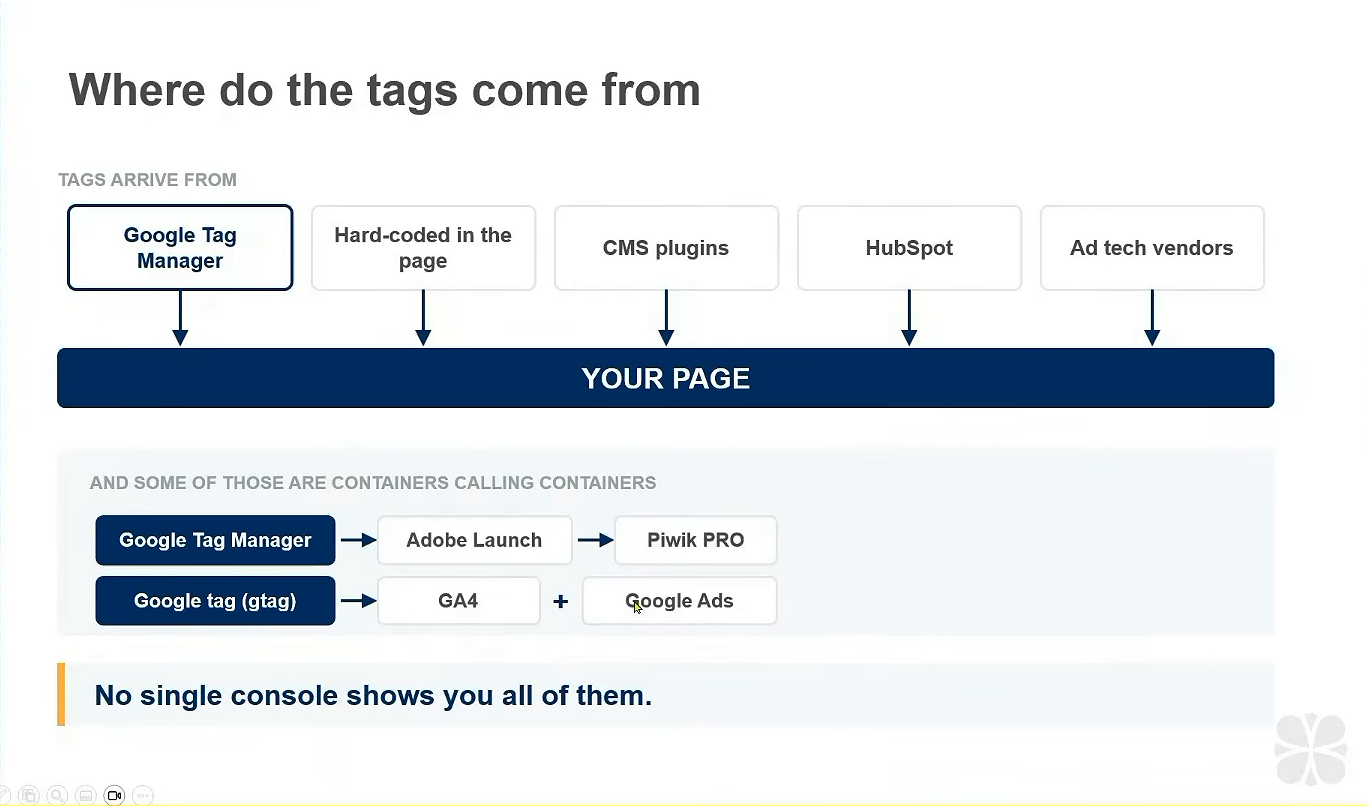
In an ideal world, every tag on your site lives in your tag manager. You want to manage tags? Put them in GTM. Simple.
But you know that's not reality.
Tags sneak onto your site through:
- Hardcoded scripts in your page templates
- CMS plugins (WordPress is notorious for this)
- Marketing platforms like HubSpot that pull in third-party vendors
- Nested tag managers you forgot existed
- Shopify apps: Anna from our team mentioned some Shopify sites have 170+ tags just from apps
Let me tell you about the HubSpot situation Fred encountered. A client had LinkedIn firing on their site, not honoring user consent. The tag wasn't hardcoded. It wasn't in GTM. Where the hell was it coming from?
HubSpot. In their marketing center, you can drag in ad vendors. Someone had configured LinkedIn through HubSpot, and it was bypassing every consent gate they'd set up. They couldn't block it until they figured out where it originated.
And it gets weirder. Fred had a client with a PCI compliance issue from a mystery cookie. After digging, he found that Google Tag Manager was calling Adobe Launch, and Adobe Launch (in some container nobody at the client had access to) was calling Piwik PRO. The Piwik PRO tag was five years old. Nobody knew the account existed. Nobody could log into Adobe Launch.
Tags can come from anywhere. And you cannot build consent gates for tags you don't know exist.
The Google Tag Problem
Here's something that drives Fred crazy: the Google tag itself. In GA4 admin, under your measurement ID, you can configure a single Google tag to send data to both GA4 and different Google Ads properties.
Convenient for Google. Nightmare for consent.
If a user says yes to analytics and no to advertising, which is what Fred always does personally, you can't honor that choice with this setup. One tag. Two destinations. No way to separate consent.
Fred's recommendation: break it out. Don't use one G-tag going to both analytics and ads properties. Keep them separate so you can gate them separately.
The Four-Scenario Audit Framework
When Fred audits a CMP implementation, he runs four distinct scenarios:
Scenario 1: Pre-Consent
Fresh session. No cookies. No prior interaction. What happens the moment someone lands on your site before they've touched the banner?
You want to see: CMP loading first, banner appearing, minimal essential requests only.
You don't want to see: Analytics firing, marketing pixels loading, session replay tools initializing.
Scenario 2: Post-Accept
Brand new session. User lands on page, clicks accept, navigates to a second page. What fires throughout that journey?
You want to see: Everything firing after, and only after, the accept click. The timeline should show a clear before/after.
Scenario 3: Post-Reject
Brand new session. User lands on page, clicks reject (the tool needs to be smart enough to find reject buttons even when they're hidden behind “cookie settings” modals), navigates to a second page.
You want to see: No tracking requests whatsoever. Or, if you're using GA4 consent mode advanced, cookieless pings only.
You absolutely don't want to see: The same requests firing as in the accept scenario.
Scenario 4: GPC (Global Privacy Control)
Brand new session with the Global Privacy Control signal enabled. Does your site respect it?
Many organizations forget this entirely. GPC should be treated like a reject signal.
Why Manual Testing Fails
You could do this manually. Open dev tools. Go to the network tab. Filter for analytics. Filter for Hotjar. Check the application tab for cookies. Check local storage. Check session storage.
Fred used to record 20-minute videos walking through all this for clients. You know how many people watched them? Approximately zero.
And even if you're diligent, manual testing fails at scale. You need to check multiple pages (homepage, product pages, careers page, people love adding random tags just for careers). You need to check multiple geolocations (California versus EU versus everywhere else). You need to check multiple times because things change.
Any audit is a point in time. Run it Friday at 5pm, get one result. Run it Monday morning, maybe different. Ad tech vendors show up based on auctions. Internet hiccups affect what loads. Someone adds a tag and forgets the consent setting.
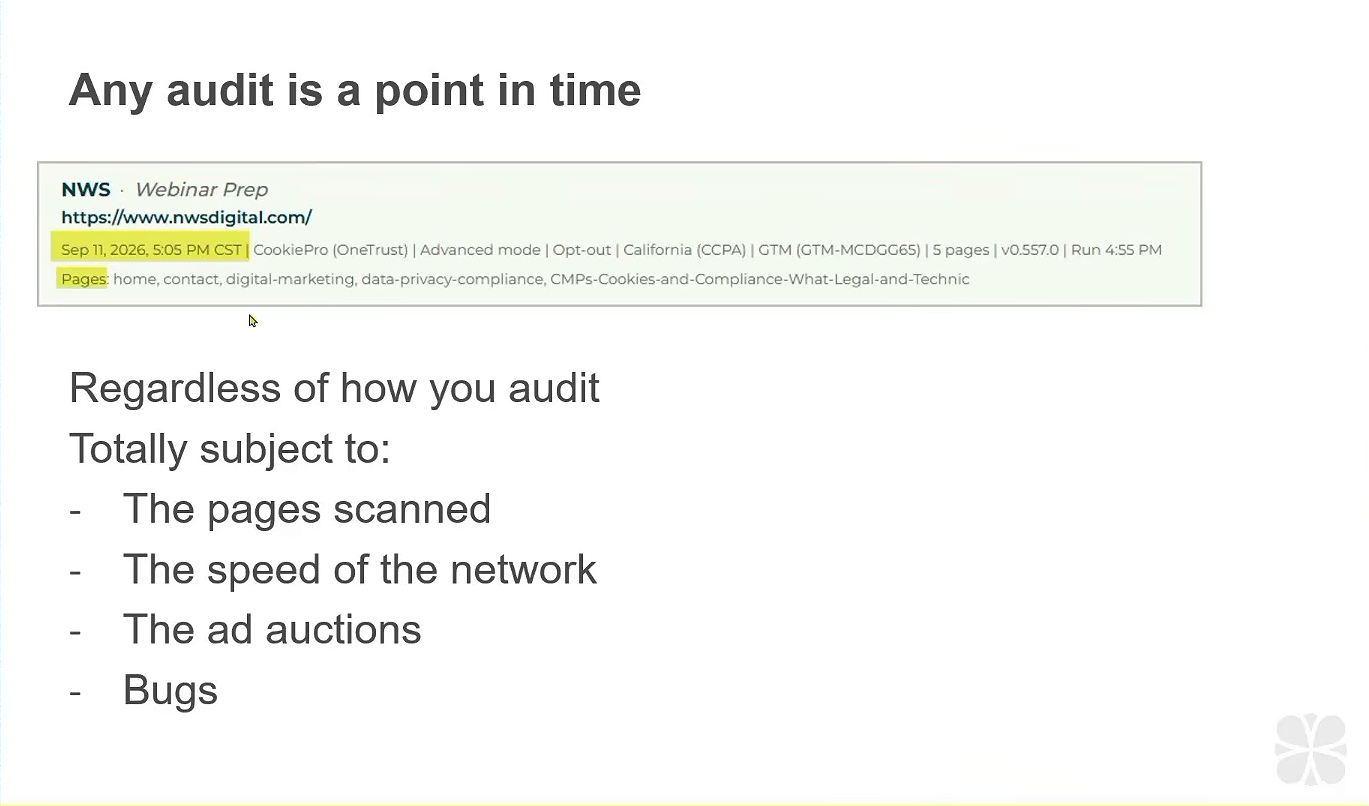
(Ask Fred about the time he added a GA4 tag and forgot the consent setting. He does this constantly and still made that mistake.)
Reading Network Requests: The Real Audit
Here's the mental shift you need to make: cookies are the residue, network requests are the crime scene.
Those demand letters from California law firms? They're looking at network requests, not cookies. A cookie is what's left behind after tracking happens. The request is the actual transmission of data to someone else's server.
Fred uses a welding analogy. In Wisconsin (where he's based), there's heavy manufacturing. When you look at a weld, you can't tell if it's good just by looking at the surface. What matters is what's happening inside. You need non-destructive testing to verify the weld will actually hold.
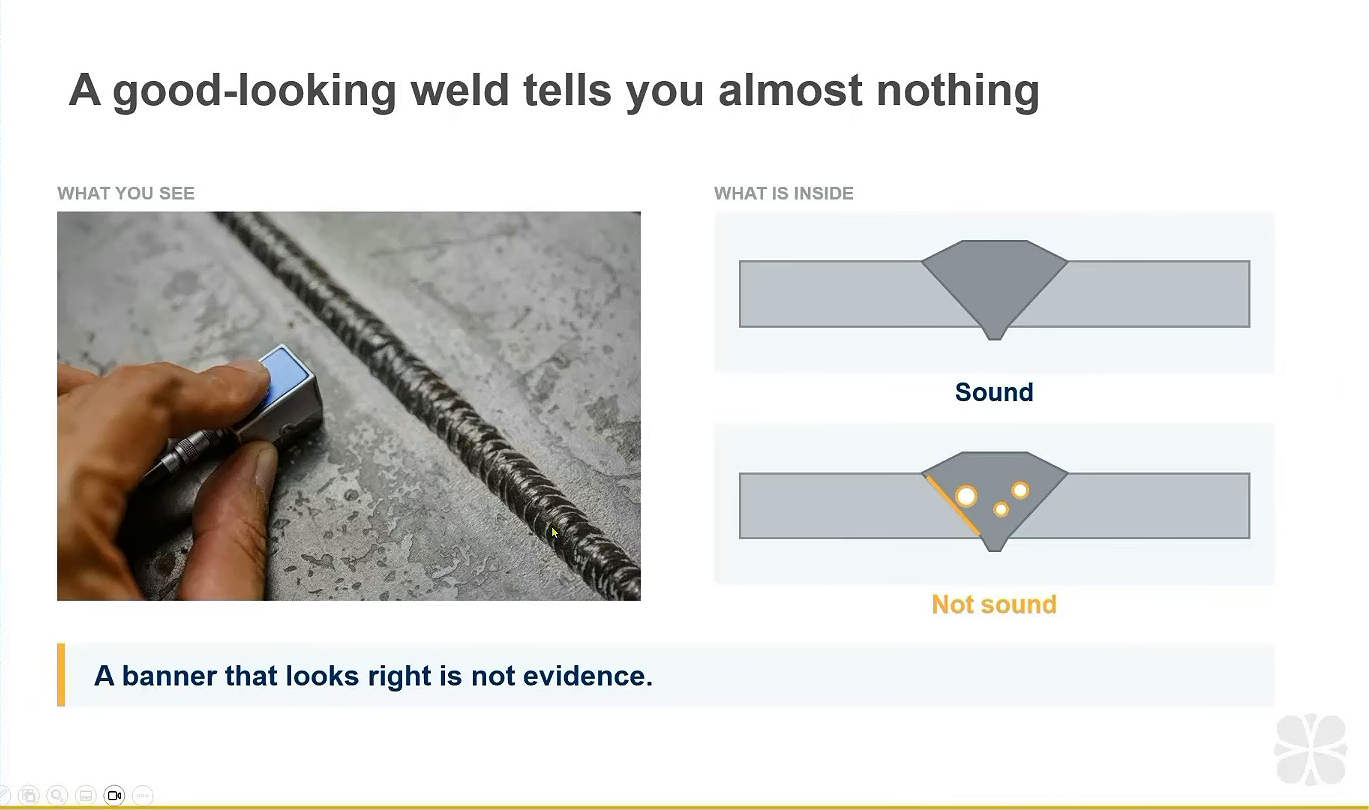
Same with your CMP. Looking at the banner is looking at the surface. You need to look at what's actually happening on the wire, what data is leaving the browser, when, and where it's going.
This is what we mean by auditing requests, not cookies:
- A network request is transient, data leaves your site, goes to an endpoint, and the transmission is complete
- A cookie is what stays behind, potentially with identifying information
- Privacy violations happen in the request, not the cookie
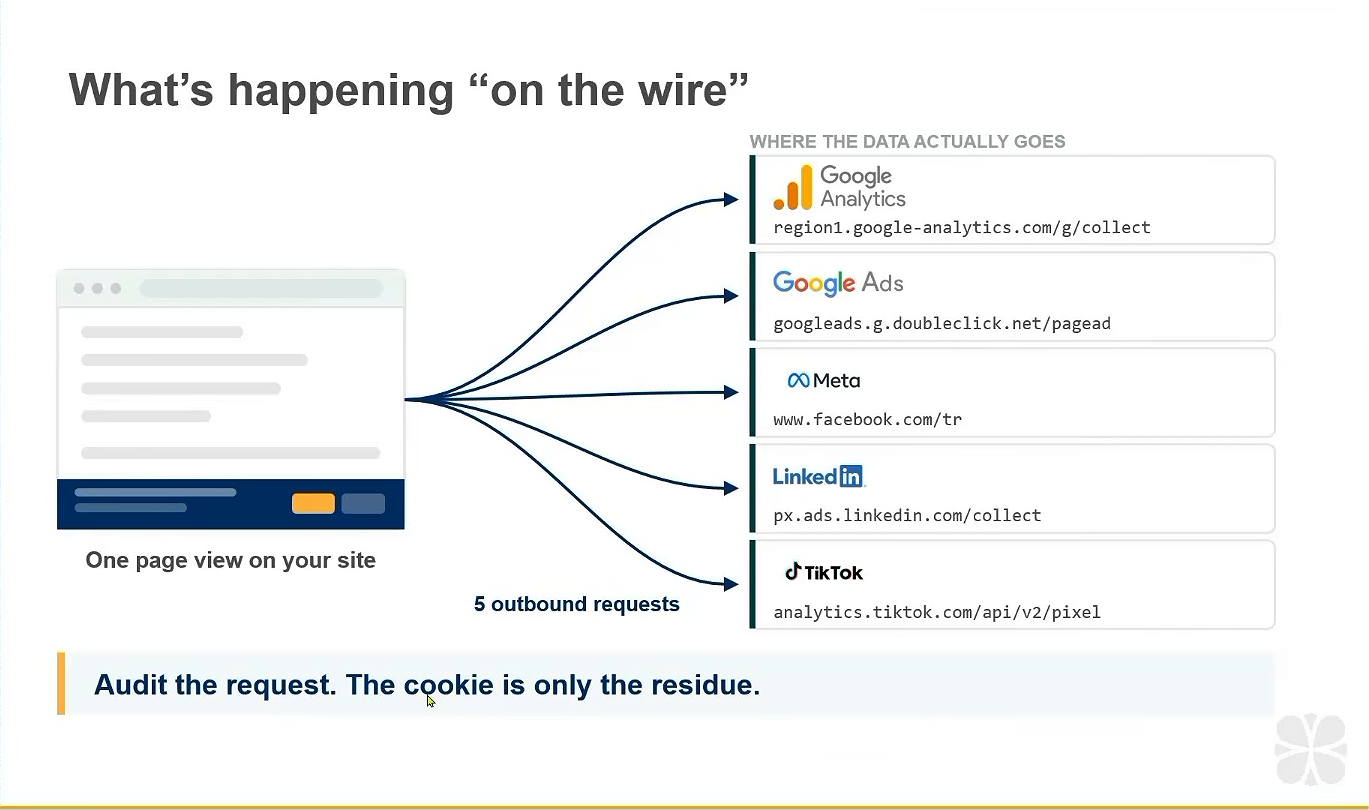
When you're auditing, you're asking: did data leave my site when it shouldn't have? Not just: what cookies exist in my browser?
Common Pitfalls That'll Get You a Demand Letter
Based on Fred's experience auditing hundreds of implementations, here's what breaks most often:
CMP Loads Too Late
Your consent banner needs to be in the head of your document, loading before anything else. If GA4 fires before your CMP even loads, that's a violation, the user never had a chance to reject.
Nothing Checks Consent Status
The CMP stores the user's choice beautifully. But you never configured GTM to read that choice before firing tags. So the choice exists, stored in a cookie, and nothing ever looks at it.
Basic vs Advanced Confusion
You think you set up Google consent mode basic (no data without consent) but you actually configured advanced (cookieless pings even without consent). Or the reverse. These aren't interchangeable.
The Unified Google Tag Trap
One Google tag sending to both GA4 and Google Ads. User can't consent to analytics while rejecting ads because there's no way to separate them at the tag level.
Third-Party Script Surprises
Manisha from our team was implementing OneTrust for a client with 25 different domains. She turned on autoblocking and half the images on the site disappeared.
Why? The development team was using a third-party script called Elcript to load images. When autoblocking activated, it blocked Elcript, and suddenly no images. Manisha spent three days going back and forth with developers before discovering this. Ten Slack conversations. Three meetings. Nobody mentioned Elcript until she found it in the audit report and asked directly.
Then legal had to determine: is Elcript strictly necessary or not? Because if it's necessary for the site to function, it shouldn't be blocked. If it's not necessary, why are we using it?
Forgotten Legacy Tags
Remember that Adobe Launch to Piwik PRO chain? Five-year-old tag. Nobody at the client knew it existed. These zombies are everywhere, especially in large organizations where people change roles and institutional knowledge evaporates.
Governance: Why “Set It and Forget It” Will Bite You
Here's something one of the attorneys Fred works with emphasizes: there has to be governance around adding tags.
You can't just randomly add marketing tags, which, let's be honest, most of us do 95% of the time. Every new tag is data leaving the browser to a new endpoint. You need to ask:
- Is our privacy policy updated to reflect this data collection?
- Have we thought through the privacy implications?
- Does this need to be added to our CMP's vendor list?
- What consent category does this fall under?
Most of the time, the answer to “did we consider privacy?” is no. That's Fred's cynical view, and honestly, it's probably accurate.
Schedule Regular Audits
CMPs are not set-it-and-forget-it. You need scheduled audits, weekly, monthly, or quarterly depending on how often your site changes.
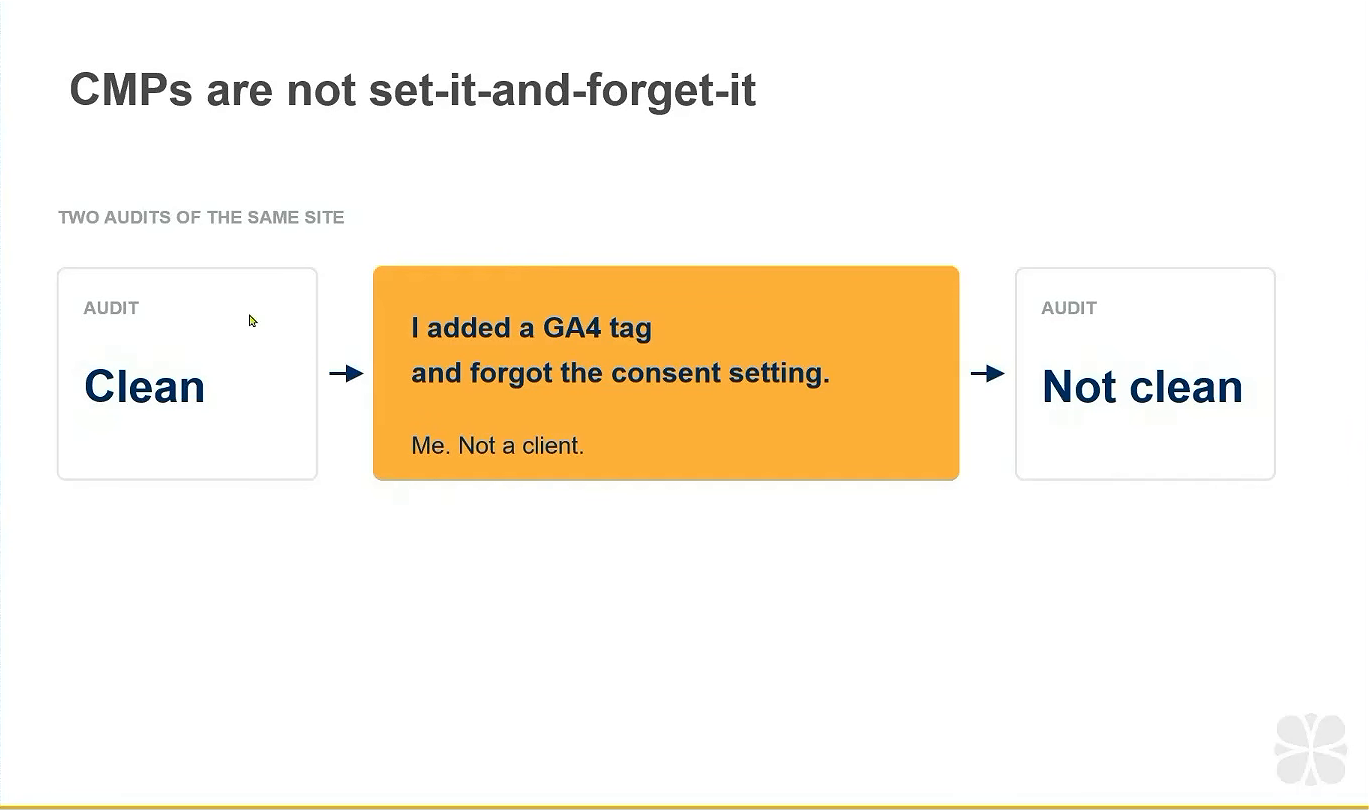
Why? Because:
- Someone adds a tag and forgets consent configuration
- A CMS update pulls in new scripts
- A marketing platform adds features that load additional vendors
- That Shopify app you installed three months ago started tracking more data
- You changed hosting providers and didn't notice the bundled “trusted site badge” (this happened to our own site)
Every audit is a snapshot in time. What passed last month might fail today.
What to Do Next
Ready to verify your consent implementation actually works?
Here's your action plan:
- Map your tag sources: Don't just look in GTM. Check hardcoded scripts, CMS plugins, marketing platforms, and any tag-manager-calling-tag-manager situations.
- Test all four scenarios: Pre-consent, post-accept, post-reject, and GPC. For multiple pages. In multiple geolocations.
- Audit requests, not cookies: Open dev tools, go to the network tab, and watch what actually transmits during each scenario.
- Check your Google tag setup: If you're sending to both GA4 and Ads from one tag, split them so you can honor separate consent choices.
- Establish governance: Create a process for reviewing privacy implications before any new tag gets added.
- Schedule recurring audits: Monthly at minimum if your site changes frequently.
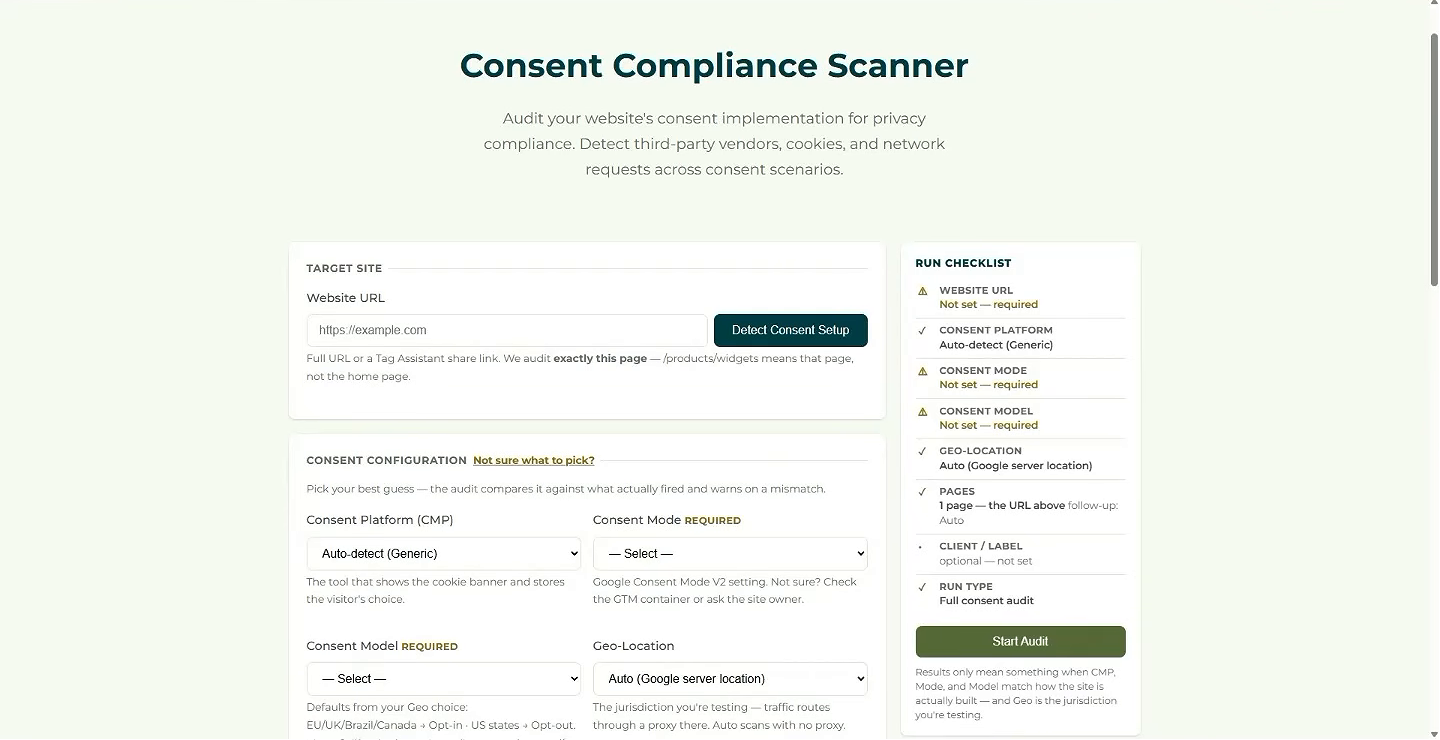
If manual auditing sounds like torture (it is), Fred built a tool specifically for this. It runs all four scenarios automatically, decodes the network requests, and flags violations. But whether you use a tool or do it manually, the important thing is actually doing the audit.
Because that beautiful banner on your site? It might be doing absolutely nothing.
Want a second set of eyes on what you find? Check out MeasureU Pro, where members bring their audits to our live calls.