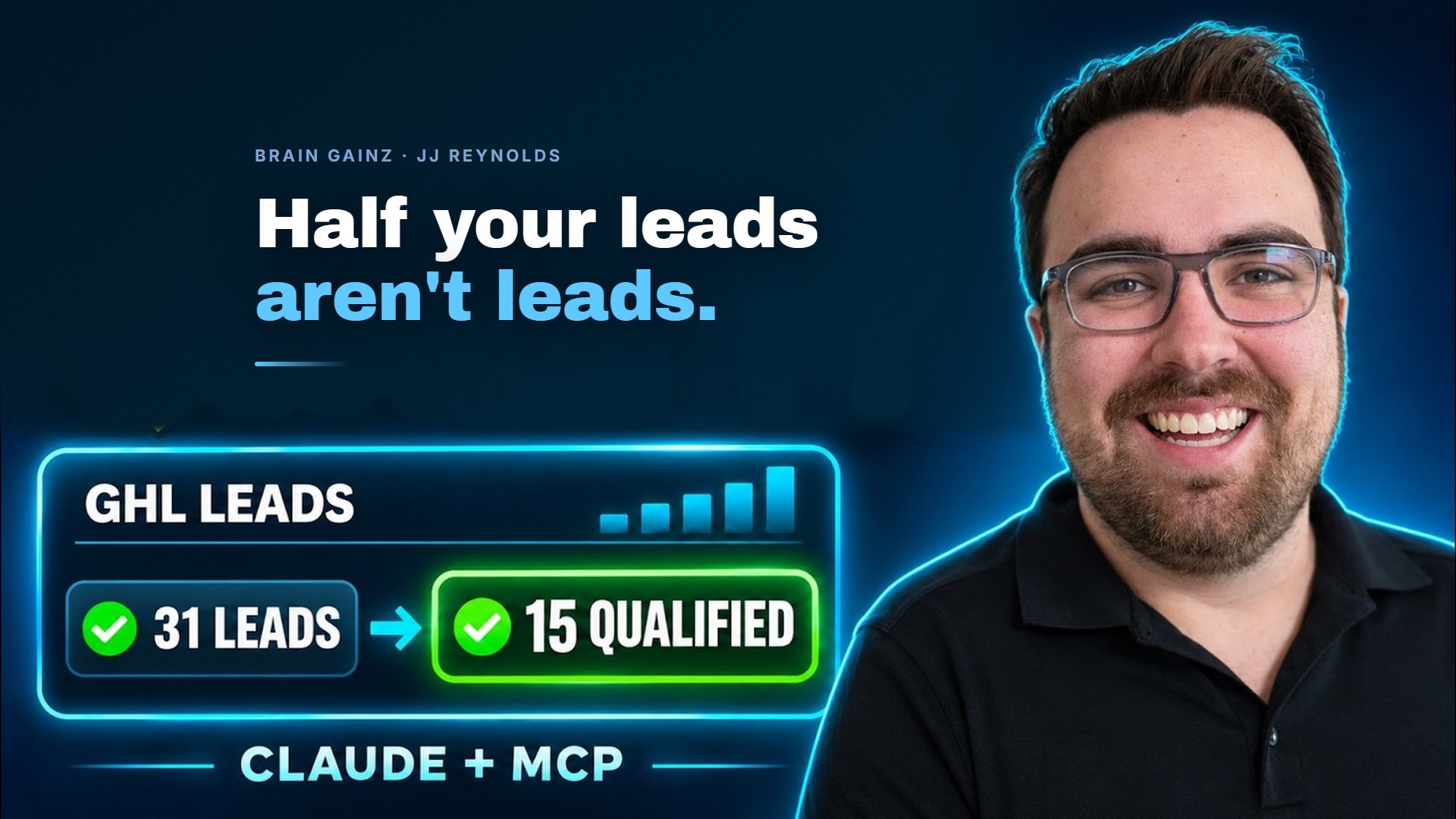
This post is based on a talk JJ Reynolds gave at a MeasureU Brain Gainz session. The ideas are his. The write-up is ours.
Tired of wrestling with GHL tracking setups that feel like you need a PhD in data engineering to get right? You’re spending hours building custom conversion tracking, duct-taping together data pipelines, and still watching your cost per lead climb month after month.
Here’s the thing. You’re not alone. And honestly? You’re probably making this way harder than it needs to be.
I recently sat down with JJ Reynolds to talk through how he’s helping businesses completely rethink their GHL tracking approach. What he shared kind of blew my mind. We’re talking about turning GoHighLevel into a legitimate customer data platform, automating server-to-server tracking, and doing it all for about the cost of a fancy coffee each month.
Watch the Full Breakdown
In this Brain Gainz session, JJ walks through his complete framework for optimizing GHL using MCPs and automated flows. Every screenshot below is a slide from that session, so you can see the real numbers behind each point.
What You’ll Learn in This Post
- Why DIY conversion tracking stopped paying for itself, and what replaced it
- The $9 a month tools that do the job of a custom build
- Why your real cost per lead is lower than Ads Manager tells you
- The 21-conversion threshold that unlocks algorithmic optimization
- How an MCP turns a plain English question into a cost per qualified lead
Table of Contents
- Why Traditional GHL Tracking Setups Are Costing You Money
- The GHL Tracking Framework That Actually Works
- Conversion Funnel Optimization: The 21-Action Benchmark
- AI-Driven Analytics with MCP Integration
- What This Actually Means For Your Business
- Your Next Steps
Why Traditional GHL Tracking Setups Are Costing You Money
Let’s face it. Most of us have been building DIY conversion tracking because we thought it was the “pro” move. Custom webhooks, manual data pipelines, spending weekends debugging why Meta isn’t seeing half our conversions.
JJ was pretty direct about this: stop doing that.
The margin compression in digital advertising is brutal right now. CPMs are climbing. CPCs are rising. And here’s what’s wild. JJ showed data where clickthrough rates are actually increasing while overall conversions are declining. People are clicking more but buying less. So every dollar you waste on inefficient tracking infrastructure is a dollar you can’t put toward actually acquiring customers.
That’s where specialized automation tools come in. For as little as $9 per month, you can get server-to-server tracking into your ad platforms without writing a single line of custom code. Nine bucks. I spend more than that on coffee in a day (don’t judge me).
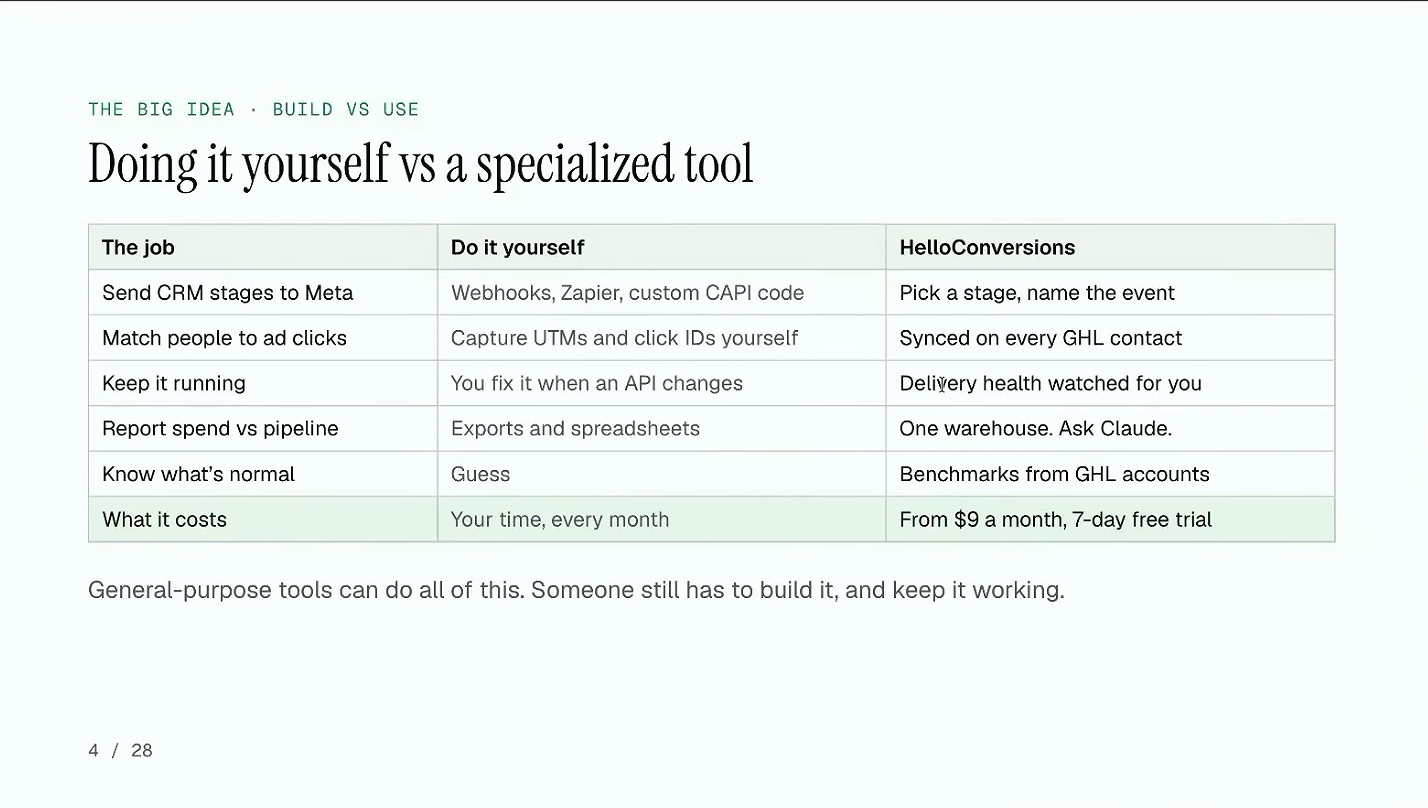
The tool JJ uses for this is HelloConversions, and it’s worth saying plainly that his team built it. Everything below is his own setup, running on his own product, with the numbers from his own ad account.
And the real shift? Stop thinking of GHL as just your CRM. It’s actually functioning as a centralized CDP, a customer data platform, where you can append tracking data directly to contact records. Every click ID, every UTM parameter, every touchpoint gets attached to the actual human who converted.
The GHL Tracking Framework That Actually Works
So how do you actually implement this? JJ broke it down into what I’d call a three-part approach. (And yeah, I know I should probably give this a catchy name like “The Revenue Tracking Triangle” but let’s just keep it practical.)
Part 1: Implement Server-to-Server Tracking
The Meta Conversion API isn’t optional anymore. Browser-based tracking is dying. iOS updates, ad blockers, privacy browsers. Your pixel is probably missing 30 to 40% of conversions on a good day.
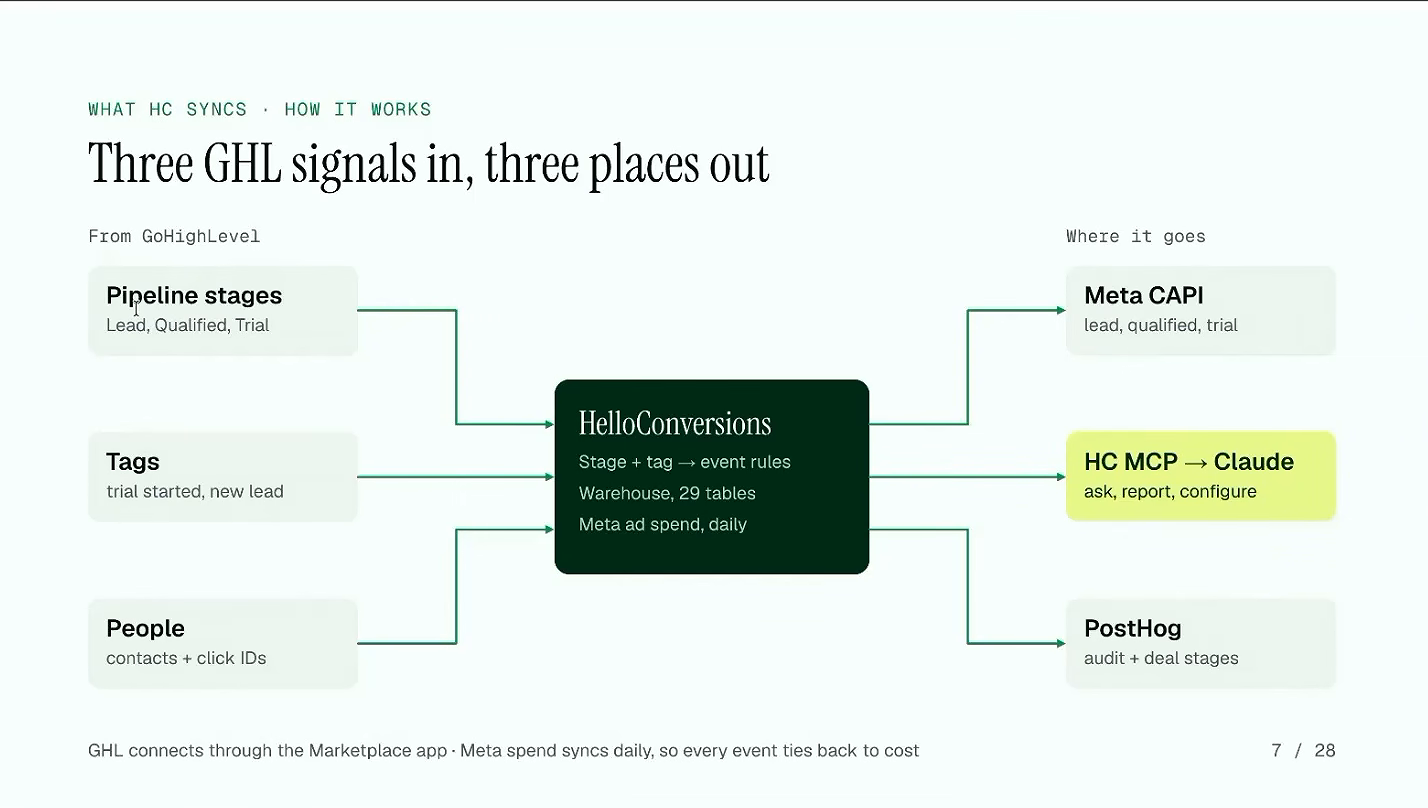
Server-to-server tracking means your data goes directly from GHL to Meta’s servers. No browser in the middle getting blocked or timing out. This is what those $9 per month tools automate for you.
Part 2: Filter Before You Feed
Here’s where most people screw up (myself included, honestly).
You’re probably sending every lead to Meta for optimization. Someone downloads your lead magnet? Meta sees it. Someone fills out a form with a fake email? Meta sees it. Some bot hits your page? Yep, Meta’s training on that too.
JJ’s approach: transmit only qualified leads to Meta. Filter out the noise before it hits your ad platform.
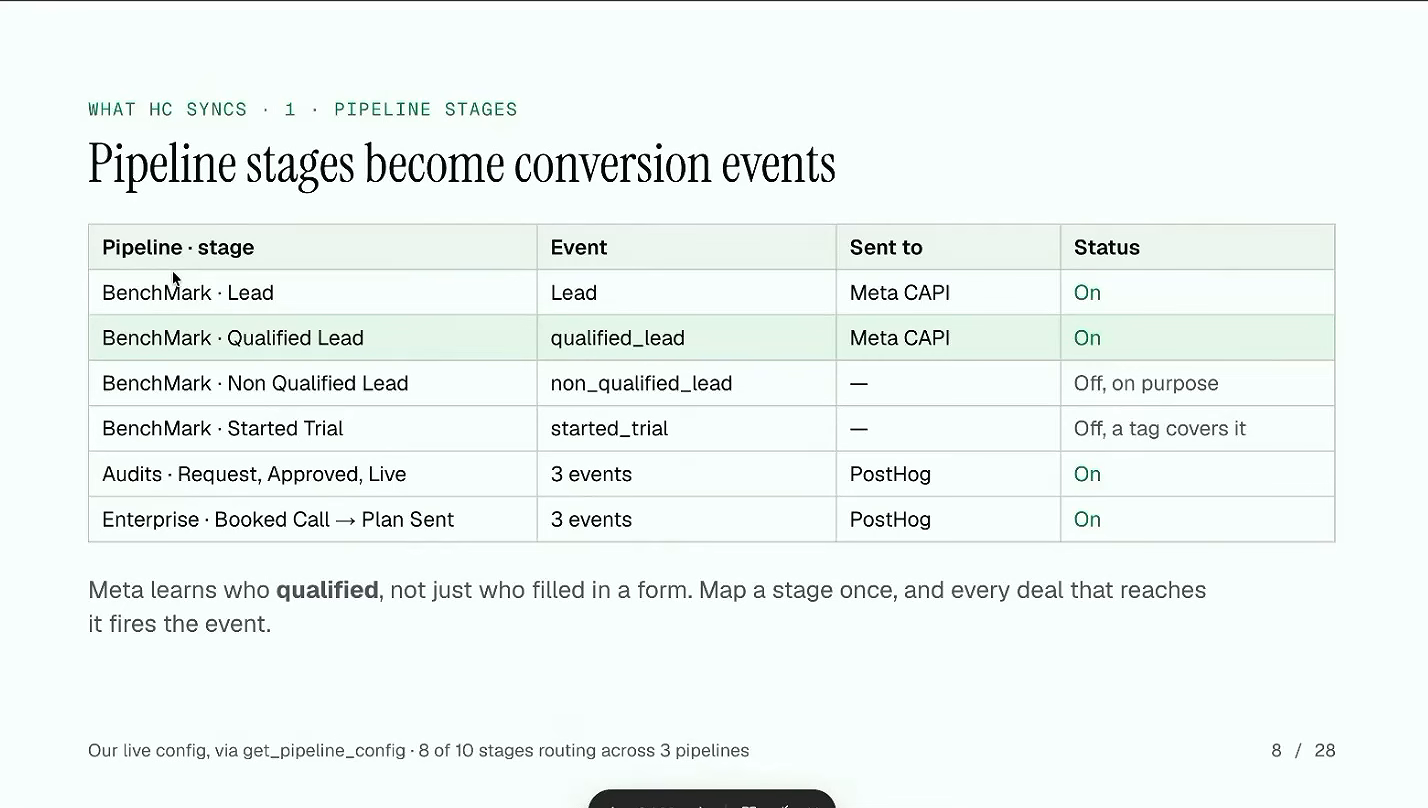
This does two things:
- Your optimization signal gets cleaner (Meta learns what a good lead looks like)
- You stop paying to acquire garbage leads
The goal isn’t maximizing the number of conversions you report. It’s maximizing the quality of the signal you send.
Part 3: Capture the Missing Data
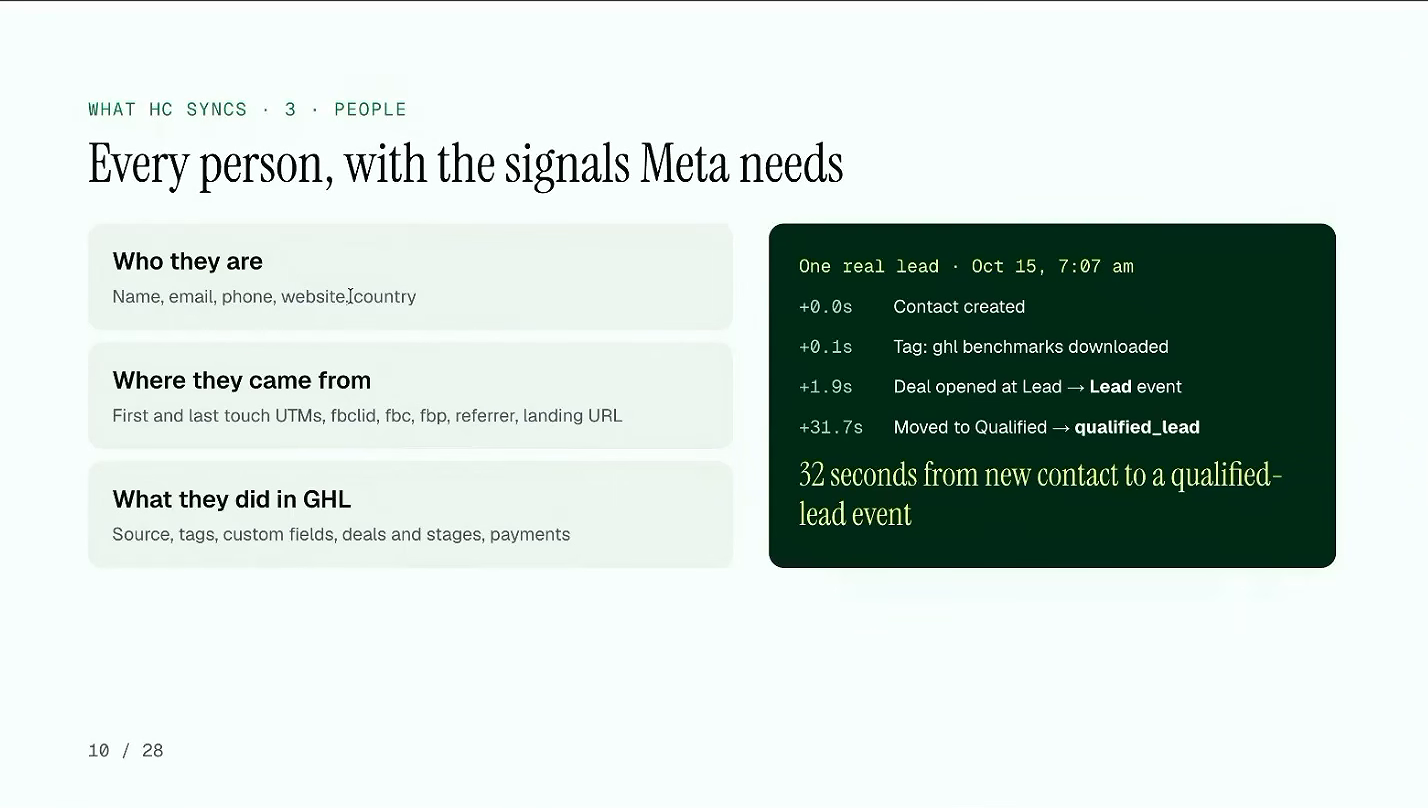
None of the filtering works if the data never reaches the contact record in the first place. Click IDs and UTM parameters are the join between the person in your CRM and the ad they came from, and they’re exactly what gets dropped when tracking is held together by hand.
JJ’s setup writes all of it onto the contact: first and last touch UTMs, fbclid, fbc, fbp, the referrer and the landing URL, alongside the tags, deals and pipeline stages. In his own account a new contact became a qualified-lead event in 32 seconds.
This is also why his reported numbers and Meta’s disagree, which turns out to be the more useful discovery. More on that next.
Conversion Funnel Optimization: The 21-Action Benchmark
Okay, this is the part that actually changed how I think about campaign optimization.
JJ emphasized maintaining at least 21 conversion actions per week. Not per month. Per week.
Why 21? That’s roughly the threshold where ad platform algorithms have enough data to actually optimize effectively. Below that, you’re essentially forcing Meta (or Google) to guess. And their guesses get expensive fast.
He also published the benchmarks behind this in a free GoHighLevel benchmarks report, pulled from real GoHighLevel CRM and ad accounts rather than a survey. Three numbers are worth memorizing.
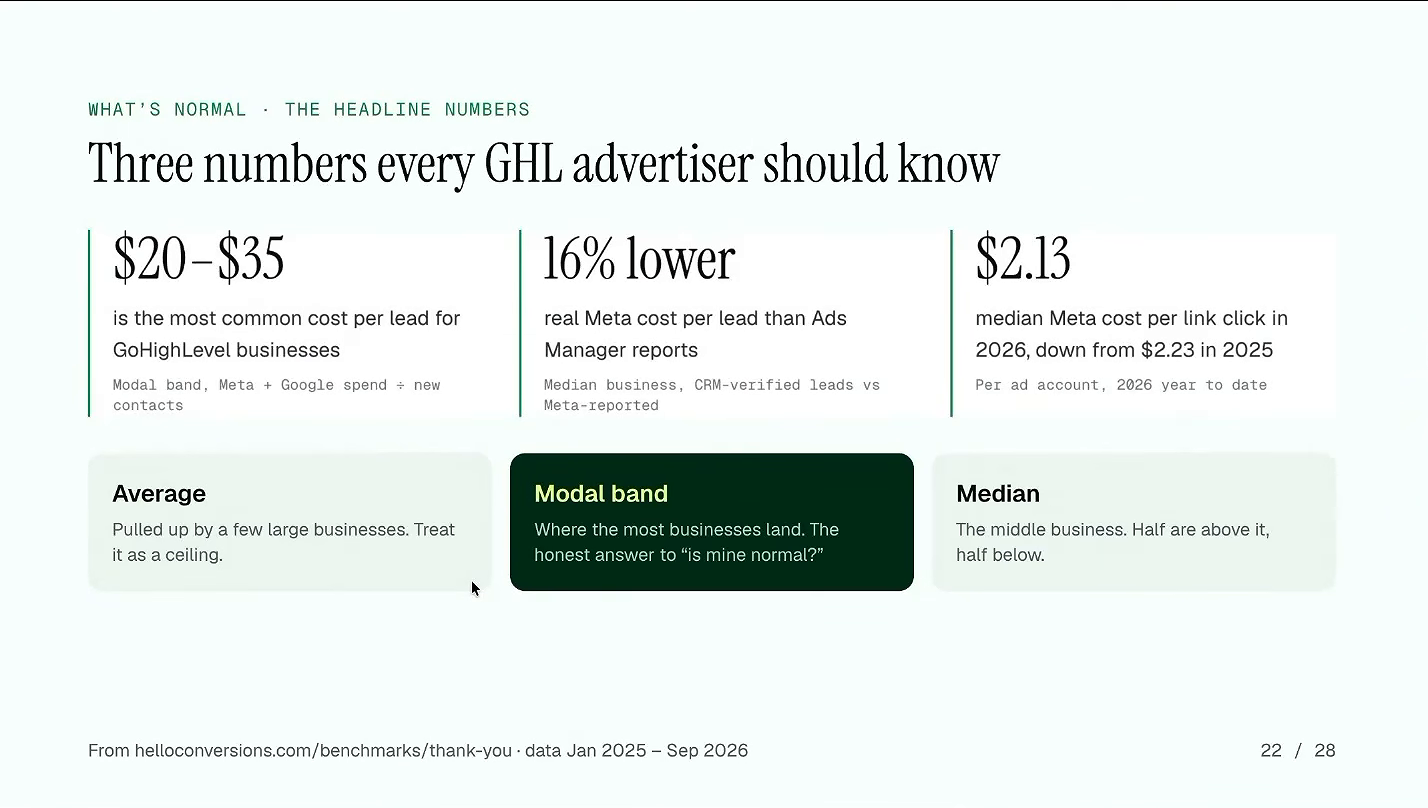
That middle number is the one that catches people out. Your real Meta cost per lead is about 16% lower than Ads Manager reports for the median GoHighLevel business, because Ads Manager counts form fires while your CRM counts verified people. Same spend, two different denominators. If you have been judging campaigns on the Ads Manager figure alone, you’ve been reading a number that’s wrong in your favor and acting on it anyway.
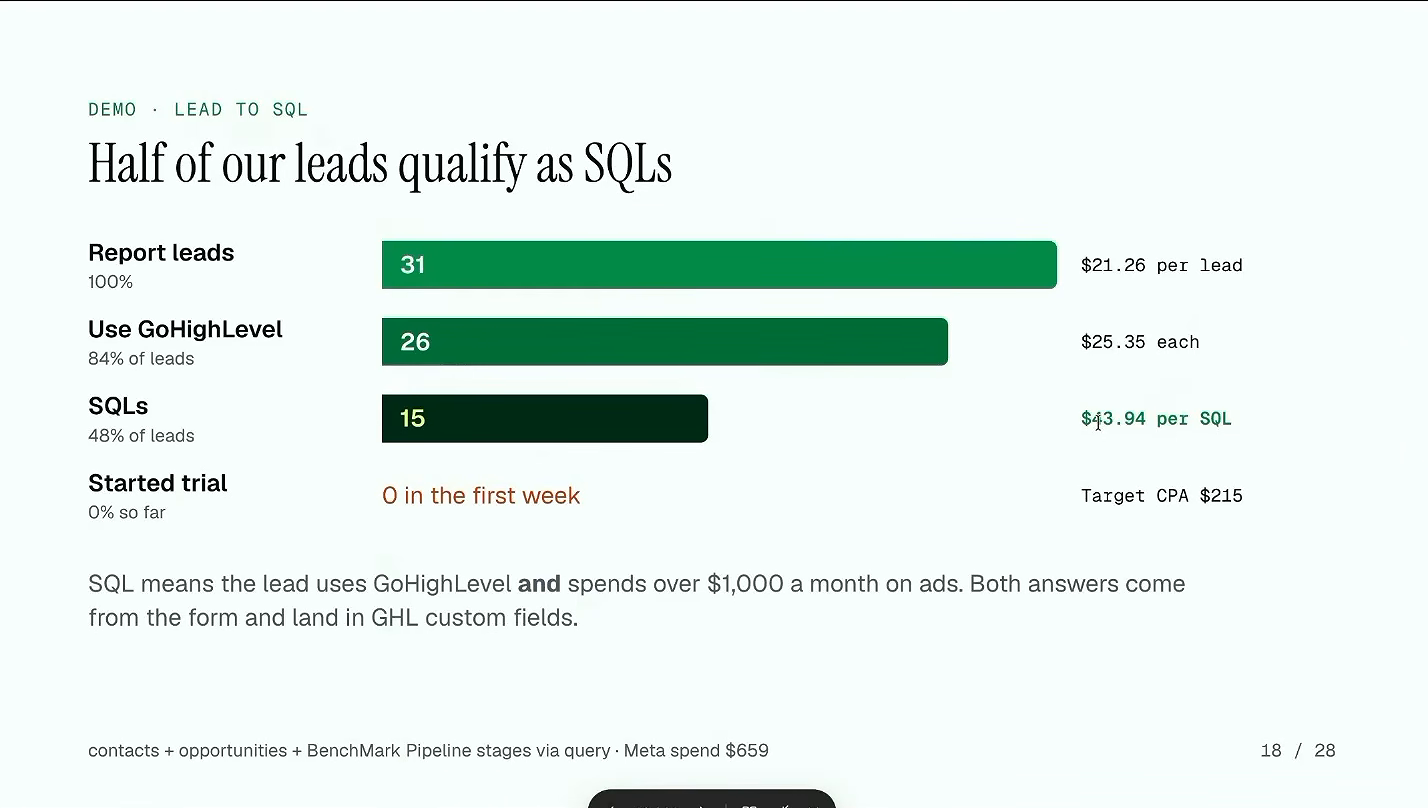
JJ’s actual campaign performance:
- 2.24% link CTR, above the GoHighLevel median of 2.09%
- $77.89 CPM, roughly twice the median
- $21.26 cost per CRM lead, inside the common $20 to $35 band
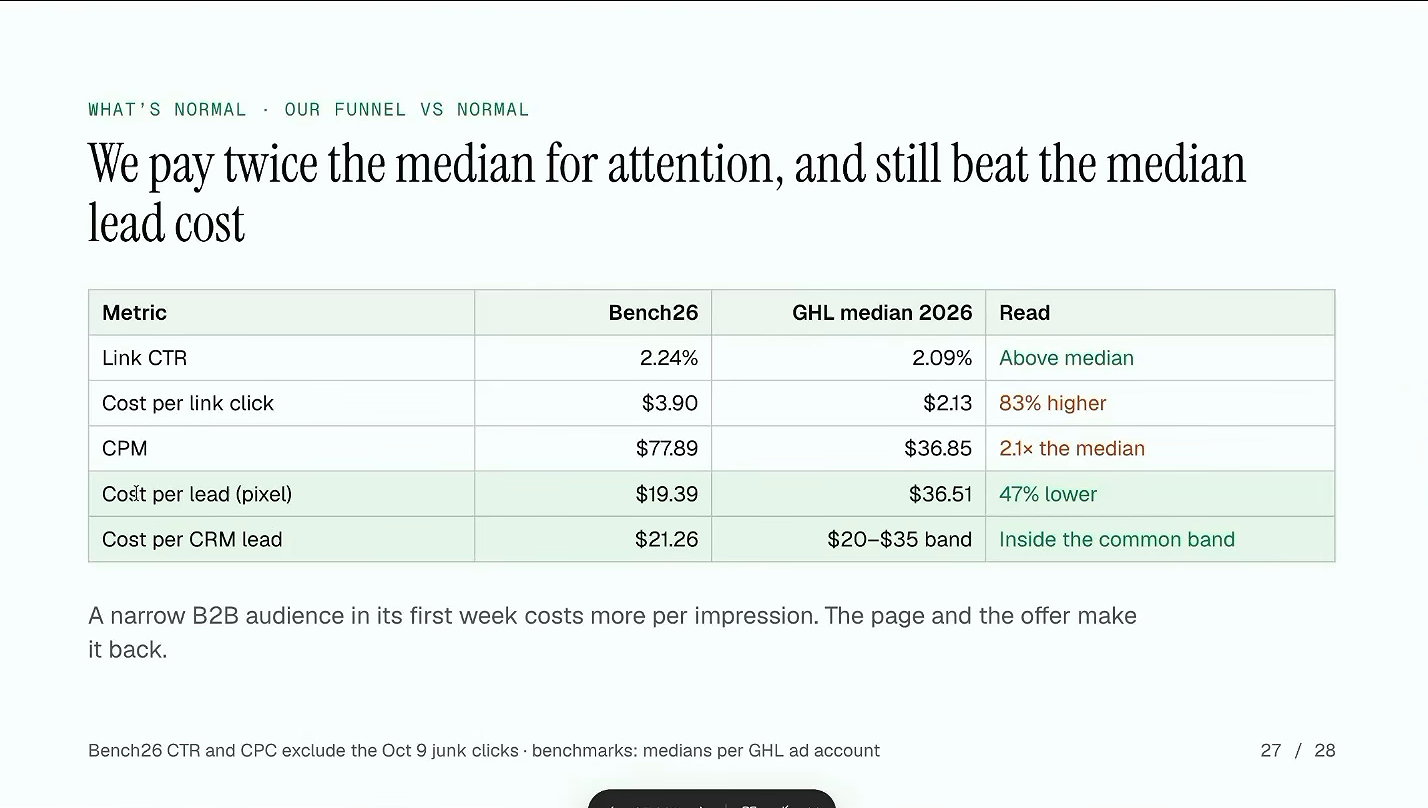
That cost per qualified CRM lead is at the low end of industry benchmarks. And it’s not because he’s running some magical creative or targeting secret audiences. It’s because his tracking is tight enough that Meta actually knows what it’s optimizing toward.
If you’re not hitting 21 conversions per week, you’ve got two options:
- Move your conversion event higher in the funnel (optimize for leads instead of sales)
- Increase your ad spend until you hit the threshold
Neither is ideal, but option 1 with solid qualification filtering beats shooting in the dark with insufficient data.
AI-Driven Analytics with MCP Integration
Now we get to the nerdy part. And honestly, this is where things get interesting.
HelloConversions includes an MCP, which enables two-way data sync and setting management directly through AI chat interfaces.
Let me translate that: you can talk to your tracking setup. Like, with ChatGPT or Claude. Ask it what’s happening with your conversion data. Tell it to adjust settings. No more clicking through 47 dashboard screens.
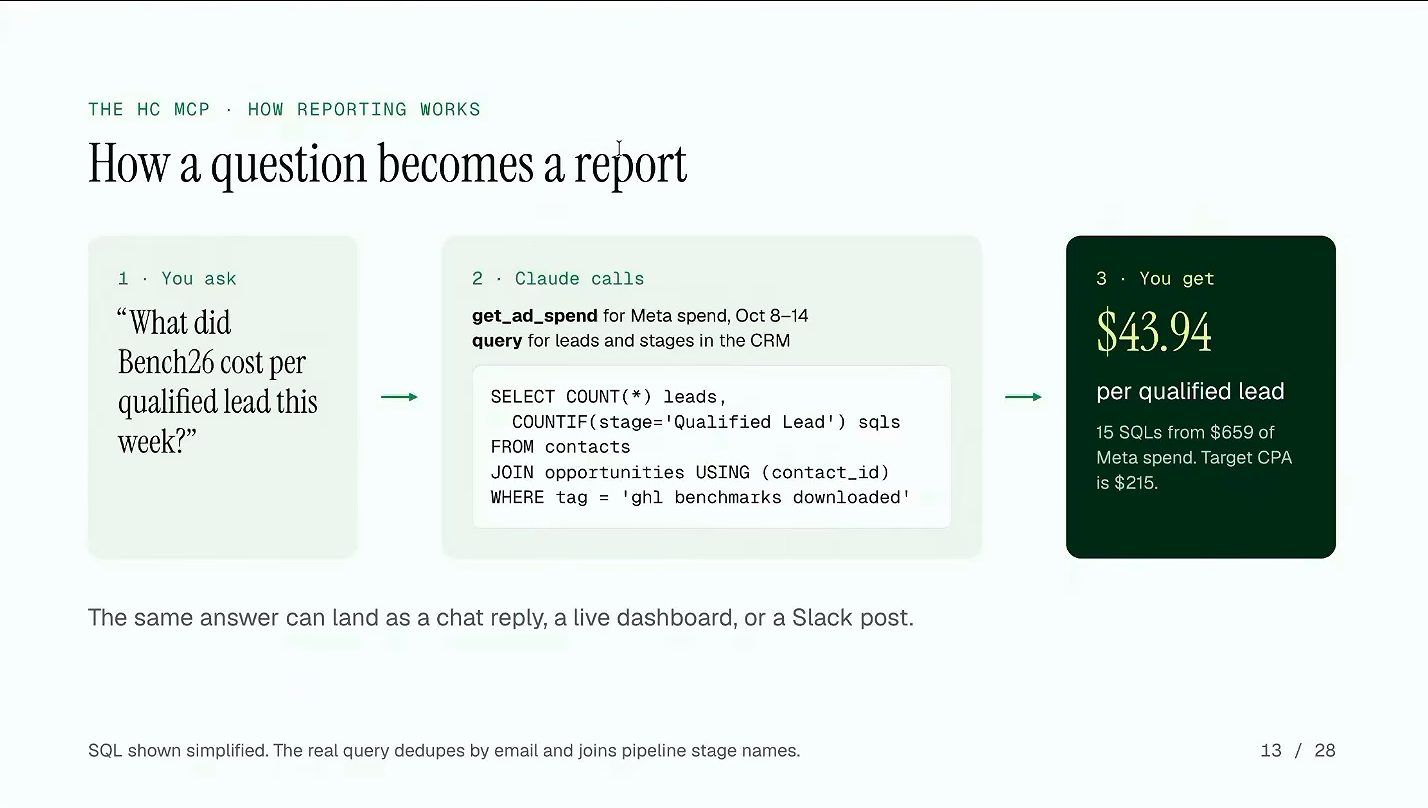
The creative analysis framework is particularly useful. It evaluates:
- Hook rate, the share of people who watch the first three seconds
- Hold rate, the share who stay to the halfway mark
- Top-performing ad creatives (what’s actually working?)
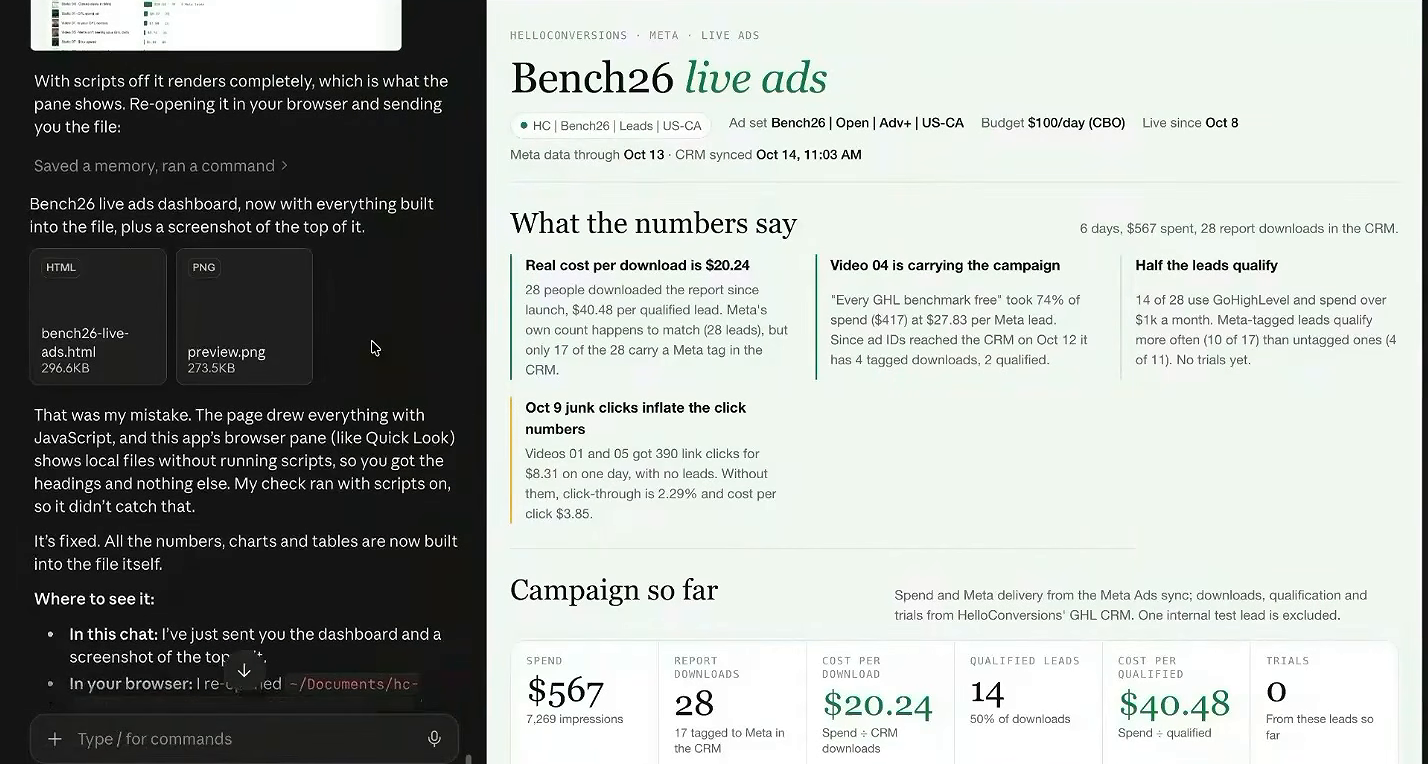
Plus there’s match quality monitoring that watches your pixels and event data against tracking identifiers in real time. When something breaks, and something always breaks, you know about it before you’ve burned through your weekly budget.
What This Actually Means For Your Business
Look, I’ve been around marketing analytics long enough to know that most “tracking optimization” advice is either too basic to matter or too complex to implement.
This sits in a different spot.
You don’t need to become a data engineer. You don’t need to hire a developer. You need to:
- Stop building DIY tracking infrastructure
- Use purpose-built tools that cost less than your Netflix subscription
- Think of GHL as your data foundation, not just your CRM
- Feed cleaner signals to your ad platforms
- Hit the 21-conversion threshold or adjust your strategy
The harsh reality? Most businesses are bleeding 15 to 20% of their ad spend just on tracking inefficiency. Not bad creative. Not wrong audiences. Just leaky data pipes.
Your Next Steps
Ready to actually do something with this? Here’s where to start:
- Audit your current GHL tracking. How many conversion events are you actually capturing? What’s your click ID capture rate?
- Calculate your 21-conversion math. Are you hitting 21 qualified conversions per week? If not, what would it take to get there?
- Compare your CRM count to Ads Manager. If the two disagree, the CRM is the one that knows whether a person is real.
- Implement qualification filtering. Before your next campaign, define what a “qualified” lead actually means and only send those to Meta.
- Set up monitoring. You need to know when tracking breaks. Same-day, not same-month.
If you want to go deeper on this stuff, we cover GHL tracking optimization and measurement strategy inside MeasureU Pro. Lots of folks working through exactly these challenges.