Tired of watching leads disappear into a black hole after they fill out your form?
You capture the lead online. Someone fills out a form, signs up for a consultation, requests a quote. And then… nothing. At least nothing you can track. The sale happens six weeks later over the phone. Or eight weeks later after three follow-up calls. Sometimes six months down the road after the prospect finally pulls the trigger on that $6,000 laser eye surgery.
And your GA4 data? It just shows a form submission. No revenue attached. No way to prove which campaigns actually drove money.
I've been there. Our technical director Manisha has been there with dozens of agency clients: laser clinics, plastic surgeons, spa treatments, SaaS companies with long sales cycles. The frustration is real.
That's where offline conversion tracking with Tracklution comes in. And the best part? You don't need Google Tag Manager. You don't need a convoluted technical setup. You need a webhook URL and maybe a two-step Zapier automation.
This post is sponsored by Tracklution. Opinions are my own.
Let me show you exactly how this works.
Watch the Full Breakdown
In this video, Manisha walks through the complete setup process using a real website and real tools:
Below I've broken the same process down step by step, with screenshots pulled straight from the walkthrough.
What You'll Learn in This Post
- You can track offline purchases that happen weeks or months after the initial lead capture
- The setup requires zero Google Tag Manager configuration
- Zapier can automate the entire process with just two blocks
- Email matching ties your offline sales back to the original lead source
Table of Contents
- Why Offline Conversion Tracking Matters for Google Analytics
- How Tracklution Bridges Online and Offline Without GTM
- Step-by-Step: Setting Up Offline Conversion Tracking
- Using Zapier to Automate Everything
- Real-World Applications: When to Use This
- Troubleshooting and Validation
- Your Next Steps
Why Offline Conversion Tracking Matters for Google Analytics
Here's the thing about traditional Google Analytics tracking: it assumes money changes hands online.
But that's not how tons of businesses actually work. Think about it:
- Laser eye surgery clinics. Someone fills out a consultation form. They come in for an evaluation. They think about it. They finally commit to a $6,000 to $7,000 procedure. That whole process? Completely offline after the initial form.
- SaaS companies with sales teams. Lead comes in, gets nurtured by sales, hops on three demo calls, finally signs a contract. Where's the conversion event? In Salesforce, not on your website.
- High-ticket service businesses. Spas, consultants, plastic surgeons, anyone selling something people don't impulse-buy online.
The conversion happens in your CRM. In Stripe. In a spreadsheet your office manager updates. And your GA4 data just sits there showing “form submission” with zero revenue attribution.
So you end up shooting in the dark on which ad campaigns actually work. You know SOME leads convert. But which ones? From what source? Facebook? Google? That blog post from last March?
Without connecting offline purchases back to online lead capture, you're basically throwing spaghetti at the wall when it comes to marketing spend.
How Tracklution Bridges Online and Offline Without GTM
Let me break down what actually happens when you set this up.
Step 1: Online Event (Lead Capture)
Someone visits your site and completes a registration, fills out a form, signs up for your newsletter, requests a consultation. Whatever your lead capture mechanism is.
Tracklution captures this as a “complete registration” event. Critically, it stores the email address associated with that event.
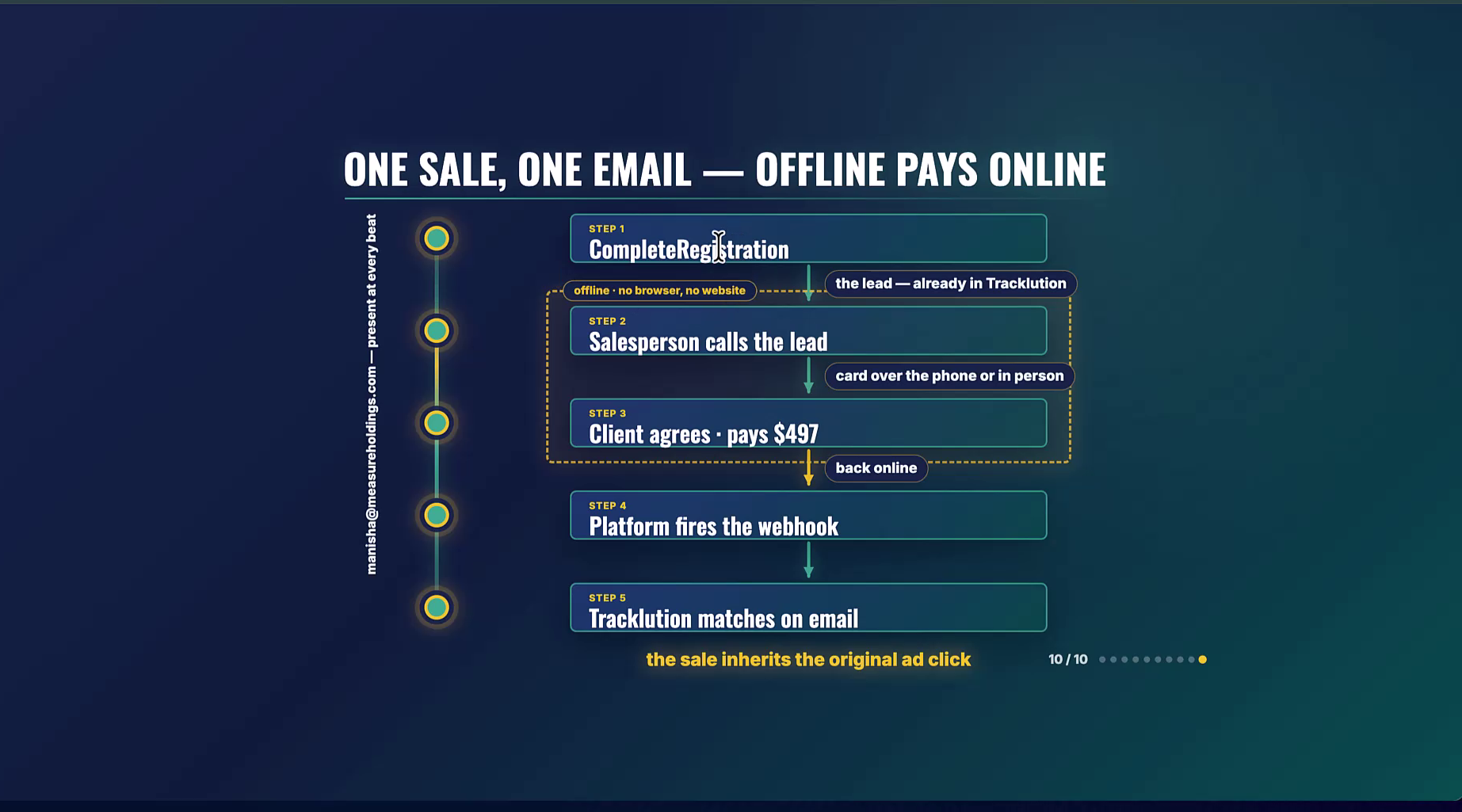
Step 2: Offline Activity (The Human Part)
This is where business actually happens. Your salesperson calls the lead. They have conversations. They nurture. They follow up. Maybe this takes a week. Maybe six weeks. Maybe six months.
At some point, the prospect becomes a customer and pays. That payment gets recorded somewhere: Stripe, your CRM, ActiveCampaign, a Google Sheet, whatever system you use.
Step 3: The Connection (Where the Magic Happens)
Here's where Tracklution does something really clever. Your payment platform or CRM fires a webhook to Tracklution. That webhook includes the email address and the purchase amount.
Tracklution matches that email to the original complete registration event. Suddenly, that lead from six weeks ago has a value attached. You can see the full chain: lead captured, purchase completed, revenue attributed.
And the whole thing works without you touching Google Tag Manager. No custom code on checkout pages. No wrestling with GTM triggers and variables.
Step-by-Step: Setting Up Offline Conversion Tracking
Alright, let's actually do this. I'm going to walk you through the same process Manisha demonstrated.
Step 1: Ensure Your Online Events Are Tracking
First, verify that Tracklution is capturing your lead events. In Manisha's demo, this was a newsletter signup on the Profit School website.
Go to your Tracklution container and check that you're seeing complete registration events come through. You should see the email address associated with each submission.
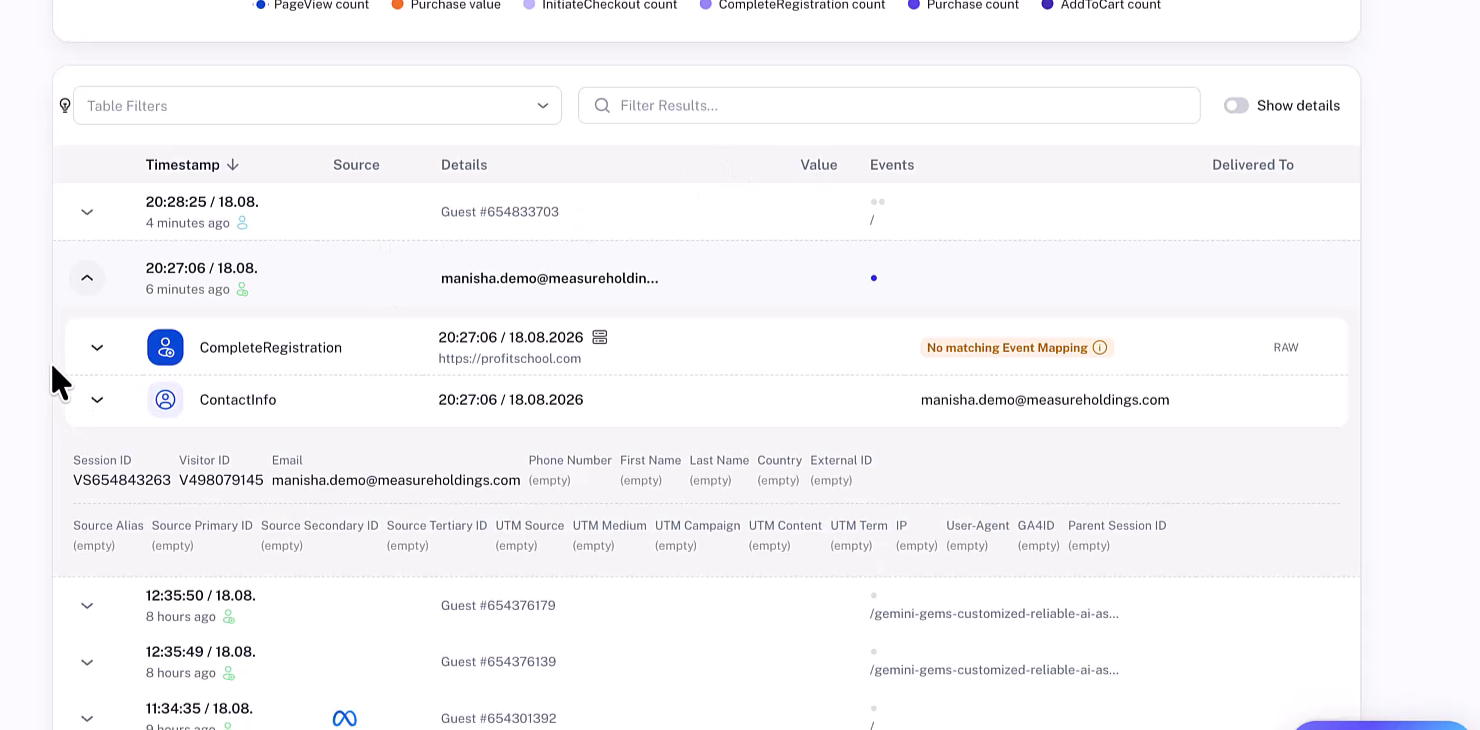
Give it a minute or two after submitting a test. The data doesn't appear instantly. (If you've used GA4, you know it can take three days to process some data, so a couple minutes is nothing.)
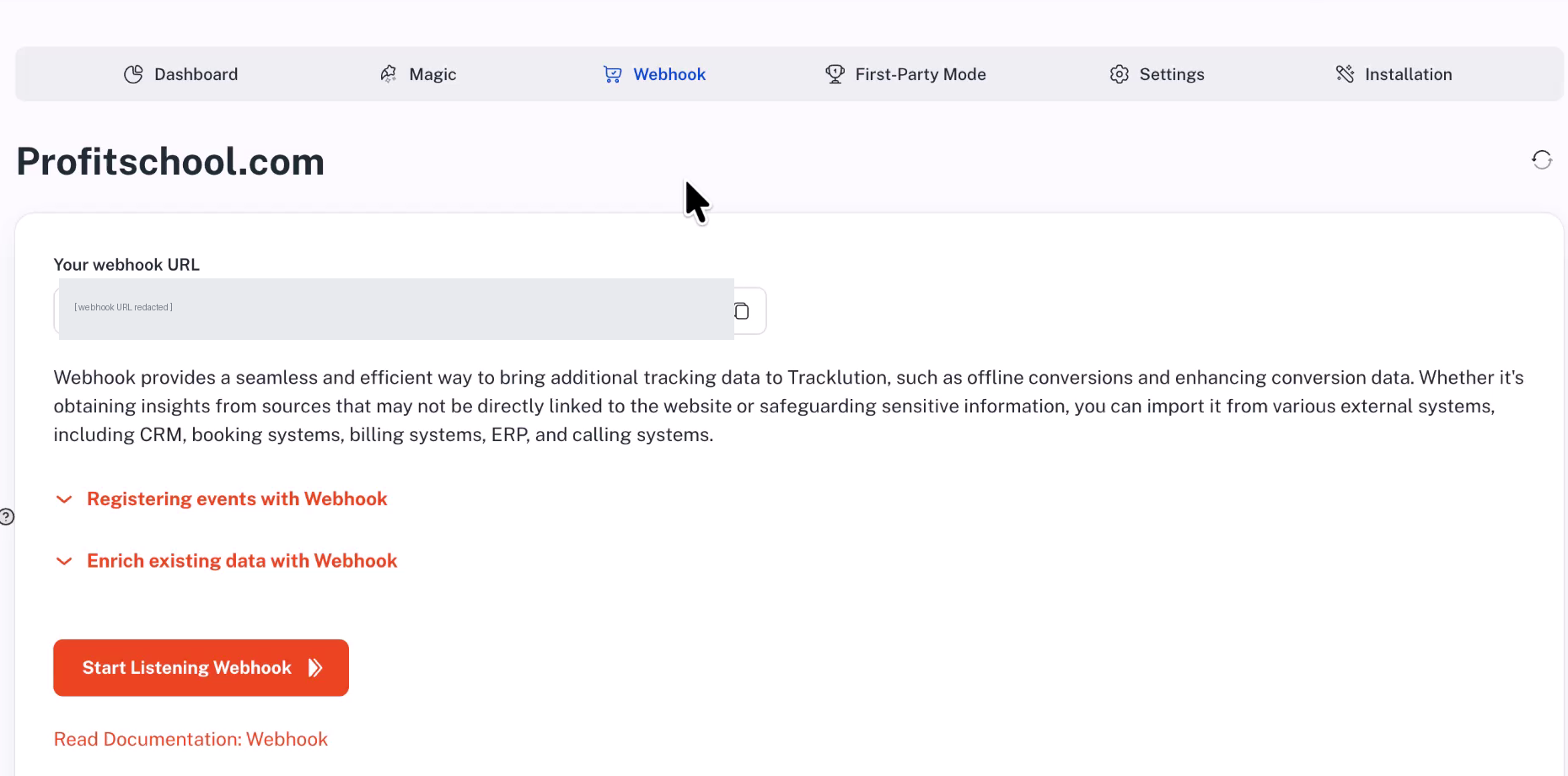
Step 2: Grab Your Magic Webhook URL
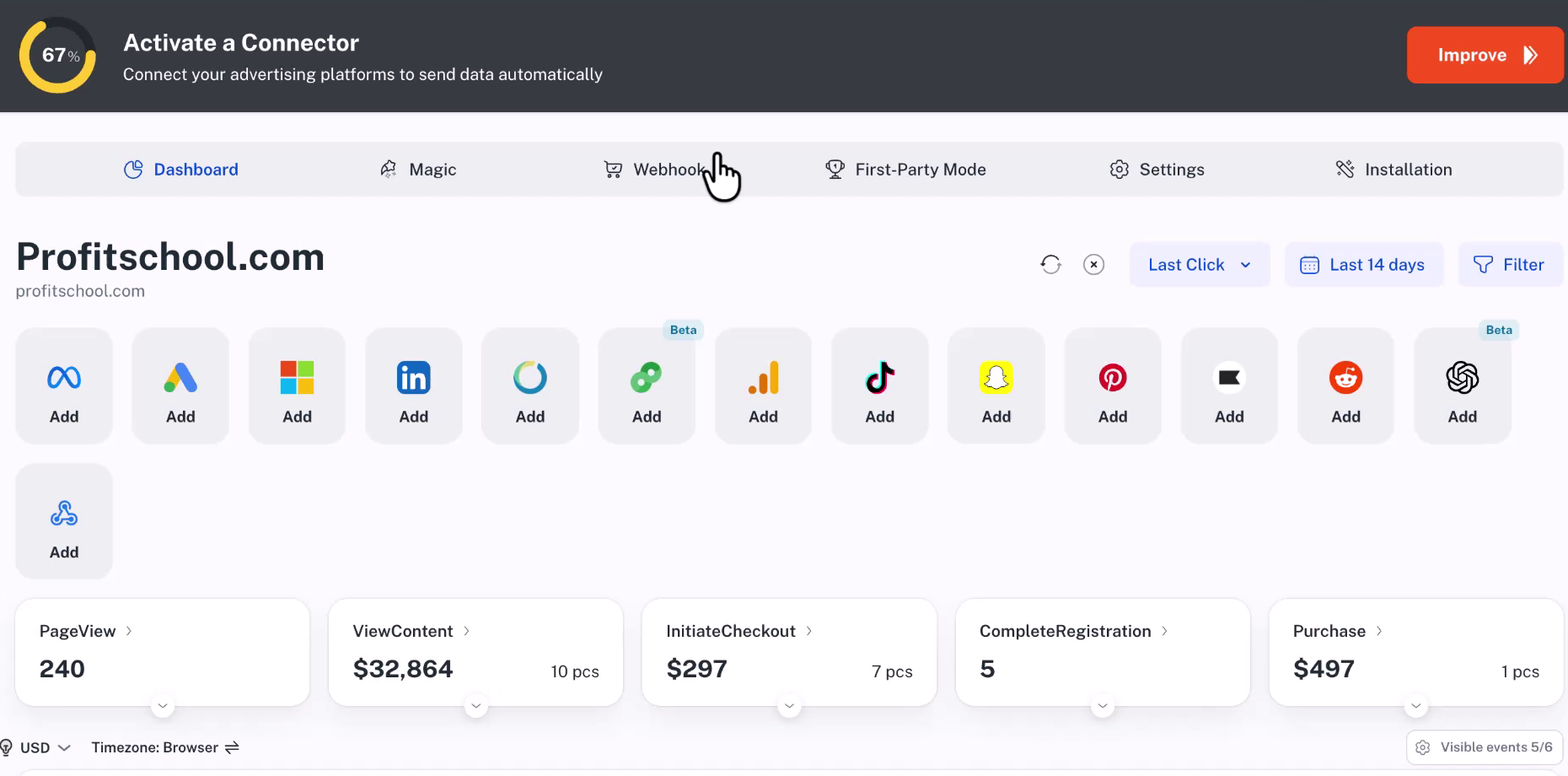
This is the part that makes everything simple. In Tracklution, look for the Magic Webhook at the top of your dashboard.
Click it. Copy the URL.
That's it. That URL is your gateway to sending offline conversion data into Tracklution without any tag management configuration.
Step 3: Structure Your Webhook Request
When you hit that webhook URL, you'll include parameters like:
- Your tracking container identifier
- The event type (purchase)
- The email address (must match the original lead)
- The value or revenue amount
- Currency
In Manisha's demo, she manually tested this by pasting a URL with all the parameters into a browser. The response came back “success” and the purchase appeared in the dashboard tied to the original registration.
Step 4: Watch the Match Happen
After sending the webhook, refresh your Tracklution dashboard. You'll see both events, the complete registration and the purchase, connected on a single line for that contact.
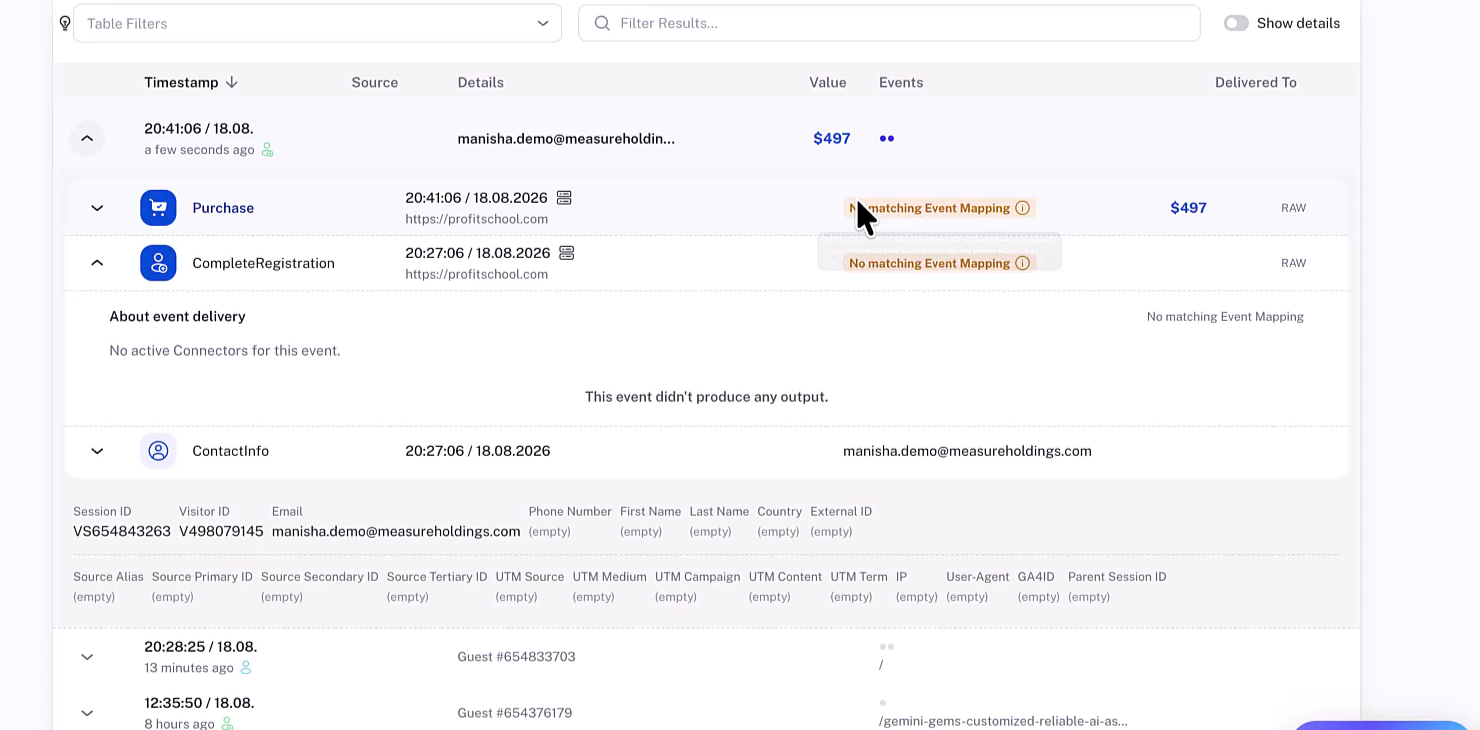
Notice how the contact now has a value displayed. In the demo, Manisha's test showed almost $500 attributed to that lead. For your laser clinic clients, that might be $6,000 to $7,000 per conversion.
Now you can actually see which lead sources drive revenue, not just form fills.
Using Zapier to Automate Everything
Okay but manually hitting webhooks isn't exactly scalable. This is where Zapier comes in, and I'm genuinely excited about how simple this is.
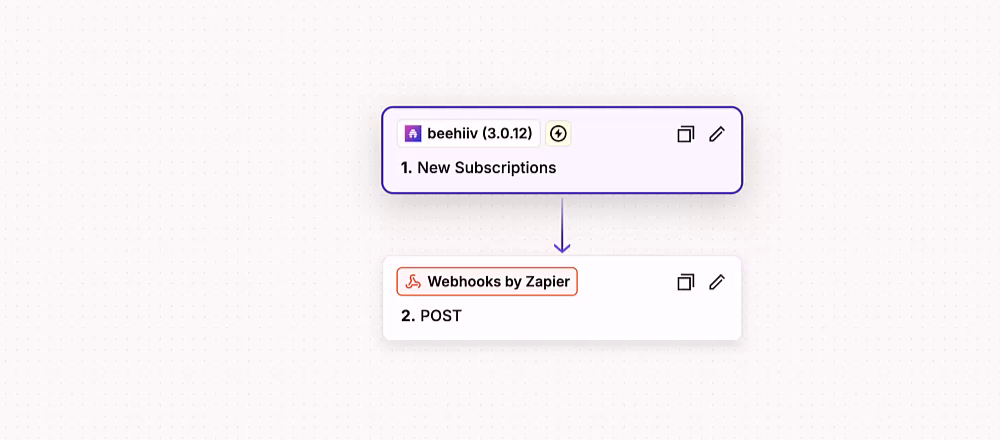
Manisha built a zap with literally two blocks:
Block 1: Trigger. New subscription in Beehiiv (or whatever platform captures your events, which could be Stripe, ActiveCampaign, Salesforce, HubSpot, whatever).
Block 2: Action. POST to the Tracklution webhook with the email in the payload.
That's the whole thing. Two blocks.
Think about what this means for your clients:
- Stripe charge? New charge triggers webhook with email and amount
- Salesforce opportunity closed? Closed-won triggers webhook
- ActiveCampaign tag added? Customer tag triggers webhook
- HubSpot deal stage changed? Deal moves to closed, triggers webhook
Any platform that Zapier connects to (which is basically everything) can now feed offline conversion data into Tracklution.
And if you're not a Zapier person, the same logic works with Make.com or n8n. Same two-hop flow.
Real-World Applications: When to Use This
Let me give you some specific scenarios where this setup changes everything:
High-Ticket Service Businesses
You know that feeling when you're running Facebook ads for a client selling $7,000 laser eye surgery and all you can report on is “cost per lead”?
Now you can report on actual revenue. Lead captured Monday from Facebook campaign X. Converted to a patient six weeks later. Facebook ROAS suddenly becomes visible.
SaaS with Sales Teams
Your marketing generates leads. Sales nurtures them in Salesforce. When that annual contract closes, the data lives in your CRM, not on your website.
With this setup, Salesforce (via Zapier) notifies Tracklution when deals close. Those deals get attributed back to the original lead source. Marketing can finally prove their value to sales.
Any Business with Payment Processors
Here's one that kills me. You're running ads, driving people to a checkout page hosted by Stripe or another payment processor. Getting GTM on Stripe's hosted checkout page? That's a no-no, right? You've been there, I know you've been there.
But Stripe can fire webhooks. New charge comes in, webhook hits Tracklution, conversion tracked. Problem solved without touching a single line of code on a checkout page you don't control.
Long Sales Cycles
Some businesses have sales cycles measured in months. B2B services, high-consideration purchases, enterprise deals.
The email matching doesn't care if the purchase happened a week or six months after the lead capture. As long as the email addresses match, Tracklution connects them.
Troubleshooting and Validation
What if your webhook data isn't showing up immediately?
Don't panic. In the demo, Manisha waited about five minutes for some events to appear. This is normal. Data processing takes time.
But here's a really helpful feature: you can validate that your webhook actually received the data before it shows up in the main dashboard.
Go to Webhooks in Tracklution and look for “Webhook Import Events.” You'll see pending events listed there with their status: processing, completed, whatever.
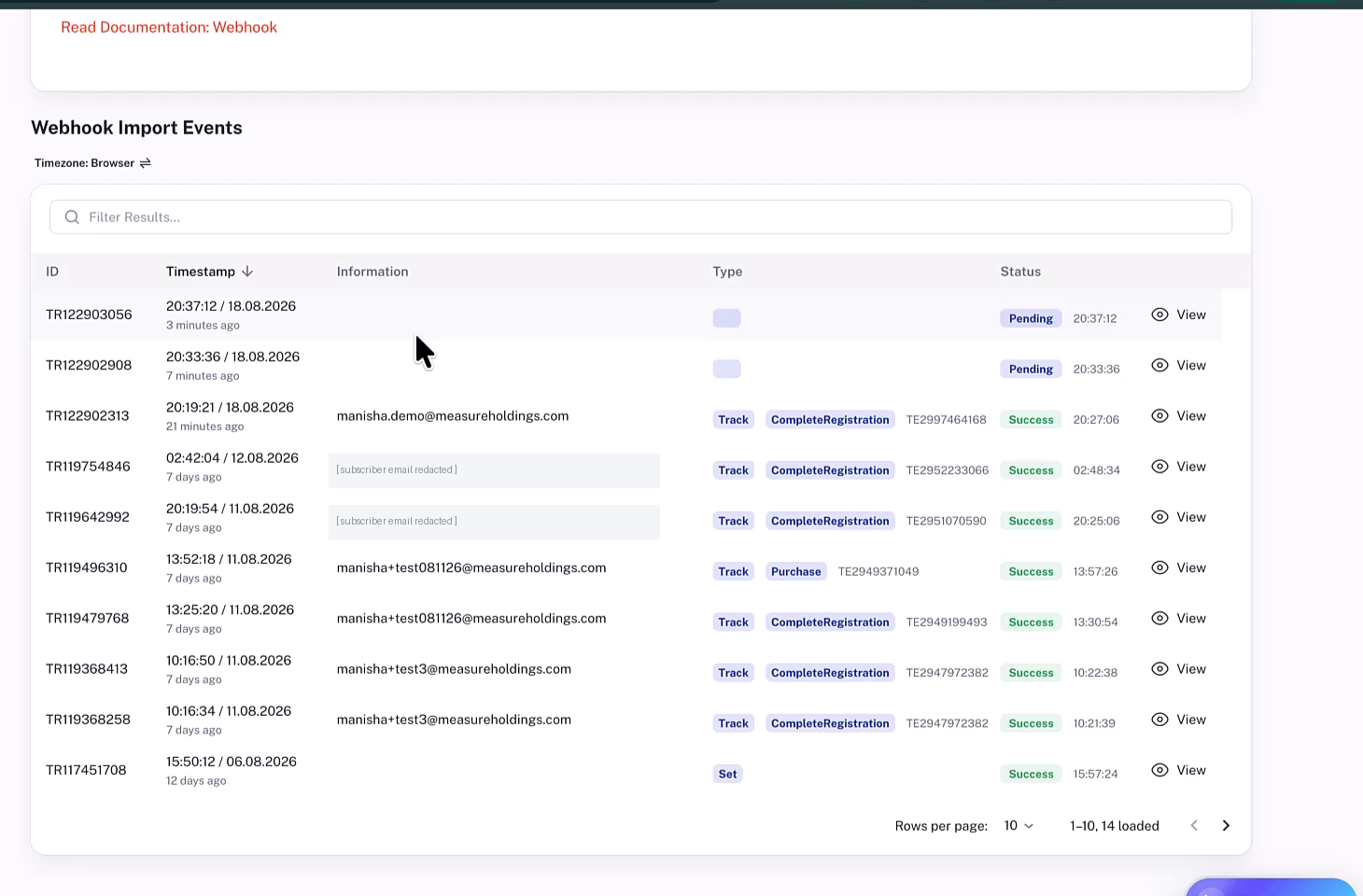
You can click “View” on any event to see exactly what data was submitted. This is huge for debugging. If something looks wrong in the payload, you'll catch it here rather than wondering why nothing's showing up.
So instead of sitting there hitting refresh on your dashboard (not that any of us would do that…), check the webhook import events to confirm your data arrived and is being processed.
Your Next Steps
Ready to stop losing track of offline conversions? Here's what to do:
- Log into Tracklution and verify your online lead events are tracking properly with email addresses captured
- Grab your Magic Webhook URL from the top of your dashboard
- Identify where your offline conversions live: Stripe, Salesforce, HubSpot, ActiveCampaign, wherever
- Create a simple Zapier automation (two blocks) that fires to your webhook when a sale happens
- Test it by triggering a test conversion and watching it appear matched in your dashboard
The setup genuinely takes less time than you've probably spent manually trying to reconcile lead data with revenue in spreadsheets.
If you're an agency dealing with clients who have that painful online-to-offline gap, this solves it. And if you've been banging your head against Stripe checkout tracking or CRM attribution, well, there's your answer.